Signature hash does not match как исправить или как подключить opencart к marketplace ( маркетплейс )?

Opencart начиная с версии 3 предоставил возможность прямого подключения к собственному маркетплейс (marketplace) через админ панель. Эта функция сильно упростила установку различных модулей как бесплатных так и платных тем самым давая возможность с помощью одного клика установить дополнительные расширения для вашего магазина.
В первый раз попытка соединить мой магазин на opencart с marketplace закончилась ошибкой: Signature hash does not match. Мне пришлось серьезно поискать решения данного вопроса в интернете, но результат был тем же. В последствии я нашел решение самостоятельно и оно оказалось очень простым.
Если вы уже прошли все этапы подключения в маркетпласе и у вас выдается ошибка Signature hash does not match тогда перейдите к разделу ( Signature hash does not match как исправить ? ).
Полный список этапов подключения opencart к маркетпласе
1 Прейдите в админ меню маркетплейсе:
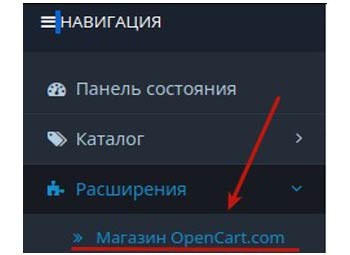
2 В открывшейся странице слева вверху нажмите:
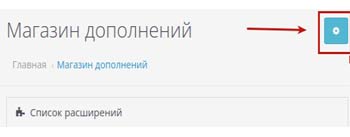
3 Перейдите в указанный пункт ниже
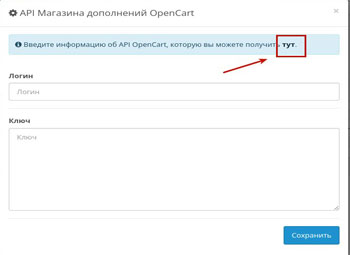
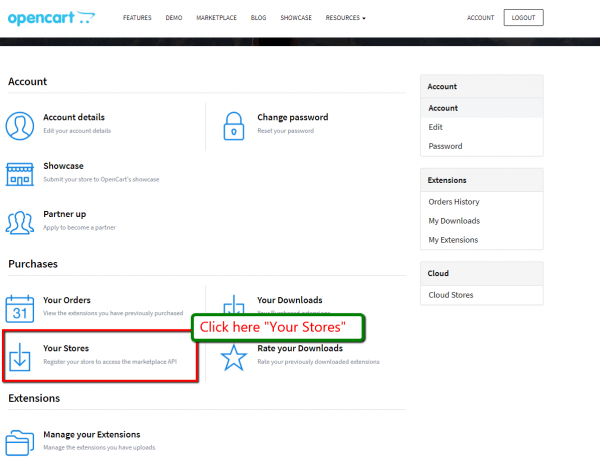
4 В личном кабинете найдите раздел «your stores» и перейдите в него:
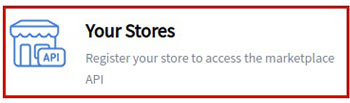
5 Добавьте свой магазин нажав на этот пункт меню:

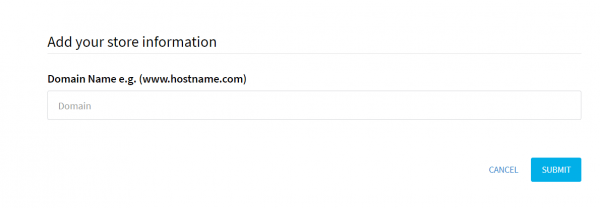
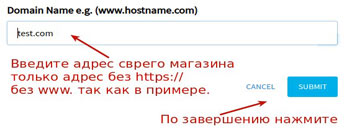
6 В открывшемся поле введите адрес своего магазина ( только адрес без https:// без www. Как в примере на картинке ):
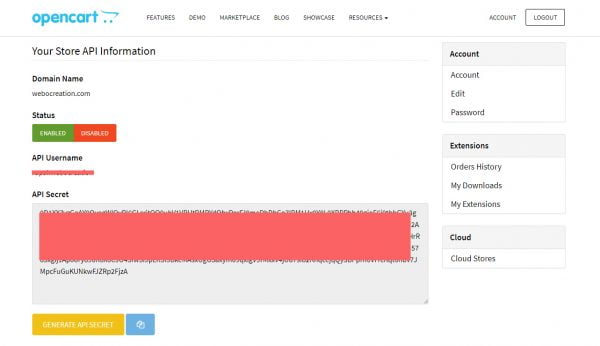
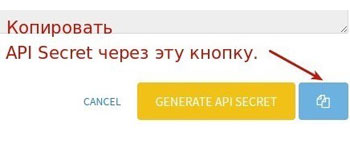
7 Это самый важный пункт в открывшейся странице с username и API Secret скопируйте username, и обязательно скопируйте API Secret через кнопку:
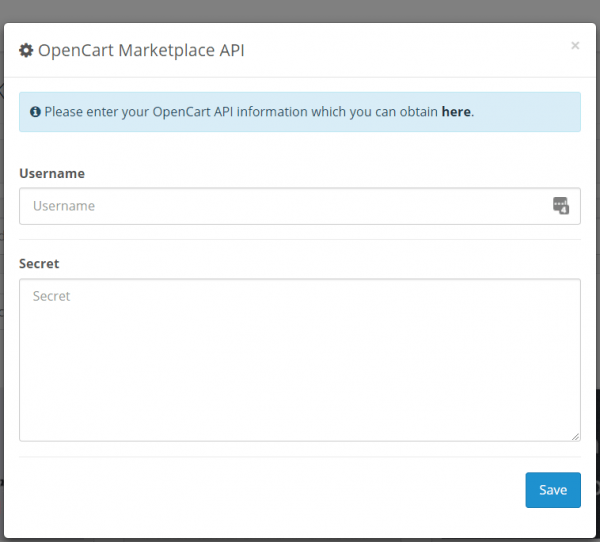
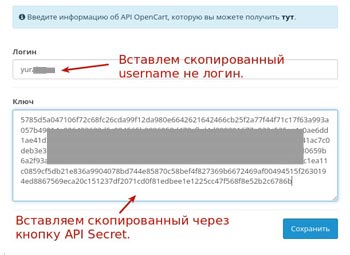
8 Как вы уже догадались эту информацию нужно добавить в админ панели в раздел маркетпласе.
Signature hash does not match как исправить ?
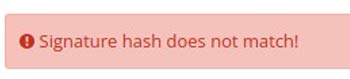
Данная ошибка появляется когда в поле добавления адреса магазина присутствуют лишние символы должен быть только адрес вот так: test.com (без http:// https: www) это важный момент. Так же может появляться из за не корректно скопированного API Secret ( Ключа ), по этому рекомендуется копировать с помощью специальной кнопки:
Маркетпласе ( marketplace ) opencart и localhost
Итак ответ на многочисленные вопросы. Работает ли opencart маркетпласе на localhost например для разработки магазина? Да.
Необходимо добавить имя вашего локального хостинга для получения ключа.
Рекомендуем сделать резервную копию магазина перед установками расширений.
Если у вас возникли сложности или вопросы обращайтесь к нам через страницу контактов мы с радостью вам поможем.
[SOLVED] Signature hash does not match
Hi All
Installed opencart Version 3.0.3.2 and added a theme.
Everything seemed on first glance to work ok. Done lots of modifications to the site and now realised that the market place API doen’t work.
Added a store to my opencart account and added API secret key and username and it says accepted. But still have the red triangle in the top right corner. Can’t install any new mods to the site.
Scrolled through the web and can’t find a recent post on how to fix.
So appologies if this has been answered before.
Thanks in advance
Mark
java signature «hash values do not match»
I am trying to send an xml document to a remote server. I sign the document using a keystore that contains a private key and certificate. But when the remote server gets the xml, it responds with «hash values do not match». Research on this error says that the xml document is being changed after it is signed. My java code does not make any such changes after the signing, as far as I can tell. I have also tried removing all the whitespace from the xml, just before signing, but that had no effect. Here is part of the signature xml that is being generated:
yFfex/IpBJ4zrAFxJ5kkTKBrIR8= F9dnhEW/RN4IphLUfSu0kCJ/+0L6KtzJlxuptzWYL52su1/mfpnaQaqdHW/iJeLUL4PJZ47hxXwwMZj5y9GJMxnedz+XSu+4GJ5dwEY… aqQTJg== CN=RapidSSL RSA CA 2018,OU=www.digicert.com,O=DigiCert Inc,C=US 8986524346372316412121820876514917638 MIIFtTCCBJ2gAwIBAgIQBsK927DS8wePBQjvzVX9BjANBgkqhkiG9w0BAQsFADBeMQswCQYDVQQGEwJVUzEVMBMGA1UEChM… YRtXpTI5y30r02yhghe//nMCL3MthO/gjEqGiLb1CxOncQ+j4A8+cfN+RR2fgA==
When the remote server tries to decode this value, it is apparently not coming up with the original signed version. Note that Reference URI=”Body” means that only the section of xml that contains the is being used to generate the DigestValue. Here is the section of xml that contains “Id=Body”:
2019-12-09T18:26Z RO 2019-12-09T18:26Z GRAND CHEROKEE 2015
Here is the java code to sign the xml. It generates and then inserts the Signature block into the SOAP-SEC:Signature element shown in the example above:
private void buildSignatureBlock5(String privateKeyPath, String publicKeyPath) < // Create a DOM XMLSignatureFactory that will be used to generate the signature. XMLSignatureFactory fac = XMLSignatureFactory.getInstance("DOM"); // Create a Reference to the enveloped document (in this case, // you are signing just the element with , so a URI of "#Body" signifies // that), and also specify the SHA1 digest algorithm and the xml-exc-c14n# Transform. Reference ref = null; try < ref = fac.newReference ("#Body", fac.newDigestMethod(DigestMethod.SHA1, null), Collections.singletonList (fac.newTransform ("http://www.w3.org/2001/10/xml-exc-c14n#", (TransformParameterSpec) null)), null, null); >catch (NoSuchAlgorithmException | InvalidAlgorithmParameterException e) < // TODO Auto-generated catch block e.printStackTrace(); >// Create the SignedInfo. SignedInfo si = null; try < si = fac.newSignedInfo (fac.newCanonicalizationMethod (CanonicalizationMethod.EXCLUSIVE, (C14NMethodParameterSpec) null), fac.newSignatureMethod(SignatureMethod.RSA_SHA1, null), Collections.singletonList(ref)); >catch (NoSuchAlgorithmException | InvalidAlgorithmParameterException e) < // TODO Auto-generated catch block e.printStackTrace(); >// Load the KeyStore and get the signing key and certificate. KeyStore ks = null; try < ks = KeyStore.getInstance("JKS"); >catch (KeyStoreException e) < // TODO Auto-generated catch block e.printStackTrace(); >try < ks.load(new FileInputStream(storage_path +"/keys/company.jks"), "changeit".toCharArray()); >catch (NoSuchAlgorithmException | CertificateException | IOException e) < // TODO Auto-generated catch block e.printStackTrace(); >KeyStore.PrivateKeyEntry keyEntry = null; try < keyEntry = (KeyStore.PrivateKeyEntry) ks.getEntry ("1", new KeyStore.PasswordProtection("changeit".toCharArray())); >catch (NoSuchAlgorithmException | UnrecoverableEntryException | KeyStoreException e) < // TODO Auto-generated catch block e.printStackTrace(); >X509Certificate cert = (X509Certificate) keyEntry.getCertificate(); // Create the KeyInfo containing the X509Data. KeyInfoFactory kif = fac.getKeyInfoFactory(); List x509Content = new ArrayList(); String issuerName = cert.getIssuerX500Principal().getName(); BigInteger serialNumber = cert.getSerialNumber(); X509IssuerSerial issuer = kif.newX509IssuerSerial(issuerName, serialNumber); x509Content.add(issuer); x509Content.add(cert); X509Data xd = kif.newX509Data(x509Content); KeyInfo ki = kif.newKeyInfo(Collections.singletonList(xd)); // Create a DOMSignContext and specify the RSA PrivateKey and location of the resulting XMLSignature's parent element. Element envHeaderSig = (Element) document.getElementsByTagName("SOAP-SEC:Signature").item(0); DOMSignContext dsc = new DOMSignContext(keyEntry.getPrivateKey(), envHeaderSig); // Create the XMLSignature, but don't sign it yet. XMLSignature signature = fac.newXMLSignature(si, ki); try < signature.sign(dsc); //ResourceResolverException: Cannot resolve element with ID Body >catch (MarshalException | XMLSignatureException e) < // TODO Auto-generated catch block e.printStackTrace(); >removeWhitespaceFromSignature(); > //hack to remove unwanted CR at the end of each line in SignatureValue and X509Certificate private void removeWhitespaceFromSignature()
I’m providing the XML to sign in the following line:
Element envHeaderSig = (Element) document.getElementsByTagName("SOAP-SEC:Signature").item(0); But I don’t know how the subsequent “signature.sign” processes that data. Does it remove whitespace? Apparently, whatever it does results in the decoding algorithm on the remote server side producing different XML, creating a mismatch in the DigestValue (hash) it calculates. Here is the java code used to send the soap request:
send(String xmlSoapString) throws IOException < HttpURLConnection connection = null; OutputStreamWriter wr = null; BufferedReader in = null; String result = ""; try < URL connectionUrl = new URL(url); connection = (HttpURLConnection) connectionUrl.openConnection(); connection.setDoOutput(true); connection.setDoInput(true); //set connection properties - guessing at equivalents from PHP headers connection.setRequestProperty("accept","image/gif, image/x-xbitmap, image/jpeg, image/pjpeg, */*"); connection.setDefaultUseCaches(false); // "cache-control: no-cache" connection.setRequestProperty("content-type","text/html"); connection.setRequestProperty("pragma","no-cache"); connection.setRequestProperty("time_stamp",timestamp_unix); connection.setRequestProperty("timestamp",timestamp); connection.setRequestProperty("SentTimeStamp",timestamp); connection.setRequestProperty("version","2.0"); connection.setRequestProperty("Content-length",String.valueOf(documentToString(xml).length())); Map> requestProperties = connection.getRequestProperties(); String userCredentials = userId + ":" + dmsId; String basicAuth = "Basic " + new String(Base64.getEncoder().encode(userCredentials.getBytes())); connection.setRequestProperty("Authorization", basicAuth); setSoapHeader(connection); wr = new OutputStreamWriter(connection.getOutputStream()); wr.write(xmlSoapString); //send soap request to remote server wr.flush(); try < in = new BufferedReader(new InputStreamReader(connection.getInputStream())); >catch (Exception e) < in = new BufferedReader(new InputStreamReader(connection.getErrorStream())); >StringBuilder bodyBuilder = new StringBuilder(); String inputLine; while ((inputLine = in.readLine()) != null) < bodyBuilder.append(inputLine); >in.close(); result = String.valueOf( bodyBuilder.toString()); System.out.println("Response mt24 mb12">javasslsoapdigital-signaturex509certificate