What Is a Security Breach?

A security breach is when an incident occurs that results in unauthorized access to sensitive data, applications, networks or devices. Typically, when a security breach happens the intruder is able to bypass security measures that were put in place to keep them out. As a result of a security breach, a company or organization’s public image suffers, which can lead to the company losing money. The company or organization could also suffer legal consequences. For individuals, the consequences could also be severe, especially if the security breach turns into a data breach and they end up getting their private data stolen.
Security Breach Vs. Data Breach
Although the terms “security breach” and “data breach” are often used interchangeably, they are two different things. A security breach is when the cybercriminal “breaks in,” whereas a data breach is when the cybercriminal also steals information after breaking in. Think of it like an intruder breaking into your home. The security breach would be the intruder pick-locking your door and the data breach would be the intruder stealing your things.
Types of Security Breaches
Attackers can breach security using various tactics – below are a few such ways.
Viruses, spyware and other malware
Viruses, spyware and malware are all types of malicious software used to break into protected networks. Malware is mainly deployed through sending emails and embedded links – when the victim clicks on the link their system fails and becomes infected.
Password spraying
A password spraying attack is when an attacker uses common passwords to attempt to access several accounts on one domain. Through this kind of attack, cybercriminals can gain access to several accounts at once.
Man-in-the-middle (MITM) attack
A man-in-the-middle attack is when a cybercriminal intercepts data sent between two businesses or people. Cybercriminals essentially act as “middlemen” between the person sending information and the one receiving it. This attack is especially common when utilizing public WiFi because it is often unsecured and anyone can sign on – making it easier to gain access to personal information.
Phishing
Phishing is a sophisticated social engineering attack designed to trick a victim into disclosing personal information. The attacker sends emails with links that take the victim to fake websites designed to look like legitimate ones, then steals the information they input.
Distributed Denial of Service (DDoS)
A Distributed Denial of Service (DDoS) attack is an attempt to disrupt the normal traffic of a targeted server. This is done by overwhelming the server, service or network that is being targeted with a flood of internet traffic. You can think of it as a car disrupting traffic and preventing the flow. When the traffic of a server is disrupted, the site or service you are trying to access will become slow or appear as unavailable. Traffic analytics tools can be used to identify suspicious activity like an unusual amount of traffic originating from a single IP address.
What To Do if You Experience a Security Breach
If you discover that a major company you are a customer of has experienced a security breach, you must take immediate action to protect yourself. The same goes if you believe your personal devices have been compromised. Keep in mind that if one of your account’s security is compromised, then there is a possibility that your other accounts may also be at risk if you reuse the same password. Here are three steps you can take after experiencing a security breach.
- Change the passwords on all your accounts. If you’re someone who uses the same passwords on all your accounts or you use different variations of the same passwords, the number one thing you should do is change all your passwords. Changing your passwords doesn’t have to be a difficult or lengthy task – a password manager makes it easy to change your passwords, while also having them be strong and unique. Plus, the only one you’ll have to remember is your master password, which gives you access to all the passwords in your password vault.
- Consider freezing your credit. Also known as a security freeze, a credit freeze could be helpful if you believe the attacker has gotten access to your Personally Identifiable Information (PII), giving them the ability to steal your identity. Getting a copy of your credit report can help confirm if your identity was stolen. A credit freeze helps prevent the attacker from being able to open new accounts under your name.
- Keep an eye on your accounts for any new activity. Since it’s possible that your other accounts may also become compromised during a security breach, it’s important that you monitor them closely to make sure there isn’t any suspicious activity going on.
How To Protect Yourself Against a Security Breach
It is important to know how to protect yourself from ever experiencing a security breach. There are several steps you can take to protect yourself, your business or organization.
Step 1: Get a password manager
The first step in protecting yourself from security breaches is to use a password manager. A password manager prevents you from recycling passwords on numerous websites and aids you in changing your password anytime you may need to. It’ll help you generate and save strong passwords for each of your accounts so the process of updating your passwords is easy.
Step 2: Utilize a dark web scanner
A dark web scanner or monitor is a tool used to scan the dark web for your credentials to see if any of them were found in a breach. You can use a free personal dark web scan or a free business dark web scan tool to make sure your credentials are safe. Or you can add a dark web monitoring solution to your password manager. Keeper offers the add-on BreachWatch, which monitors the dark web for breached accounts and alerts you so you can take immediate action to protect yourself against cybercriminals.
Step 3: Close accounts you no longer use
A vital step in making sure your accounts are not breached is by closing any accounts you no longer use. If you’re no longer using an account and it becomes compromised, this opens the door to having your other accounts breached too.
Step 4: Backup your files
Some security breaches result in files becoming encrypted, meaning there is malicious software preventing you from being able to access any of your computer files, systems or networks. The attacker will then demand that you pay a ransom in order to access them again. Having your files and data backed up will save you time and money if you were ever to experience a ransomware attack.
Step 5: Use secure websites
It’s always important to know you’re utilizing a secure website. As phishing attacks become more sophisticated, it can become harder to know what sites are secure and which ones are not. One thing to look out for when visiting websites is checking to see if the URL has the secure HTTPS and not just HTTP.
Step 6: Be cautious of where you click
As mentioned previously, one of the tactics used to breach your accounts is phishing. It’s important to think before clicking on a link. Check the URL to ensure that it matches the authentic website. Clicking on just any link could result in a security breach, which can ultimately lead you to a data breach.
Step 7: Stay Informed
Staying informed is one of the most important ways to protect yourself from security breaches. Knowing about the latest breaches will determine how fast you’re able to act if you’re a part of one. You’ll also learn about new types of attacks and ways to prevent yourself from becoming a victim. Cybercriminals are constantly changing and evolving their tactics, so staying up-to-date with the latest cybersecurity news can help you stay safe online.
Think of your cybersecurity safety as your home – you would never consider leaving your front door unlocked all day to allow intruders in. Your online security should be treated the same way. By keeping your applications, networks and devices secure, you’re preventing intruders from gaining access to your private and sensitive data.

Aranza Trevino
Aranza Trevino is an SEO Content Specialist at Keeper Security. She is an experienced cybersecurity trend and data analyst who continues to gain industry knowledge to educate readers through her blog efforts. Aranza’s blogs aim to help the public and businesses better understand the importance of password management, password security and staying protected against cyber threats. Aranza has a B.S. in digital marketing from DePaul University.
What is a security breach?

Think of a security breach as a break-in. If someone smashes a window and climbs into your home, that’s a security breach. If the intruder snatches your documents and personal information and climbs back out the window, that’s a data breach — but more on that later.
Think of a security breach as a break-in. If someone smashes a window and climbs into your home, that’s a security breach. If the intruder snatches your documents and personal information and climbs back out the window, that’s a data breach — but more on that later.

Try Norton 360 FREE 30-Day Trial* — Includes Norton Secure VPN
30 days of FREE* comprehensive antivirus, device security and online privacy with Norton Secure VPN.
Join today. Cancel anytime.
*Terms Apply
Security breaches happen a lot — not at your house necessarily, but in large and small organizations. A security breach can damage an organization’s reputation and finances. If your data happens to get swept up in the process, it can affect you, too.
Security breaches and data breaches can occur on a massive scale. Think back to the Equifax data breach in 2017 when hackers accessed the personal information of more than 145 million Americans. Or the Yahoo data breaches — first reported in 2016 — that exposed 3 billion user accounts.
What’s a security breach by definition? A security breach occurs when an intruder gains unauthorized access to an organization’s protected systems and data. Cybercriminals or malicious applications bypass security mechanisms to reach restricted areas. A security breach is an early-stage violation that can lead to things like system damage and data loss.
What are the types of security breaches?
Attackers can initiate different types of security breaches. Here are three big ones.
Viruses, spyware, and other malware
Cybercriminals often use malicious software to break in to protected networks. Viruses, spyware, and other types of malware often arrive by email or from downloads from the internet.
For instance, you might receive an email with an attached text, image, or audio file. Opening that attachment could infect your computer. Or you might download an infected program from the internet. In that case, your computer would become infected when you open or run the malicious program. If it’s a virus, it could spread to other computers on your network.
Impersonation of an organization
Cybercriminals sometimes can create a gap in security by sending a bogus, but convincing email to an employee of an organization. The email is made to appear like it’s from an executive with an urgent request for, say, employment records, log-in information, or other sensitive data. Eager to fill the request, the employee may email back the information — putting it in the hands of cybercriminals.
This tactic is known as phishing — or spearfishing, if the email is highly targeted to a specific person.
The attacks often target the financial industry, with the goal of accessing financial accounts. Or a phishing email may target you, as an account holder. You might receive an urgent email saying, there’s been an attempt to access your bank account, so click on this link and log-in now. But the link is fake, and your log-in information goes straight to fraudsters.
Denial of service (DDoS) attacks
A denial-of-service attack is capable of crashing websites. Hackers can make a website — or a computer — unavailable by flooding it with traffic. DDoS attacks are considered security breaches because they can overwhelm an organization’s security devices and its ability to do business. DDoS attacks often target government or financial websites. The motive can be activism, revenge, or extortion. During an attack, anyone who has legitimate business with an organization — like you — will be unable to access the website.
But these three examples are just a start. There are other types of security breaches. Cybercriminals can also exploit software bugs or upload encryption software onto a network to initiate ransomware attacks — in essence, demanding a ransom in exchange for the encryption key. Or intrusions may occur inside an organization, with employees seeking to access or steal information for financial gain.
Security breach or data breach?
The terms security breach and data breach are sometimes used interchangeably, but they’re two different things. It’s usually a question of order. A security breach happens first. A data breach may follow. One exception: A company may negligently expose data. That’s considered a data breach.
A security breach occurs when an unauthorized party bypasses security measures to reach protected areas of a system. A security breach can put the intruder within reach of valuable information — company accounts, intellectual property, the personal information of customers that might include names, addresses, Social Security numbers, and credit card information.
If a cybercriminal steals confidential information, a data breach has occurred. Personally identifiable information is often sold on the dark web and can be used to commit crimes such as identity theft.
Yahoo security breach
The Yahoo security breach began with a spear-phishing email sent in early 2014. A Yahoo company employee clicked on a link, giving hackers access to the company’s network. Three Yahoo breaches in total gave cybercriminals access to 3 billion user accounts. Yahoo announced the first breach in 2016.
Exposed user account information included names, birth dates, phone numbers, security questions, and passwords that were weakly encrypted. Keep in mind, some people use the same password — a dangerous practice — on multiple accounts. This could give cybercriminals access to other accounts. Some stolen information reportedly has been sold on the dark web.
Equifax security breach
The data breach at Equifax, one of the nation’s largest credit reporting companies, exposed the personal information of more than 145 million Americans.
Cybercriminals exploited a website application vulnerability. Unauthorized access to data occurred from between May and July 2017. Equifax announced the cybersecurity incident on September 7, 2017.
Hackers accessed personally identifiable information that included names, Social Security numbers, birth dates, addresses, and, in some cases, driver’s license numbers.
The breach arguably increased the risk of identity theft for millions of Americans.
Facebook security breach
Facebook, in September 2018, announced an attack on its computer network. The personal information of nearly 29 million users was exposed. Cybercriminals exploited three software flaws in Facebook’s system.
Hackers were able to break into user accounts that included those of Facebook CEO Mark Zuckerberg and Chief Operating Officer Sheryl Sandberg.
How to help protect yourself from a security breach
Your personal information is in a lot of places, including with government agencies, healthcare providers, financial institutions, and stores.
- Create strong, secure passwords. That means using uppercase and lowercase letters, as well as non-sequential numbers and special characters.
- Use different passwords on different accounts. If one account is compromised, cybercriminals won’t be able to easily access your other accounts.
- Use secure websites. Look for “https” in the web address. It indicates a secure, encrypted connection.
- Protect Social Security number. Provide your SSN only when it’s absolutely required. Ask about providing a different form of identification.
- Install updates. Always update your computers and mobile devices with the latest versions of operating systems and applications. Updates sometimes contain patches for security vulnerabilities.
- Stay informed. If you do business with a company that’s had a data breach, find out what information was taken and how it could affect you. Companies sometimes set up a website to keep consumers informed.
- Be watchful. Monitor online and monthly financial account statements to make sure the transactions are legitimate.
- Sign up for credit reports. Regularly check your credit reports to make sure an imposter hasn’t opened credit cards, loans, or other accounts in your name.
- Consider credit services. Credit freezes, credit monitoring, and identity theft protection services can help you keep track of your information.
3 steps to help defend yourself
Helping to defend yourself against a security breach boils down to taking three steps — one before, one during, and one after a breach occurs.
- Plan ahead. Your personal information has value. Help protect it by sharing as little as possible. Guard key identifiers like your Social Security Number. Consider the tradeoffs of providing your personal data to organizations, computer app makers, and social media platforms. Read privacy policies and seek assurances that your data will be protected.
- Be proactive. When a security breach happens, it’s important to know what personal data was exposed and what you should do to help protect yourself. This might include changing passwords on your accounts, freezing your credit reports, and considering an identity theft protection service to help manage any fallout.
- Follow up. Here’s the thing: If your personal information is stolen, you could face the consequences in the short or long term. You might detect suspicious charges on a credit account soon afterward. That might be easy to spot and take care of. But often stolen information doesn’t appear for sale on the dark web until months or years after a data breach. Regularly checking your credit reports or enlisting the help of an identity theft protection service can help spot some problems as they arise.
Your personal information lives in a lot of places — not just in your home. It’s smart to know what to do when a cyberthief “breaks a window” and steals it away.
Try Norton 360 FREE 30-Day Trial* — Includes Norton Secure VPN
30 days of FREE* comprehensive antivirus, device security and online privacy with Norton Secure VPN.
Join today. Cancel anytime.
*Terms Apply
What is a security breach?

A security breach is any incident that results in unauthorized access to computer data, applications, networks or devices. It results in information being accessed without authorization. Typically, it occurs when an intruder is able to bypass security mechanisms.
Technically, there’s a distinction between a security breach and a data breach. A security breach is effectively a break-in, whereas a data breach is defined as the cybercriminal getting away with information. Imagine a burglar; the security breach is when he climbs through the window, and the data breach is when he grabs your pocketbook or laptop and takes it away.
Confidential information has immense value. It’s often sold on the dark web; for example, names and credit card numbers can be bought, and then used for the purposes of identity theft or fraud. It’s not surprising that security breaches can cost companies huge amounts of money. On average, the bill is nearly $4m for major corporations.
It’s also important to distinguish the security breach definition from the definition of a security incident. An incident might involve a malware infection, DDOS attack or an employee leaving a laptop in a taxi, but if they don’t result in access to the network or loss of data, they would not count as a security breach.

Examples of a security breach
When a major organization has a security breach, it always hits the headlines. Security breach examples include the following:
- Equifax — in 2017, a website application vulnerability caused the company to lose the personal details of 145 million Americans. This included their names, SSNs, and drivers’ license numbers. The attacks were made over a three-month period from May to July, but the security breach wasn’t announced until September.
- Yahoo — 3 billion user accounts were compromised in 2013 after a phishing attempt gave hackers access to the network.
- eBay saw a major breach in 2014. Though PayPal users’ credit card information was not at risk, many customers’ passwords were compromised. The company acted quickly to email its users and ask them to change their passwords in order to remain secure.
- Dating site Ashley Madison, which marketed itself to married people wishing to have affairs, was hacked in 2015. The hackers went on to leak a huge number of customer details via the internet. Extortionists began to target customers whose names were leaked; unconfirmed reports have linked a number of suicides to exposure by the data breach.
- Facebook saw internal software flaws lead to the loss of 29 million users’ personal data in 2018. This was a particularly embarrassing security breach since the compromised accounts included that of company CEO Mark Zuckerberg.
- Marriott Hotels announced a security and data breach affecting up to 500 million customers’ records in 2018. However, its guest reservations system had been hacked in 2016 — the breach wasn’t discovered until two years later.
- Perhaps most embarrassing of all, being a cybersecurity firm doesn’t make you immune — Czech company Avast disclosed a security breach in 2019 when a hacker managed to compromise an employee’s VPN credentials. This breach didn’t threaten customer details but was instead aimed at inserting malware into Avast’s products.
A decade or so ago, many companies tried to keep news of security breaches secret in order not to destroy consumer confidence. However, this is becoming increasingly rare. In the EU, the GDPR (General Data Protection Regulations) require companies to notify the relevant authorities of a breach and any individuals whose personal data might be at risk. By January 2020, GDPR had been in effect for just 18 months, and already, over 160,000 separate data breach notifications had been made — over 250 a day.
Types of security breaches
There are a number of types of security breaches depending on how access has been gained to the system:
- An exploit attacks a system vulnerability, such as an out of date operating system. Legacy systems which haven’t been updated, for instance, in businesses where outdated and versions of Microsoft Windows that are no longer supported are being used, are particularly vulnerable to exploits.
- Weak passwords can be cracked or guessed. Even now, some people are still using the password ‘password’, and ‘pa$$word’ is not much more secure.
- Malware attacks, such as phishing emails can be used to gain entry. It only takes one employee to click on a link in a phishing email to allow malicious software to start spreading throughout the network.
- Drive-by downloads use viruses or malware delivered through a compromised or spoofed website.
- Social engineering can also be used to gain access. For instance, an intruder phones an employee claiming to be from the company’s IT helpdesk and asks for the password in order to ‘fix’ the computer.
In the security breach examples we mentioned above, a number of different techniques were used to gain access to networks — Yahoo suffered a phishing attack, while Facebook was hacked by an exploit.

Though we’ve been talking about security breaches as they affect major organizations, the same security breaches apply to individuals’ computers and other devices. You’re probably less likely to be hacked using an exploit, but many computer users have been affected by malware, whether downloaded as part of a software package or introduced to the computer via a phishing attack. Weak passwords and use of public Wi-Fi networks can lead to internet communications being compromised.
What to do if you experience a security breach
As a customer of a major company, if you learn that it has had a security breach, or if you find out that your own computer has been compromised, then you need to act quickly to ensure your safety. Remember that a security breach on one account could mean that other accounts are also at risk, especially if they share passwords or if you regularly make transactions between them.
- If a breach could involve your financial information, notify any banks and financial institutions with which you have accounts.
- Change the passwords on all your accounts. If there are security questions and answers or PIN codes attached to the account, you should change these too.
- You might consider a credit freeze. This stops anyone using your data for identity theft and borrowing in your name.
- Check your credit report to ensure you know if anyone is applying for debt using your details.
- Try to find out exactly what data might have been stolen. That will give you an idea of the severity of the situation. For instance, if tax details and SSNs have been stolen, you’ll need to act fast to ensure your identity isn’t stolen. This is more serious than simply losing your credit card details.
- Don’trespond directly to requests from a company to give them personal data after a data breach; it could be a social engineering attack. Take the time to read the news, check the company’s website, or even phone their customer service line to check if the requests are legitimate.
- Be on your guard for other types of social engineering attacks. For instance, a criminal who has accessed a hotel’s accounts, even without financial data, could ring customers asking for feedback on their recent stay. At the end of the call, having established a relationship of trust, the criminal could offer a refund of parking charges and ask for the customer’s card number in order to make the payment. Most customers probably wouldn’t think twice about providing those details if the call is convincing.
- Monitor your accounts for signs of any new activity. If you see transactions that you don’t recognize, address them immediately.
How to protect yourself against a security breach
Although no one is immune to a data breach, good computer security habits can make you less vulnerable and can help you survive a breach with less disruption. These tips should help you prevent hackers breaching your personal security on your computers and other devices.
- Use strong passwords, which combine random strings of upper and lower-case letters, numbers, and symbols. They are much more difficult to crack than simpler passwords. Don’t use passwords that are easy to guess, like family names or birthdays. Use a Password Manager to keep your passwords secure.
- Use different passwords on different accounts. If you use the same password, a hacker who gains access to one account will be able to get into all your other accounts. If they have different passwords, only that one account will be at risk.
- Close accounts you don’t use rather than leaving them dormant. That reduces your vulnerability to a security breach. If you don’t use an account, you might never realize that it has been compromised, and it could act as a back door to your other accounts.
- Change your passwords regularly. One feature of many publicly reported security breaches is that they occurred over a long period, and some were not reported until years after the breach. Regular password changes reduce the risk you run from unannounced data breaches.
- If you throw out a computer, wipe the old hard drive properly. Don’t just delete files; use a data destruction program to wipe the drive completely, overwriting all the data on the disk. Creating a fresh installation of the operating system will also wipe the drive successfully.
- Back up your files. Some data breaches lead to the encryption of files and a ransomware demand to make them available again to the user. If you have a separate backup on a removable drive, your data is safe in the event of a breach.
- Secure your phone. Use a screen lock and update your phone’s software regularly. Don’t root or jailbreak your phone. Rooting a device gives hackers the opportunity to install their own software and to change the settings on your phone.
- Secure your computer and other devices by using anti-virus and anti-malware software.Kaspersky Antivirus is a good choice to keep your computer free from infection and ensure that hackers can’t get a foothold in your system.
- Be careful where you click. Unsolicited emails which include links to websites may be phishing attempts. Some may purport to be from your contacts. If they include attachments or links, ensure they’re genuine before you open them and use an anti-virus program on attachments.
- When you’re accessing your accounts, make sure you’re using the secure HTTPS protocol and not just HTTP.
- Monitoring your bank statements and credit reports helps keep you safe. Stolen data can turn up on the dark web years after the original data breach. This could mean an identity theft attempt occurs long after you’ve forgotten the data breach that compromised that account.
- Know the value of your personal information and don’t give it out unless necessary. Too many websites want to know too much about you; why does a business journal need your exact date of birth, for instance? Or an auction site your SSN?
You’d never dream of leaving your house door open all day for anyone to walk in. Think of your computer the same way. Keep your network access and your personal data tightly secured, and don’t leave any windows or doors open for a hacker to get through.
Related links
What is a security breach?
A security breach is any incident that results in unauthorized access to computer data, applications, networks or devices. It results in information being accessed without authorization. Typically, it occurs when an intruder is able to bypass security mechanisms.
PLATFORM
Protect your SAP applications with our comprehensive SAP security solution that addresses all your security needs. Our platform seamlessly integrates within your SAP environment and provides actionable insights in hours. Reduce the risk of data breaches and compliance violations with our trusted solution.
Incident & Response
Get complete visibility into your SAP security, custom code risks, and vulnerabilities with the SecurityBridge platform.
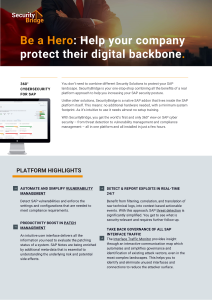
Our brochure provides detailed information on how our platform can help protect your company from cyber threats. Discover how our cutting-edge technology helps you identify and address security risks in real-time. Download our brochure today to learn more.
MSP PASàPAS
“From day one, we have been able to use SecurityBridge reports to alert our customers of their risky behaviors”
SUCCESS STORY
Schneider Electric
Securing mission critical SAP Systems
worldwide
SUCCESS STORY
Replaced its enterprise SAP security with SecurityBridge
SUCCESS STORY
Pharmaceutical
«For SAP cybersecurity this is
the most advanced solution.»
CASE STUDY
Sport & Apparel
«We selected SecurityBridge as it
represents next-generation technology.»
CASE STUDY
«SecurityBridge keeps our resources
lean and maximizes ROI.»
CASE STUDY
SecurityBridge
Customers around the Globe rely on us
“We selected SecurityBridge as the platform most comprehensive in functionality that is completely and seamlessly integrated within the SAP technology stack. SecurityBridge’s agile and holistic approach enable us to transition very quickly and smoothly.”
Stéphane Peteytas, Head of SAP Cybersecurity at Sanofi
SecurityBridge
PARTNERs & ALLIANCES
“The expansion of our partnership with SecurityBridge is an important step in complementing our portfolio. It will help us strengthen our position in a dynamic market environment and underpin our leading role as SAP Partner.”

Nicolaj Vang Jessen
EVP, Global Innovation & IP, Global SAP Alliances & Region NEE
NTT DATA Business Solutions AG
Protect Your Business: How SecurityBridge Can Keep Your Organization Safe
Introducing the first and only holistic, natively integrated SAP security product that addresses all aspects necessary to protect organizations against cyber threats. The SecurityBridge Platform identifies SAP vulnerabilities and risks, providing mitigation measures to safeguard your organization’s critical assets. With our product, you can rest assured that your business is protected against potential security breaches.
Fast implementation, rapid discovery, actionable insights. Advanced SAP security technology includes anomaly detection for identifying sophisticated threats.
Eliminate false positives, optimize Security Analyst’s effort with a specialized Security Operation Center (SOC) integration for SAP.
Experience truly integrated real-time threat monitoring with SecurityBridge for SAP Threat Detection. Evolving results increase awareness of your organization’s threat posture.
Streamline your SOC team’s focus with SecurityBridge, the easy-to-maintain, deploy, and install SAP security solution.
Experience a unified platform with SecurityBridge. Our open architecture enables intelligent sharing of findings across all modules.
Streamline your security operations with the SAP SIEM connector. Our platform offers seamless, out-of-the-box integration with leading SIEM products.
Automate Patch detection with SecurityBridge. Our platform detects missing patches, including SNotes and SAP Kernel Patches, for a timely implementation.
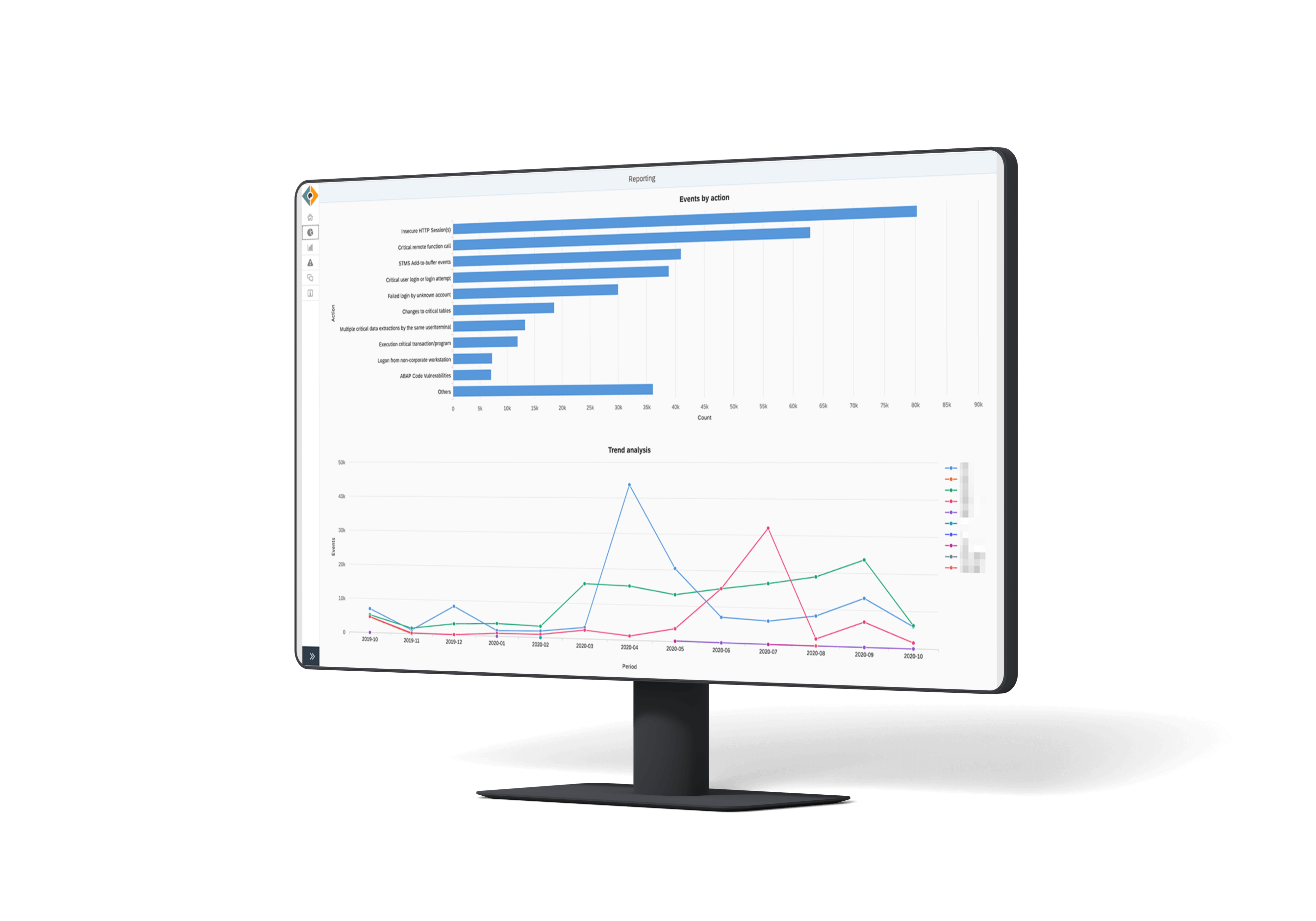
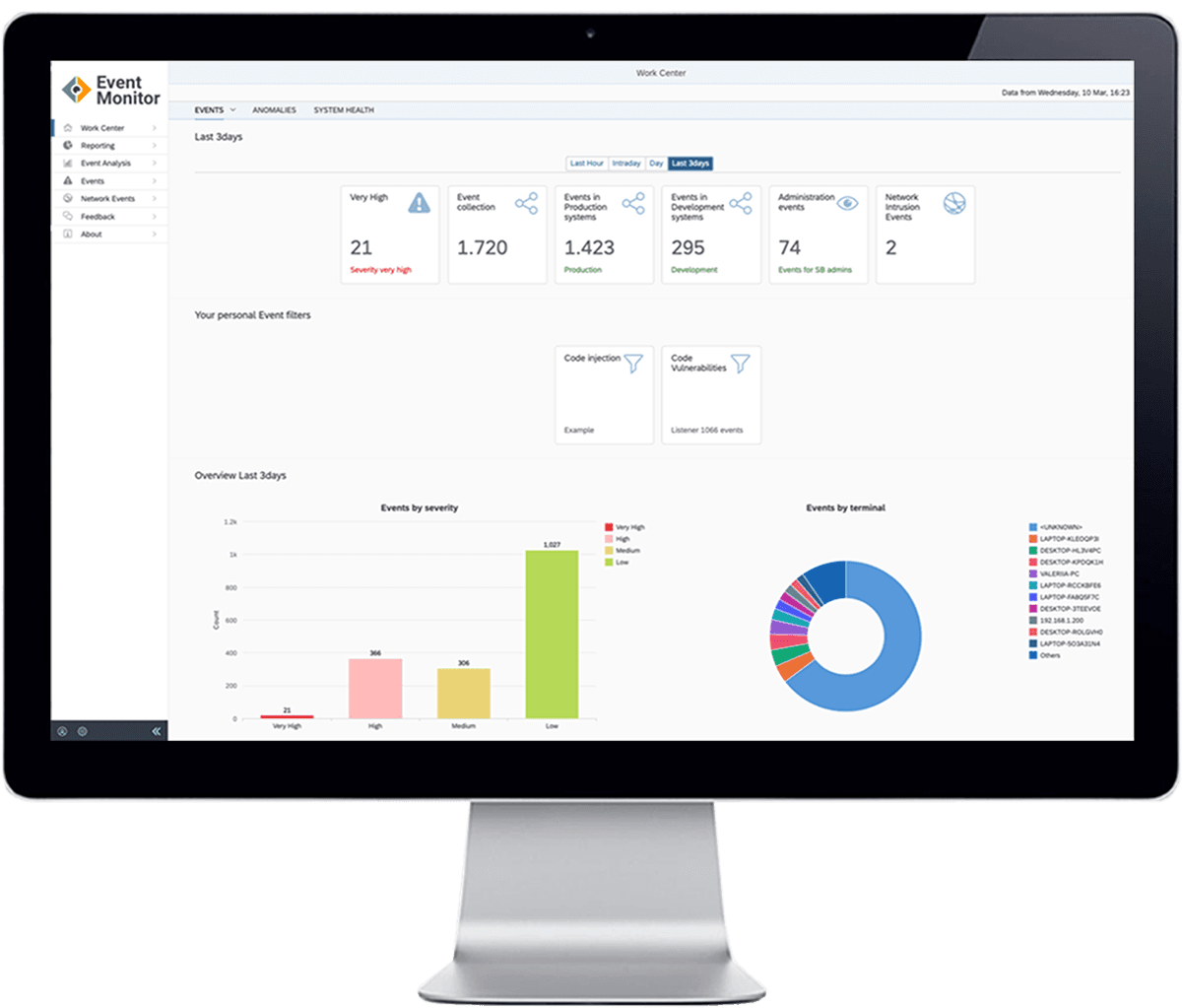
Get a single source of truth with our Dashboard, providing comprehensive insights in one place.
Report security incidents with one click, document risk acceptance inline, and access the integrated knowledge base.
Ready to meet security like never before?
BUSINESS CASE CALCULATOR
How much can you save?
Calculate an individual business case for SecurityBridge usage and related improvement.
CYBER SECURITY
Customer Security Story
Reinforcing the security of the global organization.
Learn more
Press
Resilience, security, and responsiveness are your core operational requirements. Our solutions help you to deliver your…
Discover our press centre
alliance
How to detect SAP Attacks?
SecurityBridge integrates with Fortinet’s FortiGate a NextGen Firewall to increase the accuracy of detecting attacks on SAP applications.
Recent Highlights
The Platform receives frequent updates of attack detection patterns, compliance rules, and SAP security features. In our publications, we also inform you about active threats or security trends for SAP customers.
SAP Security Patch Day
SAP Security Patch Day – November 2023
SAP has released another set of Security Patches on this SAP Security Patch Day for November. Like last month, the number of patches is relatively low, with only 3 new Security Notes and 3 updates to notes that have been earlier released.
November 14, 2023
SAP Cybersecurity
Security Breaches Not Only Affect Large Organisations
In this blog, we highlight the vulnerability of small and medium-sized businesses’ SAP systems to cyber-attacks.
November 9, 2023

Life at SecurityBridge
A recap of our 3rd #CrossTheBridge cycling event
On September 8th, 2023, we hosted the 3rd edition of our #CrossTheBridge Cycling Event. This annual gathering brought together our valued partners and customers, for a day packed with adventure, celebration, networking and, importantly, the sharing of SAP cybersecurity knowledge and insights.
November 7, 2023
SAP Vulnerability
Practical Exploitation of SAP Vulnerability CVE-2021-44231
In this blog, we talk about the practical exploitation of SAP vulnerability CVE-2021-44231 and provide a solution to address it.
November 6, 2023
SAP Cybersecurity
Reverse Invoke for Added Security: SAP Web Dispatcher as an example
In this blog, we highlight reverse invoke for added security by taking an SAP Web Dispatcher to SAP backend scenario as an example.
November 2, 2023

SAP Cybersecurity
SAP BTP Security: A Top Priority for 2024
Organizations should proactively acknowledge the presence of zero-day vulnerabilities and anticipate their exploitation. Choosing a proactive approach, rather than merely reacting to situations, helps prevent chaotic responses to critical security incidents and promotes organized handling of such events. Organizations need to target a long-lasting and sustainable security posture that is resilient against currently unknown vulnerabilities.
October 30, 2023
ONE-STOP SHOP PLATFORM FOR SAP SECURITY
ABAP, HANA, JAVA, SAP CLOUD – We cover it all
Product
- Threat Detection for SAP©
- Vulnerability Management for SAP©
- SIEM Integration for SAP©
- SAP Attack detection
- Request a Demo
Features
- ABAP™ Code Vulnerability
- Data Loss Prevention for SAP©
- Central Alarm Center for SAP©
- Protection for SAP Identities
Company
- About
- News & Press Releases
- Support
- Security Advisories
- Responsible Disclosure
Contact Us
- +49 (841) 93914840
- +1 416 821 0850
- Contact Us
Follow Us
© All rights reserved SecurityBridge GmbH 2023
This website uses cookies to improve your experience. We’ll assume you’re ok with this, but you can opt-out if you wish. Cookie settingsACCEPT
Privacy & Cookies Policy
Privacy Overview
This website uses cookies to improve your experience while you navigate through the website. Out of these cookies, the cookies that are categorized as necessary are stored on your browser as they are essential for the working of basic functionalities of the website. We also use third-party cookies that help us analyze and understand how you use this website. These cookies will be stored in your browser only with your consent. You also have the option to opt-out of these cookies. But opting out of some of these cookies may have an effect on your browsing experience.
Always Enabled
Necessary cookies are absolutely essential for the website to function properly. This category only includes cookies that ensures basic functionalities and security features of the website. These cookies do not store any personal information.
Non-necessary
Any cookies that may not be particularly necessary for the website to function and is used specifically to collect user personal data via analytics, ads, other embedded contents are termed as non-necessary cookies. It is mandatory to procure user consent prior to running these cookies on your website.