Bep 20 wallet address где взять
Frequently Asked Questions
What is Binance Smart Chain?
Binance Smart Chain (BSC) is a blockchain platform developed by the cryptocurrency exchange Binance. It was launched in September 2020 as a parallel blockchain to the existing Binance Chain. BSC is designed to provide a decentralized platform for creating and executing smart contracts, similar to Ethereum. Binance Smart Chain utilizes a dual-chain architecture, which means it operates with the Binance Chain. While Binance Chain focuses on providing fast and secure trading of cryptocurrencies, BSC enhances the ecosystem by enabling the creation of decentralized applications (dApps) and the execution of smart contracts. One of the primary goals of Binance Smart Chain is to offer high performance and low transaction fees, making it an attractive option for developers and users. It achieves this by utilizing a consensus mechanism called Proof of Staked Authority (PoSA), where a set of validators is elected to validate transactions and produce new blocks. BSC supports the Ethereum Virtual Machine (EVM), which is compatible with most Ethereum tools, dApps, and smart contracts. This compatibility allows developers to easily port their projects from Ethereum to BSC, leveraging its lower fees and faster transaction confirmation times. The native cryptocurrency of Binance Smart Chain is called Binance Coin (BNB), which is used for various purposes within the ecosystem, including paying transaction fees, participating in token sales, and staking for yield farming. Overall, Binance Smart Chain aims to provide a scalable and efficient blockchain platform that supports decentralized finance (DeFi) applications, decentralized exchanges (DEXs), and other innovative projects in the blockchain space.
What is BEP20 wallet address?
BEP20 is a token standard on the Binance Smart Chain (BSC), similar to the ERC20 standard on the Ethereum blockchain. A BEP20 address is a unique identifier to receive, store, and send BEP20 tokens on the Binance Smart Chain. A BEP20 address is a string of alphanumeric characters, typically represented in a hexadecimal format. It usually starts with the prefix “0x” and is 42 characters long. Each BEP20 token holder has a unique address associated with their BSC wallet. It’s important to note that BEP20 addresses are case-sensitive, so even a tiny change in letter casing can result in a different address. Therefore, it’s crucial to double-check and accurately copy the address when sending or receiving BEP20 tokens to avoid any loss or error.
Which wallet has BEP20?
Ledger is one of the most popular wallets that are known to support BEP20 tokens on the Binance Smart Chain.
What is my BEP20 wallet address?
- Open Ledger Live.
- Connect your Ledger device and open the Binance Smart Chain (BSC) app on your Ledger device
- Navigate to the Accounts tab, click the Add account button, select Binance Smart Chain (BNB), and click Continue.
- Once a BSC account is added, navigate to the Receive tab, select your BSC account, and click Continue. Ledger Live and your Ledger device will display your Binance smart Chain address.
- Verify this address on your device and click Confirm. This address can be used to deposit BNB or BEP20 tokens.
What is BEP20 wallet app?
A BEP20 wallet app is a mobile/web or desktop application designed to store, manage, and interact with BEP20 tokens.
A BEP20 wallet app like Ledger Live provides users with a secure and user-friendly interface to store and manage their BEP20 tokens. It typically generates a unique address for each user, which serves as their wallet address. Users can use this address to receive BEP20 tokens from others or transfer tokens to other addresses on the BSC network.
Additionally, a BEP20 wallet app often includes features such as transaction history, token balance tracking, and the ability to connect with decentralized applications built on the Binance Smart Chain. This allows users to interact with various DApps and perform actions such as trading, staking, or participating in token sales directly from their wallet app.
BEP2 vs BEP20
BEP2 and BEP20 are two different token standards used in the BNB Beacon Chain and BNB Smart Chain networks. The primary distinction lies in their respective functionalities. BEP2 serves as a protocol exclusively designed for native transactions within the BNB Beacon Chain, whereas BEP20 operates as a protocol tailored for smart contract transactions within the BNB Smart Chain. Consequently, BEP2 is better suited for straightforward transfers of tokens and assets, while BEP20 offers support for more intricate features such as token staking, decentralized exchanges, and NFTs. Both protocols provide notable levels of security and scalability, but each possesses its own set of advantages and disadvantages.
Ultimately, both BEP2 and BEP20 tokens offer reliable and secure solutions to transfer digital assets. Still, depending on your needs, one may be more suitable than the other. Here’s the difference between the two:
- Blockchain Network:
- BEP2: BEP2 tokens are used on the BNB Beacon Chain, which is the native blockchain of the Binance exchange.
- BEP20: BEP20 tokens are used on the BNB Smart Chain (BSC), which is a parallel blockchain to the BNB Beacon Chain and offers smart contract functionality.
- Token Functionality:
- BEP2: BEP2 tokens are typically used for simple token transfers and basic token functionalities. They do not support complex smart contracts.
- BEP20: BEP20 tokens are fully compatible with the Ethereum Virtual Machine (EVM) and support smart contracts. They can be used for more advanced token functionalities, such as decentralized applications (DApps) and decentralized finance (DeFi) protocols.
- Address Format:
- BEP2: BEP2 tokens use a different address format than BEP20 tokens. BEP2 addresses start with “bnb” followed by a series of alphanumeric characters.
- BEP20: BEP20 tokens use the same address format as Ethereum’s ERC-20 tokens. The addresses start with “0x” followed by a series of alphanumeric characters.
- Interoperability:
- BEP2: BEP2 tokens are specific to the BNB Beacon Chain and are not directly interoperable with other blockchain networks.
- BEP20: BEP20 tokens are compatible with the Ethereum network and can be easily transferred to and from Ethereum using bridges or token swap services.
- Token Ecosystem:
- BEP2: BEP2 tokens are mainly associated with the Binance exchange and its ecosystem. They are used for trading, paying transaction fees, and participating in token sales on Binance Launchpad.
- BEP20: BEP20 tokens are widely used in the BNB Smart Chain ecosystem, including various DeFi protocols, DApps, token sales, and liquidity pools.
Кошелек Tether BEP20 (USDT)
Создайте кошелек Tether BEP20 (USDT) — анонимно, безопасно и без регистрации! Онлайн кошелек BEP20 — это функциональный сервис для работы с USDT!
Скачивайте Trustee Wallet — он превзойдет ваши ожидания!
Скачать криптокошелек Trustee Wallet
Отсканируйте QR-код, чтобы установить Trustee Wallet из маркета
137 отзывов
Отсканируйте QR-код, чтобы установить Trustee Wallet из маркета
902 отзыва
* Оценки магазинов за май 2023г
Отсканируйте QR-код, чтобы установить Trustee Wallet из маркета


Скачать криптокошелек Trustee Wallet
Отсканируйте QR-код, чтобы установить Trustee Wallet из маркета
137 отзывов
Отсканируйте QR-код, чтобы установить Trustee Wallet из маркета
902 отзыва
* Оценки магазинов за май 2023г
Отсканируйте QR-код, чтобы установить Trustee Wallet из маркета
Как создать кошелек USDT (BEP20)
Установите бесплатное мобильное приложение Trustee Wallet для пользования USDT (BEP20) Wallet всего за несколько минут и вы получите инновационный и надежный мультивалютный криптокошелек, который всегда под рукой.
Скачать приложение Trustee Wallet для iOS или Android
Нажать «Создать кошелек»
Записать индивидуальную фразу восстановления доступа на листе и подтвердить ее
Кошелек готов к использованию
Скачать криптокошелек Trustee Wallet
Отсканируйте QR-код, чтобы установить Trustee Wallet из маркета
137 отзывов
Отсканируйте QR-код, чтобы установить Trustee Wallet из маркета
902 отзыва
* Оценки магазинов за май 2023г
Отсканируйте QR-код, чтобы установить Trustee Wallet из маркета

0% КОМИССИЯ
на обмены USDT и другие стейблкоины
Преимущества BEP20 кошелька
Выгодность — встроенный мониторинг обменников
- cмарт алгоритм в реальном времени подбирает лучшее предложение на рынке
- лучшие комиссии на рынке для операций с банковскими картами
- переводы между кошельками без комиссии Trustee, только комиссия сети (майнеров)
- кэшбэк и выгодная партнерская программа
Анонимность и инновационные технологии безопасности
- нет необходимости предоставлять личные документы или персональную информацию
- уникальная ключ-фраза сохраняет анонимность, гарантируя безопасность и неприкосновенность средств
- прозрачность – открытый исходный код на GitHub
- безопасность подтверждена специалистами Hacken.io
Удобство в использовании
- простой и интуитивно понятный дизайн
- обмен, покупка и продажа монет в пару простых шагов
- возможность персонализации графического интерфейса
- удобная сортировка монет и токенов по разным параметрам
- встроенные блокчейн-обозреватели
Уникальная технология Trustee Booster Kit
- позволяет не переплачивать за транзакции
- возможность отправки нескольким получателям одной транзакцией
- отмена крипто транзакций путем возврата средств
- возможность ускорения зависших транзакций
WalletConnect
- безопасное и удобное подключение к рынку децентрализованных финансов
Поддержка 24/7
- профессиональная клиентская поддержка 24/7
Обзор токена USDT (BEP20)
Tether BEP20 — токен, функционирующий на блокчейне Binance Smart Chain (BSC) экосистемы Binance c 2020 года.
BEP-20 — это стандарт токенов на BSC, который расширяет функциональность стандарта ERC-20. Благодаря своему сходству с BEP-2 (Binance Chain) и ERC-20 (Ethereum), он совместим с обоими.


USDT (BEP20) — стейблкоин. Цена этого токена привязана к доллару США в соотношении 1:1. Комиссия сети BSC за переводы токенов BEP-20 оплачивается в BNB.
Стейблкоин Tether (USDT) появился на рынке криптоактивов в 2014 году (на блокчейне Bitcoin) как связующее звено между традиционной валютой и криптовалютой.
Затем USDT начал функционировать в других сетях, среди которых Algorand, Bitcoin Cash’s Simple Ledger Protocol (SLP), Polygon, Tron, EOS, Liquid Network, Omni, Tron, Velas и Solana.
Его обычно используют для удобных расчетов, хеджирования рисков, связанных с колебанием курсов криптовалют и упрощения конвертации криптовалюты в фиатную валюту (евро, доллары).

Онлайн график динамики курса Tether BEP20 к гривне (UAH), евро (EUR), доллару (USD)
Bitcoin (BTC)
Ethereum (ETH)
Ethereum Classic (ETC)
Litecoin (LTC)
Ripple (XRP)
Bitcoin Cash (BCH)
Dogecoin (DOGE)
Monero (XMR)
Tether (USDT)
Binance Smart Chain (BSC)
Stellar (XLM)
Binance Coin (BNB)
USD Coin (USDC)
Сhainlink (LINK)
Cardano (ADA)
Uniswap (UNI)
BitTorrent (BTT)
Waves (WAVES)
Polkadot (DOT)
Shiba Inu (SHIB)
Solana (SOL)
Basic Attention Token (BAT)
Digibyte (DGB)
Fantom (FTM)
Horizen (ZEN)
Cosmos (ATOM)
VeChain (VET)
Metis (METIS)
TrueUSD (TUSD)
Binance USD (BUSD)
Polygon (MATIC)
Harmony (ONE)
Как пользоваться BEP20 wallet!
- Как хранить
- Как пополнить
- Как вывести
- Как обменять
Trustee Wallet использует инновационные технологии безопасности, а поэтому идеально подходит для хранения Tether BEP20 .
- на главном экране приложения выберите BEP20 из списка;
- также в этом меню доступна вся история транзакций по активу.
Монеты и токены на главном экране можно отсортировать, нажав на значок “Фильтра” в правом верхнем углу. Их можно распределить по балансу, названию, росту и падению курса. Активы с нулевым балансом скрываются при отключении тумблера в соответствующей строке.


Trustee Wallet предлагает ряд способов пополнения счета Tether BEP20 от других пользователей или мгновенное получение средств по номеру телефона.
- На главном экране Trustee Wallet выберите вкладку BEP20 ;
- Зайдите в нее и нажмите на кнопку “Пополнение”;
- Скопируйте адрес (буквенно-цифровой код);
- Поделитесь адресом с отправителем средств любым удобным способом.
Также, вы можете получить средства, отправив свой адрес в виде QR-кода с помощью кнопки “Поделиться”.


Быстрый вывод USDT BEP20 на банковскую карту — уникальная особенность, которая отличает Trustee Wallet от других криптовалютных приложений. Ни один из подобных сервисов не предлагает такую опцию.
- Выберите вкладку “Обмен” на главном экране;
- Выберите криптовалюту, которую отдаете и фиатную валюту – гривну;
- Завершите обмен;
- Перейдите в меню гривны и далее во вкладку “Перевод”;
- Выберите способ оплаты — “Перевод на карту” с нулевой комиссией;
- Выберите банковскую карту. Если ее данных еще нет в приложении, введите их, нажав на кнопку “Добавить новую карту”;
- Укажите сумму вывода и нажмите на “Перевести на карту”;
- Ожидайте средства на своей банковской карте.


Trustee Wallet интегрировал множество криптовалютных пар для комфортной работы и быстрого обмена активов.
- Выберите криптовалюту, которую отдаете и которую хотите получить;
- Введите сумму обмена вручную или выберите одну из кнопок для автоматического подсчета процентной доли баланса;
- Ознакомьтесь с деталями сделки, размером комиссии;
- Завершите обмен и ожидайте криптовалюту в приложении.


Популярные вопросы
Что такое USDT (BEP20) Wallet address?
Это буквенно-цифровой код, крипто адрес и уникальный идентификатор, используемый для получения актива USDT (BEP20) и других операций.
Как узнать адрес USDT (BEP20) кошелька?
Для отправки адреса другу, продавцу или другому отправителю USDT (BEP20), нужно открыть вкладку USDT, нажать кнопку “Пополнить” и выбрать стандарт USDT BEP20. Адрес актива можно скопировать и переслать отправителю любым удобным для вас способом. Также вы можете передать свой адрес в виде QR-кода.
Как перевести USDT (BEP20) в USDT (ERC20)?
Очень важно определить правильный стандарт монеты перед отправкой/обменом – иначе средства просто пропадут. Но в Trustee Wallet при выводе актива на банковскую карточку, отправке средств по номеру телефона или другому пользователю в системе не нужно думать о разных стандартах USDT — все происходит автоматически. Trustee Wallet максимально упрощает управление вашими активами и помогает переводить крипто валюту действительно удобно, мгновенно и с нулевыми комиссиями. Оцените все преимущества крипто кошелька Trustee Wallet.
Как перевести USDT (TRC20) в USDT (BEP20)?
Перевод USDT (TRC20) в USDT (BEP20) — это также обменная операция. Для обмена зайдите на страницу “Обменник”, укажите токены и сумму обмена и выберите лучшее предложение на рынке из списка, сгенерированного системой Smart Swap. Перед обменом убедитесь, что на балансе вашего Tron-кошелька есть достаточное количество монет TRX для оплаты комиссии.
BSC tokens: Common Questions
BSC (Binance Smart Chain) is a blockchain made to run on smart contracts, similar to Ethereum. The main purpose of BSC is to optimize fast trading and support the launch of Binance DEX. The original Binance Chain, while being fit for trading, turned out to be incapable of supporting a fully-fledged decentralized exchange. The key missing component was smart contracts, that allow to automate transactions. ‘Why not use the already existing Ethereum blockchain for that?’ — you might ask. The answer is congestion—a measure of how busy the network is at a given moment. Network overload leads to slower transactions and higher fees. The original Binance Chain was built to avoid congestion and did not have smart contracts. The Ethereum blockchain has smart contracts yet suffers from congestion. The BSC is meant to have the strengths of both and weaknesses of neither! For a more detailed explanation of how the BSC works, check out this article.
What are BEP20 and BEP2 tokens?
BEP stands for Binance Smart Chain Evolution Proposal. BEP20 tokens are the tokens that run on BSC (referred to as BSC tokens in this article). BEP2 tokens are the ones running on the original Binance Chain.
If you have a token in your wallet and you are unsure if it’s BEP2 or BEP20, you can figure it out by checking the token address. BEP2 tokens’ addresses start with ‘bnb’ and will match your BNB address. BEP20 tokens’ addresses start with ‘0x’ and match your BSC BNB address.
Are BSC tokens different from other cryptocurrencies?
BSC tokens differ from other coins like BTC or ETH in the same manner as any tokens differ from main net coins. BSC tokens run on the BSC blockchain and they all have the same address. A single address may have dozens of different tokens on it. In comparison, BTC has its own blockchain and each address can only hold BTC. BEP20 tokens transactions can be traced using one block explorer and do not require a different block explorer for each token.
What are the fees for the BSC transactions?
All BSC transactions require a network fee to be paid in BSC BNB. Similarly to how ERC20 tokens require a fee to be paid in ETH. Thusly, if you wish to transfer your BSC tokens, make sure to deposit some BSC BNB to your wallet. Keep in mind, that the fee can only be paid in BSC BNB, it is not possible to cover the fee using the token you are trying to transfer.
What BSC tokens does Atomic Wallet support?
All of them! Some of them are featured in the wallet by default and some of them you will have to send to your address before you could see them in your wallet. Some of the tokens that are presented by default are: Pancake Swap, Binance USD, Tether USD, Wall Street Games, Baby Doge, Ethereum, FEG, Plant vs Undead, Shiba Inu, SafeMoon, USD Coin, NEAR Protocol, STEPN.
How do I add a BSC token to my wallet?
If the token you wish to have in your wallet is not presented by default, all you need to do is to send this token to your BNB BSC address. The wallet will display all the BSC tokens that you have on your BSC BNB address. If you have deposited tokens to that address and still can’t see the token in your wallet, make sure it’s not filtered out.
Why do BSC tokens have the same address as ETH?
The Binance Smart Chain is a modified ETH fork and as such, it is compatible with the Ethereum network. Both of these blockchain networks have similar infrastructure, which is why they have the same address in your wallet. It is done in order to make sure that your funds are not permanently lost when you send them via wrong network. For example, if you send a token to your ETH via the BSC network, the funds will still be on the blockchain and you’ll be able to retrieve them.
Did this answer your question?
Thanks for the feedback There was a problem submitting your feedback. Please try again later.
How to Find BEP20 Wallet Address on Trust Wallet & Metamask
Unlocking the power of the Binance Smart Chain using the BEP-20 Wallet Address.
The BEP20 wallet address has emerged as a critical element within the Binance Smart Chain (BSC) ecosystem. As an evolution of the widely adopted ERC-20 standard on the Ethereum blockchain, BEP-20 tokens play a crucial role in powering decentralized finance (DeFi) and decentralized applications (DApps) within the BSC network.
In this article, we will guide you on how to find BEP20 wallet address on Trust Wallet and Metamask, unravel how to access them on these two top-ranking BEP20 wallets, and explore how they enable seamless transactions and interactions across the Binance Smart Chain. If you’re looking for a place to store your BEP20 tokens, check out our comprehensive list of the best BEP20 wallets.
How to Find Bep20 Wallet Address On Trust Wallet
It’s effortless to find the BEP20 wallet address on Trust Wallet. Below is a step-by-step guide on how to get this address.
Step 1: Download and Install Trust Wallet
- Trust Wallet is a mobile application. To download it to your device, visit Apple Store or Google Play Store, depending on your mobile phone’s operating system.
- Once the app is installed, open it, and click the Get Started button.
- This will redirect you to a password screen. Enter a password you can remember and confirm it on the next screen.
- After that, you will need to store your seed phrase securely. There will be an option to store the phrase on your iCloud or Google Drive or manually. Whichever you choose, make sure you can access it should you need to, but most importantly, ensure that third parties cannot access the phrase without your permission.
- Once this is done, your wallet is ready to use.
Step 2: Get the Wallet Address
- Open your Trust Wallet and click the Wallet icon at the bottom of the package. This will display all the coins you have added to your trust wallet.
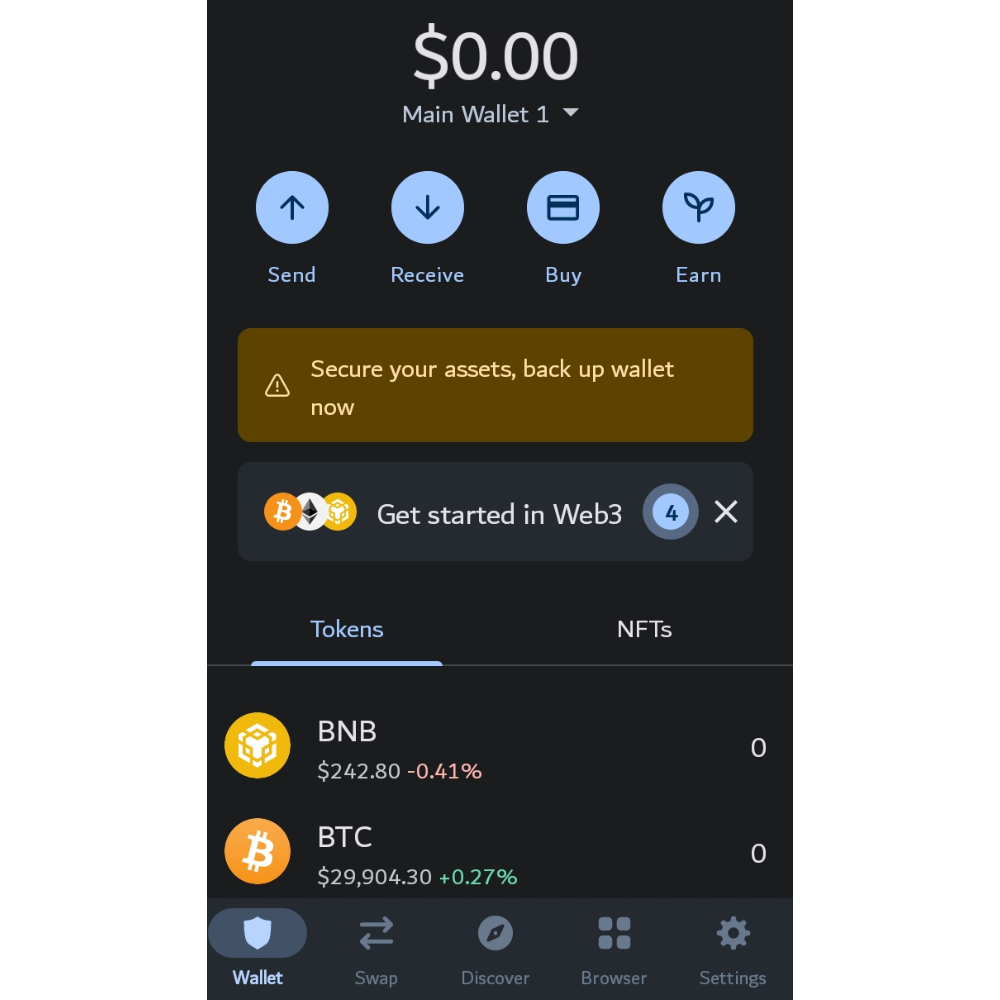
- By default, only Bitcoin (BTC), Ethereum (ETH), BNB Beacon Chain (BNB), BNB Smart Chain (BNB), and Trust Wallet Token (TWT) are automatically added.
- To add other tokens to your list, click the Toggle icon at the top right of the page. This redirects you to a tab that lists all the coins supported on Trust Wallet.
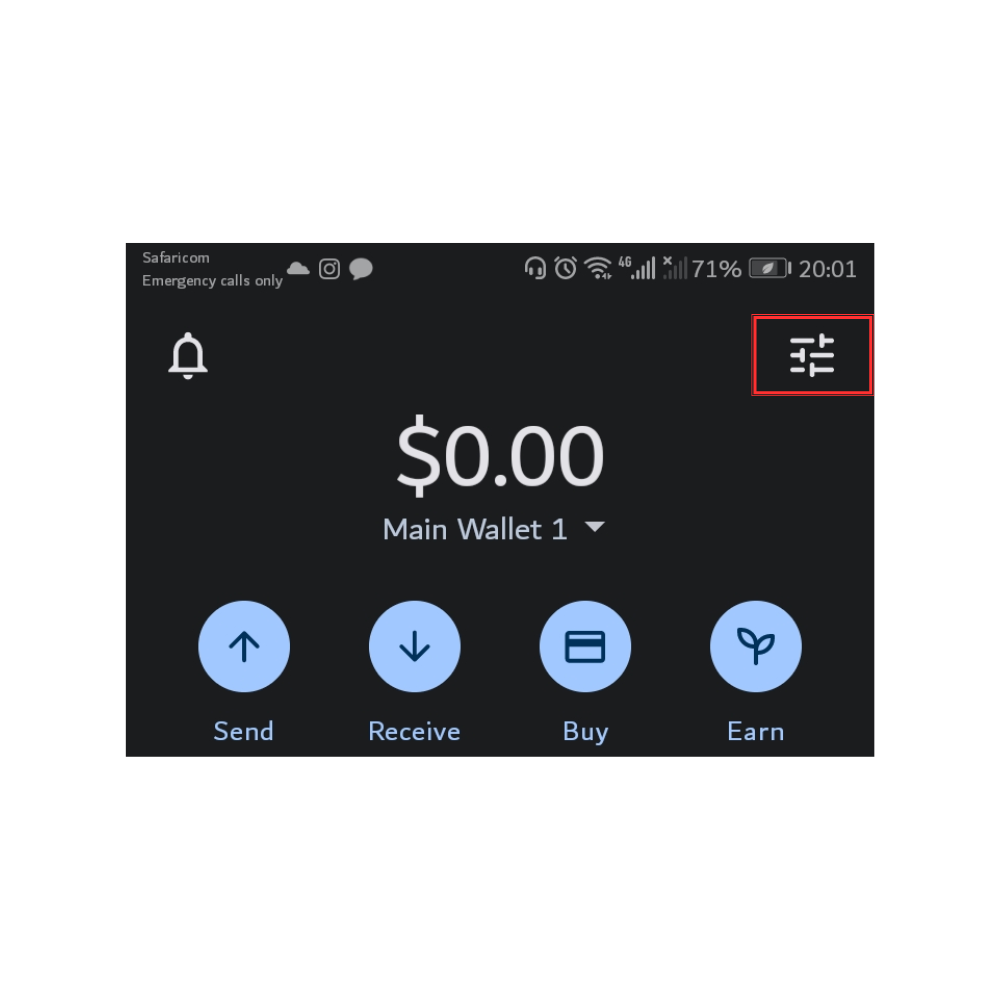
- Search for the coin you want to add and turn on the Toggle button next to it. When done, press the Return arrow to return to the Wallet tab.
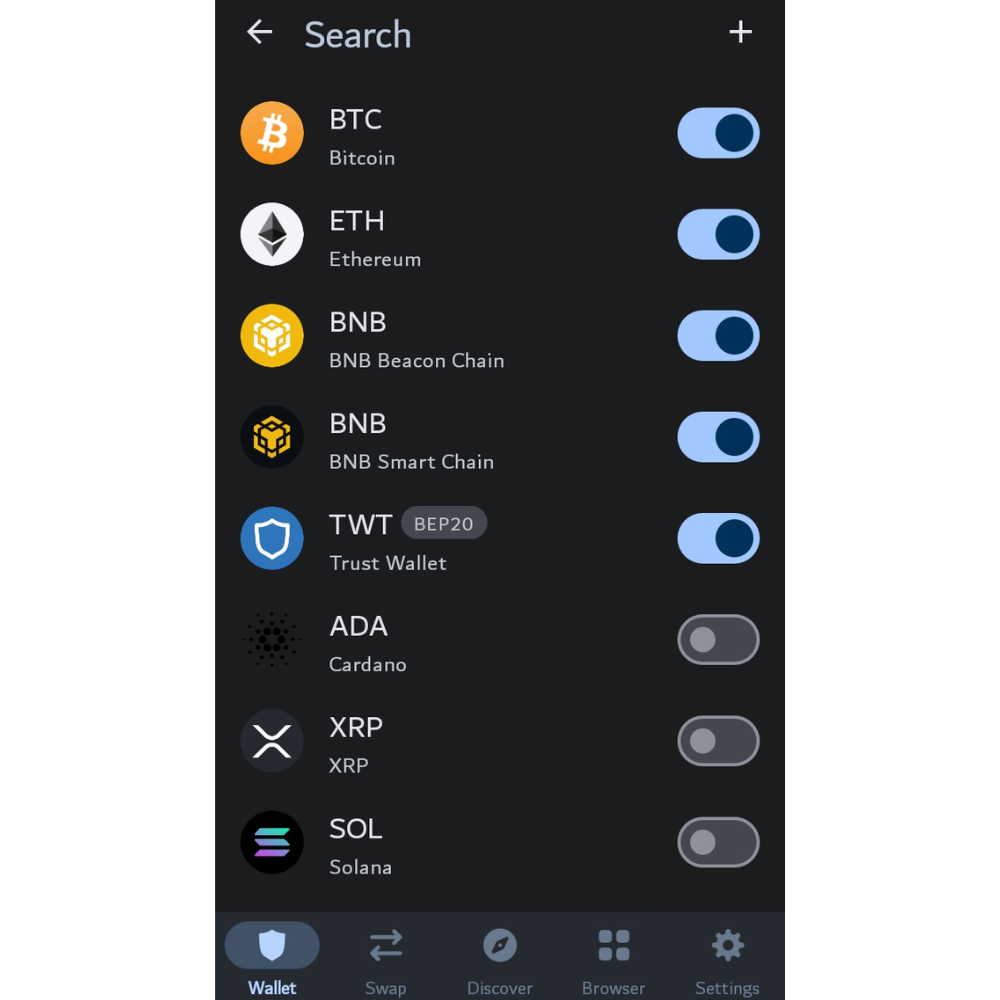
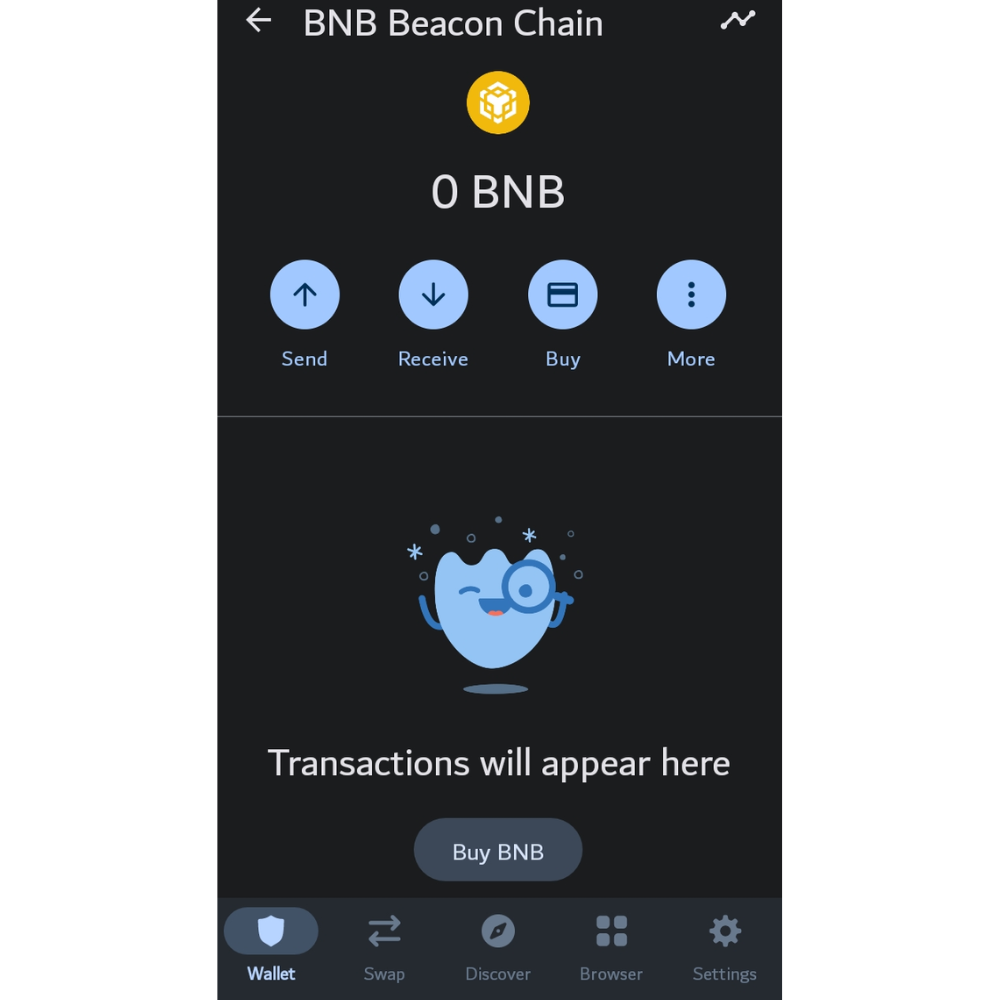
- Now click the coin whose token address you want to get. This will open a tab where you can see that coin’s balance and four buttons under it. Click the Receive button.
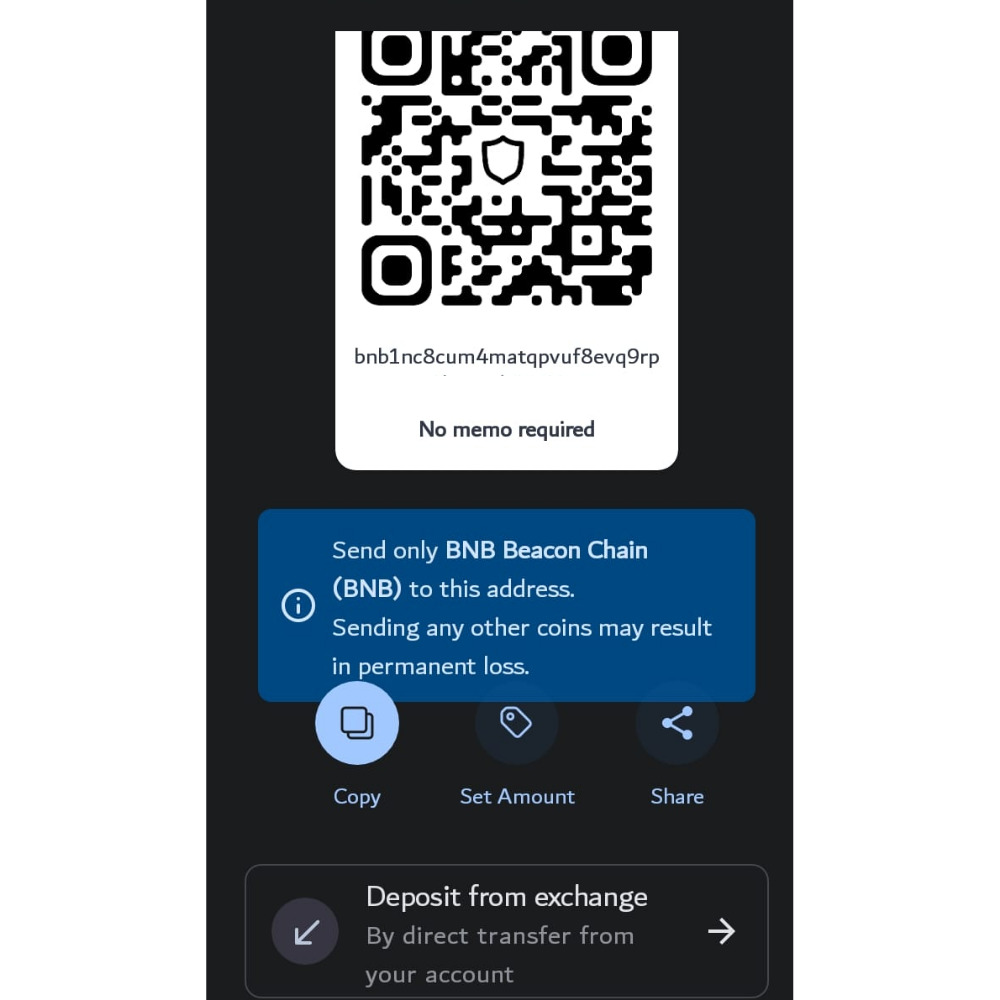
- On the screen that opens, you will see a QR code and, underneath it, an address. This is the token address.
- Click the Copy button to copy the address and ensure when sending the token; the sender sends only the selected token to this address. If they send another cryptocurrency, it will be lost.
How to Get Bep20 Wallet Address on Metamask
Like Trust Wallet, finding a token’s contact address on MetaMask is also very easy. The following steps will guide you on how to obtain this address easily.
Step 1: Download and Install MetaMask Wallet
- Go to the Apple Store or Google Play Store to download the MetaMask Wallet mobile app. Alternatively, visit MetaMask’s website and start with the wallet’s browser extension. For more details on how to set this up, you can refer to this MetaMask Wallet guide.
Step 2: Get the Wallet Address
- After installing the app, you will be redirected to the Token dashboard. Here, you can see all the tokens you’ve added to your MetaMask Wallet. By default, only Ethereum is added.
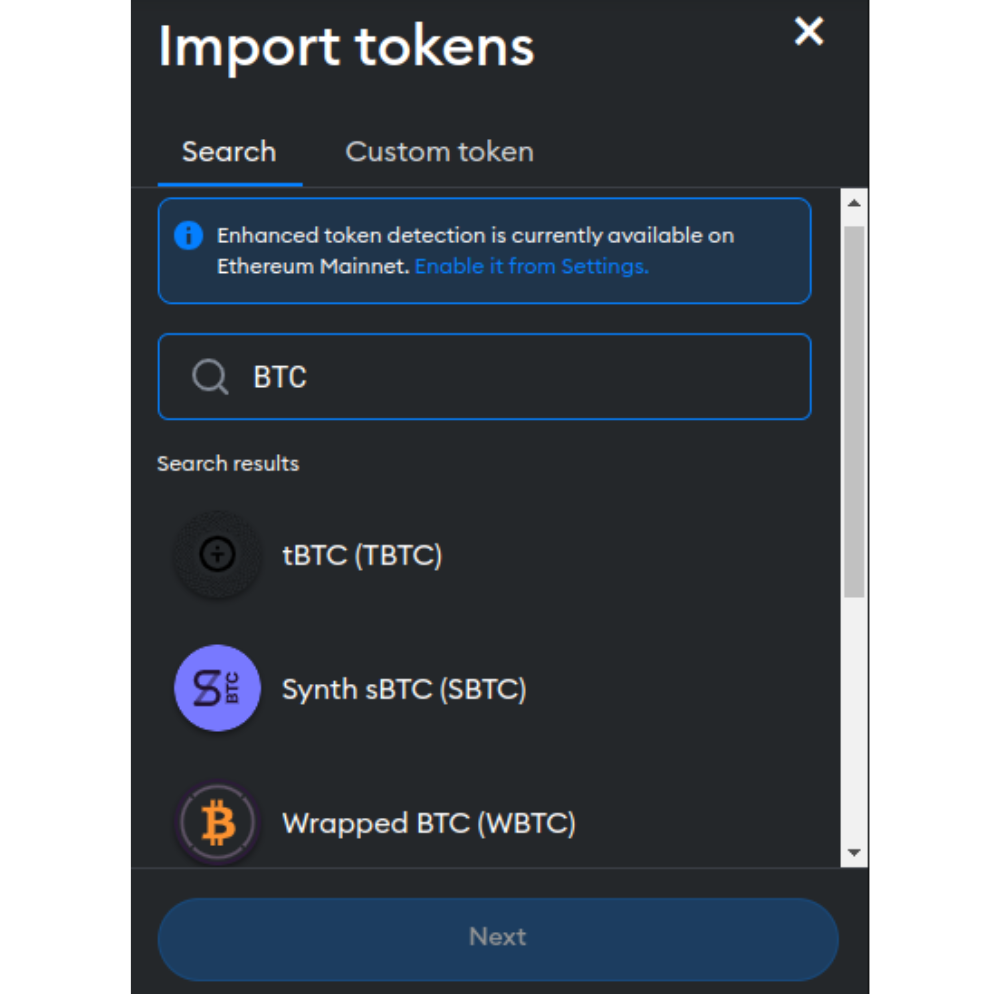
- Click the Import Tokens hyperlink to get other tokens listed on the Token dashboard.
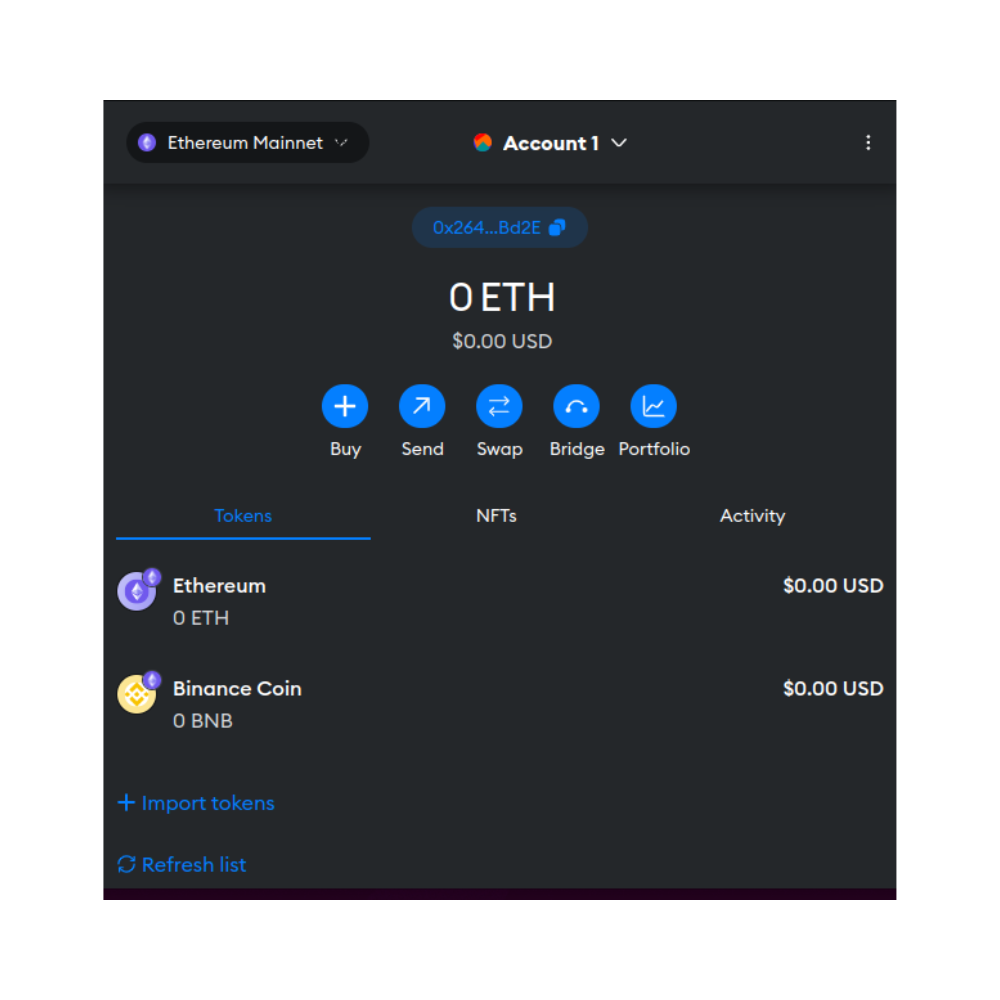
- This will redirect you to a page listing all the coins MetaMask supports. Search for the coin you want to add and select it. Click the Next button.
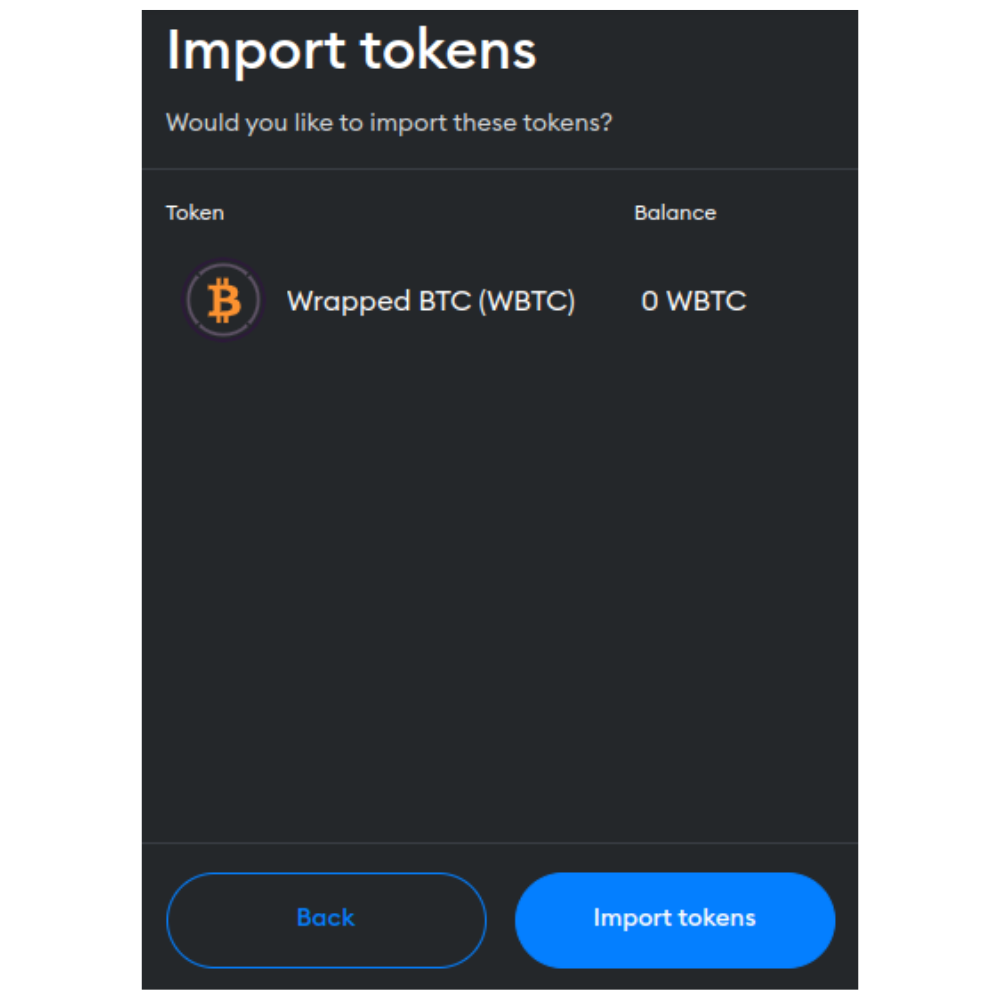
- To complete the importing process click the Import tokens button that appears on the tab that follows.
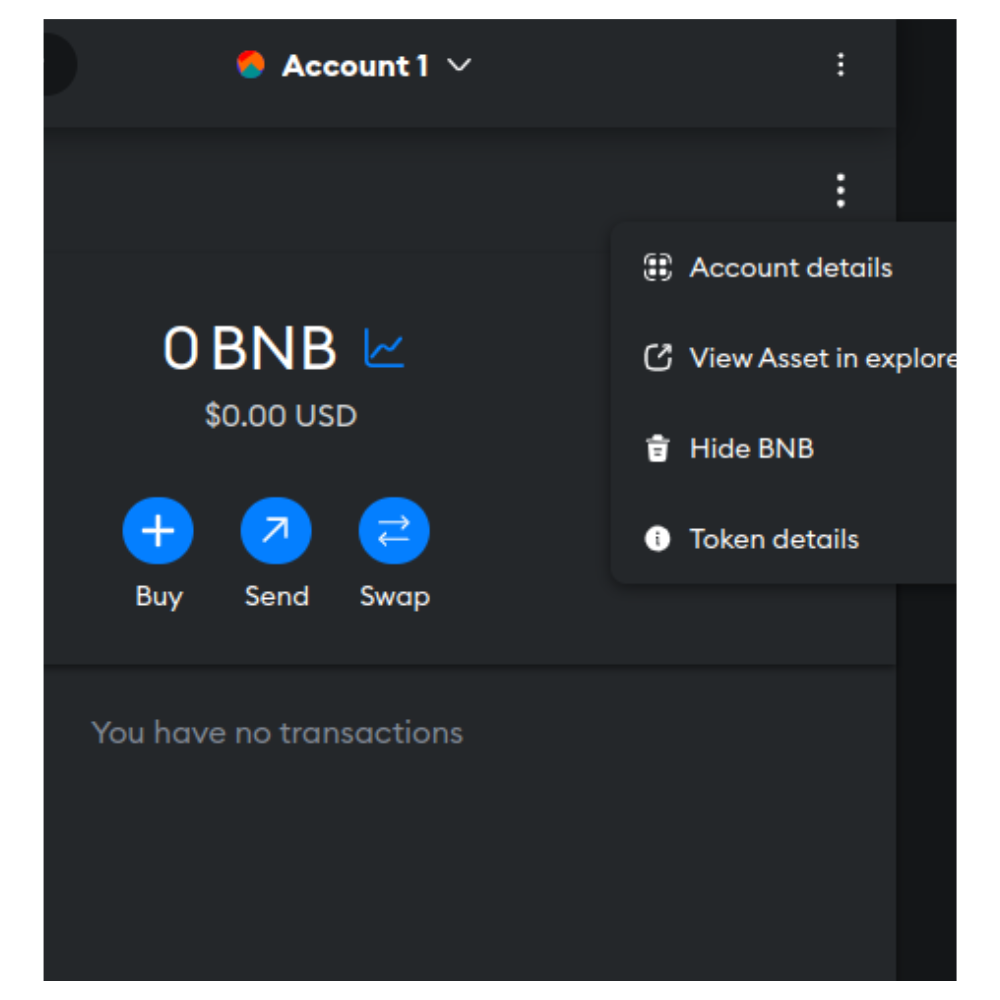
- Once done, return to the Token dashboard and select the coin you wish to import. This will open another tab where you can see the coin’s details. On this tab, click the Three-dot menu and select theToken Details option.
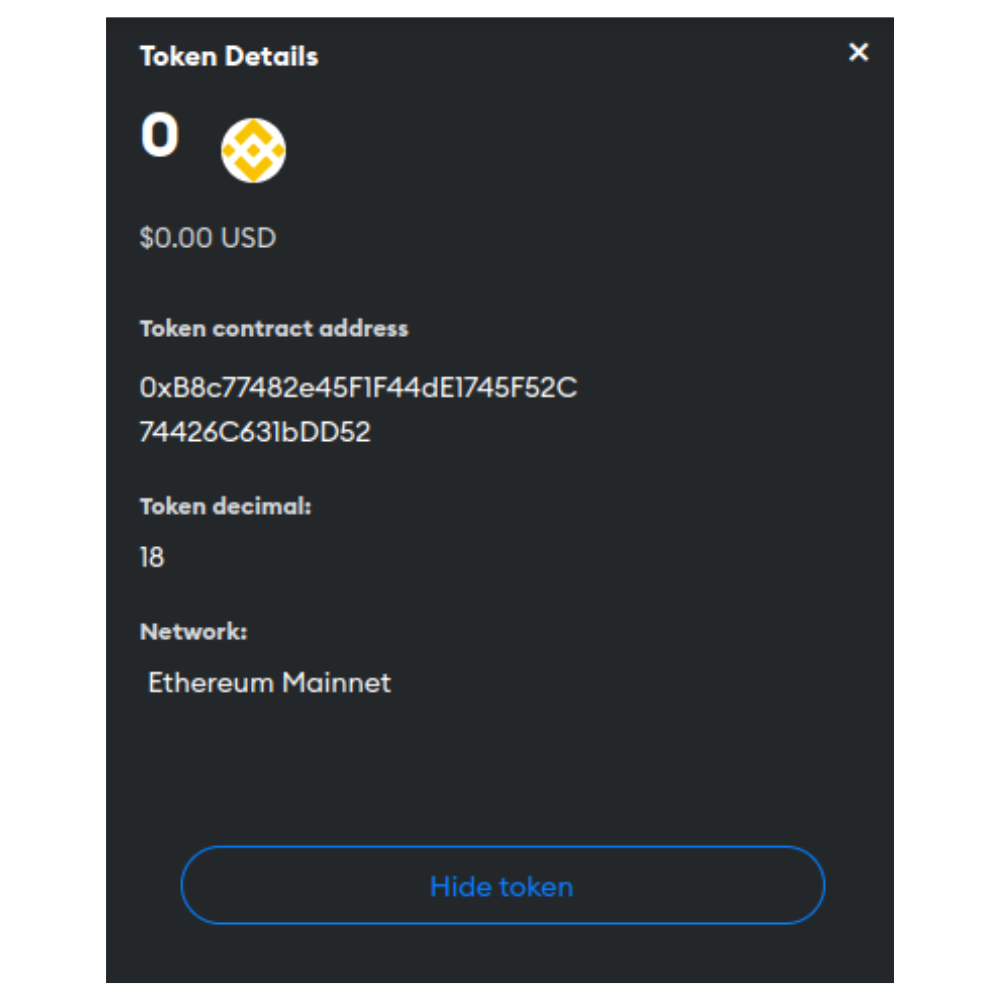
- This will reveal the token address for the selected coin.
What Is BEP20?
BEP stands for Binance Smart Chain Ethereum Protocol, derived from the Ethereum Request for Comments (ERC-20) standard. ERC-20 is a formalized way of proposing improvements and standards for the Ethereum network. The 20 simply represents the unique proposal number for the ERC-20 standard.
Similarly, the 20 in BEP20 represents the unique proposal number for the BEP20 standard. The BEP20 is a technical standard that applies tokens on the Binance Smart Chain (BSC), a blockchain network developed by Binance, one of the largest cryptocurrency exchanges in the world.
The BEP20 standard implements a set of rules and guidelines that enable token developers to create and deploy their tokens on the Binance Smart Chain. These tokens can represent digital assets, utility tokens, stablecoins, and various other forms of value. BEP20 tokens facilitate various use cases, including decentralized finance (DeFi) protocols, gaming assets, non-fungible tokens (NFTs), and more.
BEP20 tokens share similar functions and features with ERC-20 tokens. For instance, both tokens are fungible, divisible, and interoperable with various decentralized applications (dApps), exchanges, and wallets that support the respective standards.
FAQs
Does Coinbase support BEP-20?
Most recently, the Coinbase Wallet started supporting BEP20 cryptocurrencies. This digital wallet, provided by one of the largest crypto exchanges in the world, also supports other digital assets, including Ethereum, Polygon, Stellar Litecoin, Dogecoin, Ripple, and tokens from layer 2 rollups like Arbitrum and Optimism.
Where can I find my Binance Smart Chain BEP20 wallet address?
You can easily find your BEP20 wallet address on MetaMask or Trust Wallet. These two digital wallets support BEP20 tokens, making it easy for users to locate the addresses. Alternatively, you can use blockchain explorers like BscScan.
Is MetaMask a BEP20 wallet?
Yes. MetaMask is one of the leading BEP20 wallets. It supports, amongst other coins, multiple BEP20 tokens, including Binance Coin (BNB), Binance USD (BUSD), Wrapped BNB (WBNB), and PancakeSwap(CAKE).
Read more about
Want to be a crypto expert? Get the best of Coinwire straight to your inbox.
Get daily crypto news updates + weekly roundups on our most important stories.