Token Factory iFrame Keeps Downloading – How to Remove It (2023)
Here’s a guide that explains how to remove Token Factory iFrame keeps downloading issue on your Mac system.
By Dinesh Last updated Jan 2, 2023
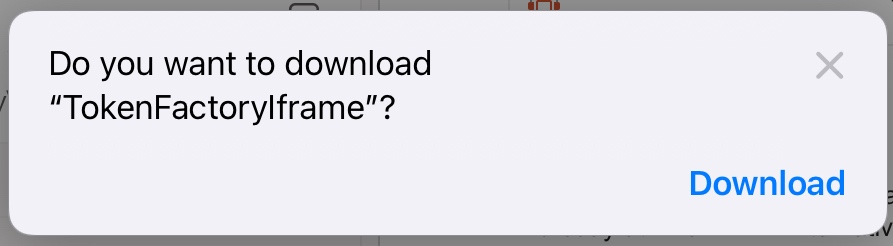
There are many people who are having problems with Token Factory iFrame on their Mac operating system. What happens is that when a user launches a Word or Outlook program on the Safari browser, a file called TokenFactoryIframe automatically downloads on their computer. Even after clearing the website data and exiting the web browser, it keeps downloading again and again. So, in this guide, we will tell you how to fix and remove the Token Factory iFrame that keeps downloading on your computer in detail below.
Fix: Token Factory iFrame Keeps Downloading Issue (2023)

Token Factory iFrame is not a virus but a file that gets automatically downloaded from a Microsoft server. However, if you are looking to remove TokenFactoryIframe from your Mac computer, you can follow various methods given below to fix this issue.
Method 1: Remove Token Factory iFrame from Safari
- First of all, launch the Safari browser on your Mac computer.
- On the top bar, click on the Safari tab.
- A drop-down menu will open, here click on Preferences.
- On the top, click on the Extensions option.
- Under Extensions, click on the extension related to Token Factory iFrame to remove it.
- After that click the “Uninstall” button.
- Finally, you will come across a pop-up window that will ask for confirmation to uninstall the extension. Just choose the option of “Uninstall” again, and it will remove the TokenFactoryIframe from your Mac system.
Method 2: Block Microsoft applications from downloading in Safari
There is also a workaround to block Microsoft apps like Token Factory iFrame from downloading in Safari, as the browser provides you the option to control the downloads from any website. Follow the steps given below to stop Microsoft apps from downloading in Safari:
- First, open the Safari browser.
- Then click on the Safari tab on the top.
- In the drop-down menu, click on Preferences.
- Go to Websites.
- Select the Downloads tab which will be located on the left side.
- Search for outlook.office.com, outlook.live.com, and outlook.office365.com from the right side.
- Select the Deny option.
- That’s it, in this way you can block Token Factory iFrame from downloading on your Mac system.
That is all you need to know about how to remove the Token Factory iFrame that keeps downloading issues on your Mac operating system. In the meantime, do not forget to check out our other guides only on TechNClub.com: How to Remove a Device from Microsoft Account That Still Appears After Deletion, and How to Remove Cisco EAP-FAST Module.
Token Factory Iframe Virus Mac Removal [Solved]
The Token Factory Iframe is a Mac application designed to appear useful and connected to ERC20 tokens but is primarily distributed for profit. These ads can lead users to dangerous websites, including scams and potentially malware.
These applications pose a risk to your Mac’s security and should be removed. To remove this potentially unwanted program (PUP) and effectively clean your Mac, run an anti-malware program.

On this page:
Token Factory Iframe Virus Summary
Malware Removal Tool
Token Factory Iframe Virus – Why Do I See It?
Token Factory Iframe is the type of program, which many outline to be a PUP. This is the kind of software that may end up on your Mac via a variety of ways, the main one of which is believed to be bundled together with the installers of other applications.
Token Factory Iframe Virus – How Did I Get It?
This software may have ended up on your Mac if you have opened Outlook or some other type of mail software, from where many victims report that their Mac starts to download Token Factory Iframe.
Token Factory Iframe Mac – What Does It Do?
This program may firstly begin modifying the settings of your web browser, where it could start performing different types of activities, like change the default home page, new tab page and other such. The main problem of this software is it could display a lot of different types of unwanted content on your Mac, such as:
- Highlighted text on the pages you visit.
- Pop-ups with video and/or sound.
- Interruptive banner ads.
- Redirects.
- Changed search results to show ads instead of relevant sites.
- Intrusive push notifications.
Many of this content could have a lot of different tracking technologies, like cookies, tags, pixels and others.
Token Factory Iframe or the pop-ups shown by it may use these trackers to get different details from your computer, like:
- What you have visited.
- Your mouse movements.
- IP and Mac addresses.
- Your bookmarked websites.
- The browsing history from your browser.
- What searches you have made.
- Your mouse clicks.
Is Token Factory Iframe a Virus?
No, this software is not be a virus. It could perform a lot of pop-ups and redirects on your computer, which makes it just as a problem, as there is a chance some of these ads could lead to risky websites. This is why Token Factory Iframe is classified as a risky app and you should get rid of it from your computer.
This is the main reason why we would strongly suggest to remove this software immediately from Mac.
How to Remove Token Factory Iframe from Mac?
When affected by unwanted programs, the fastest way to eliminate them is scanning your system with anti-malware. This proactive measure not only removes potential threats but also ensures a safer and more secure browsing experience.
Ventsislav Krastev
Ventsislav is a cybersecurity expert at SensorsTechForum since 2015. He has been researching, covering, helping victims with the latest malware infections plus testing and reviewing software and the newest tech developments. Having graduated Marketing as well, Ventsislav also has passion for learning new shifts and innovations in cybersecurity that become game changers. After studying Value Chain Management, Network Administration and Computer Administration of System Applications, he found his true calling within the cybersecrurity industry and is a strong believer in the education of every user towards online safety and security.

Follow Me:
Related posts:
- Factory Automation Vulnerabilities Could Trigger Code InjectionAccording to a new report by Applied Risk conducted by.
- JS:Iframe-CLO [Trj] Detailed Description and Removal OptionsJS:Iframe-CLO [Trj] is classified as a JavaScript Trojan horse that.
- Details of 25,000 Bezop Token Users Exposed by MongoDB DatabaseSecurity researchers at Kromtech recently came across a MongoDB database.
- How to Remove Malware and Viruses from Mac [Guide]Mac Viruses If you’re wondering how to remove malware from.
- OnlineClient Mac Virus Removal Guide [Free Fix Steps]What Is OnlineClient Mac OnlineClient is the name of a.
- Simage4.pubmatic.com Mac Virus Removal Guide [Free]What Is Simage4.pubmatic.com Mac Simage4.pubmatic.com it’s actually the name of.
- TrackFrequency Mac Pop-ups Removal Steps [Free Delete Guide]What Is TrackFrequency Mac TrackFrequency is the name of a.
- NavigateNetwork Mac Adware Removal Guide [Free]What Is NavigateNetwork Mac NavigateNetwork is the kind of program.
Download (MAC)
Malware Removal Tool
Get a free scanner to see if your MAC is infected.
Use SpyHunter to remove malware in less than 15 minutes .
Enjoy a free 7-day trial using your credit card. Cancel at least two days before the trial ends to avoid any charges. Subscription fees vary by region and will renew automatically unless you cancel in time. You’ll receive a reminder before your next billing, and there’s a 30-day money-back guarantee. Read the full terms and discover the free removal service. Read more.
SPECIAL OFFER
Malware Removal Tool
Get a free scanner to see if your PC is infected.
SpyHunter 5 free remover allows you, subject to a 48-hour waiting period, one remediation and removal for results found. Read EULA and Privacy Policy
REMOVE IT NOW (MAC)
with SpyHunter for Mac
Token Factory Iframe may remain persistent on your system and may re-infect it. We recommend you to download SpyHunter for Mac and run free scan to remove all virus files on your Mac. This saves you hours of time and effort compared to doing the removal yourself.
Free Remover allows you, subject to a 48-hour waiting period, one remediation and removal for results found. Read EULA and Privacy Policy
Steps to Prepare Before Removal:
Before starting to follow the steps below, be advised that you should first do the following preparations:
- Backup your files in case the worst happens.
- Make sure to have a device with these instructions on standy.
- Arm yourself with patience.
- 1. Scan for Mac Malware
- 2. Uninstall Risky Apps
- 3. Clean Your Browsers
Step 1: Scan for and remove Token Factory Iframe files from your Mac
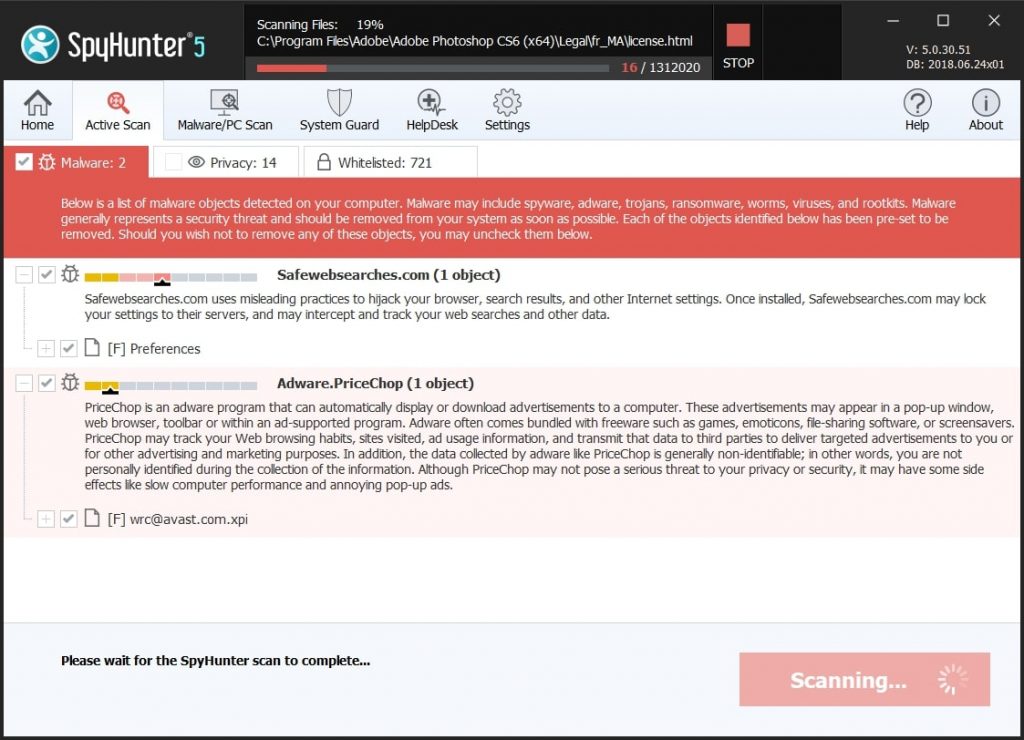
When you are facing problems on your Mac as a result of unwanted scripts and programs such as Token Factory Iframe, the recommended way of eliminating the threat is by using an anti-malware program. SpyHunter for Mac offers advanced security features along with other modules that will improve your Mac’s security and protect it in the future.
Click the button below below to download SpyHunter for Mac and scan for Token Factory Iframe:
SpyHunter for Mac
Quick and Easy Mac Malware Video Removal Guide
Bonus Step: How to Make Your Mac Run Faster?
Mac machines maintain probably the fastest operating system out there. Still, Macs do become slow and sluggish sometimes. The video guide below examines all of the possible problems that may lead to your Mac being slower than usual as well as all of the steps that can help you to speed up your Mac.
Step 2: Uninstall Token Factory Iframe and remove related files and objects
Manual Removal Usually Takes Time and You Risk Damaging Your Files If Not Careful!
We Recommend To Scan Your Mac with SpyHunter for Mac
Keep in mind, that SpyHunter for Mac needs to purchased to remove the malware threats. Click on the corresponding links to check SpyHunter’s EULA and Privacy Policy
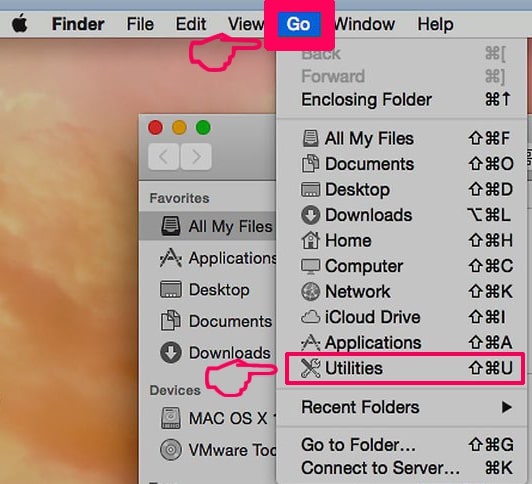
1. Hit the ⇧+⌘+U keys to open Utilities. Another way is to click on “Go” and then click “Utilities”, like the image below shows:
2. Find Activity Monitor and double-click it:
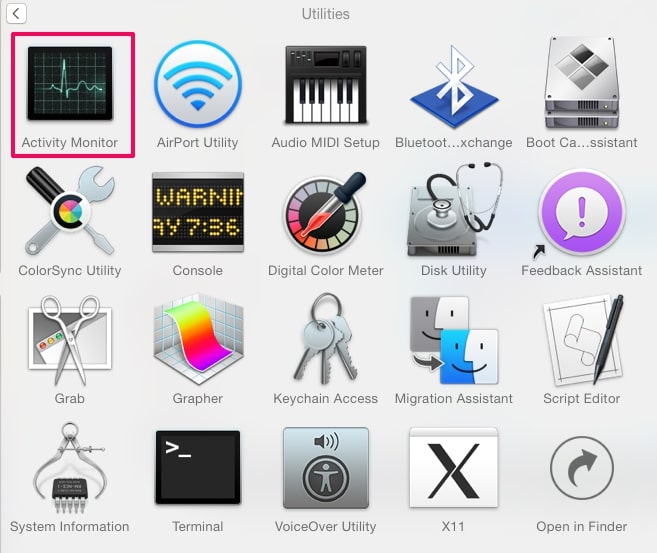
3. In the Activity Monitor look for any suspicious processes, belonging or related to Token Factory Iframe:
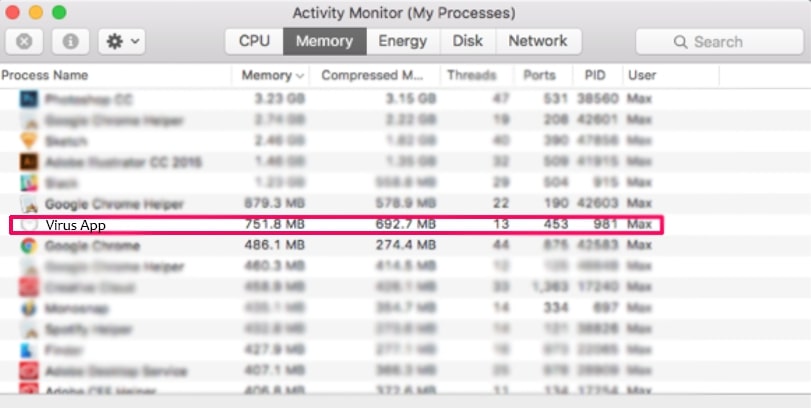
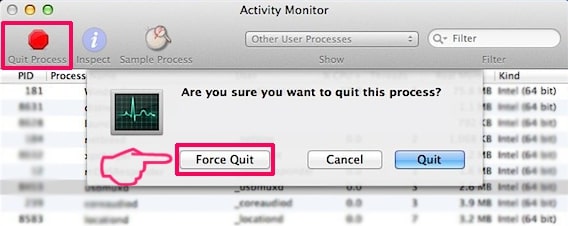
Tip: To quit a process completely, choose the “Force Quit” option.
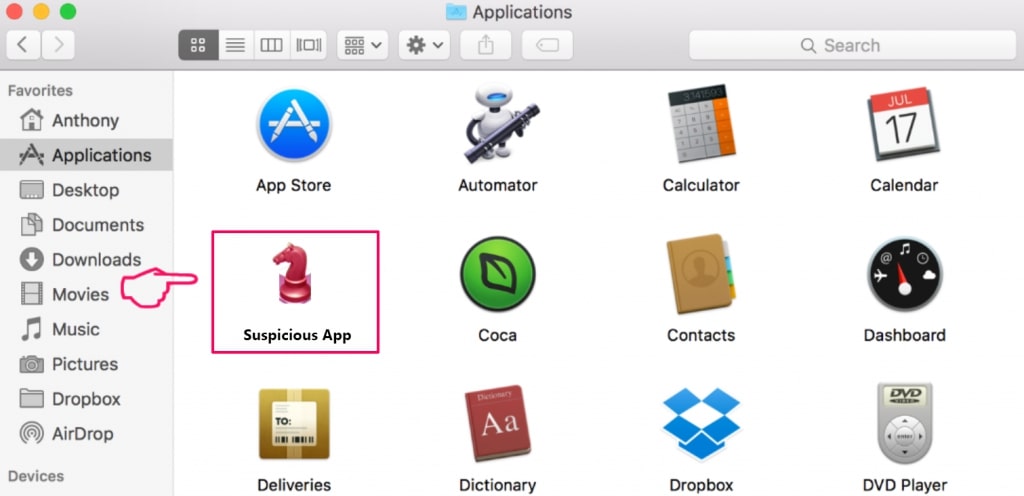
4. Click on the «Go» button again, but this time select Applications. Another way is with the ⇧+⌘+A buttons.
5. In the Applications menu, look for any suspicious app or an app with a name, similar or identical to Token Factory Iframe. If you find it, right-click on the app and select “Move to Trash”.
6. Select Accounts, after which click on the Login Items preference. Your Mac will then show you a list of items that start automatically when you log in. Look for any suspicious apps identical or similar to Token Factory Iframe. Check the app you want to stop from running automatically and then select on the Minus (“-“) icon to hide it.
7. Remove any leftover files that might be related to this threat manually by following the sub-steps below:
- Go to Finder.
- In the search bar type the name of the app that you want to remove.
- Above the search bar change the two drop down menus to “System Files” and “Are Included” so that you can see all of the files associated with the application you want to remove. Bear in mind that some of the files may not be related to the app so be very careful which files you delete.
- If all of the files are related, hold the ⌘+A buttons to select them and then drive them to “Trash”.
In case you cannot remove Token Factory Iframe via Step 1 above:
In case you cannot find the virus files and objects in your Applications or other places we have shown above, you can manually look for them in the Libraries of your Mac. But before doing this, please read the disclaimer below:
Disclaimer! If you are about to tamper with Library files on Mac, be sure to know the name of the virus file, because if you delete the wrong file, it may cause irreversible damage to your MacOS. Continue on your own responsibility!
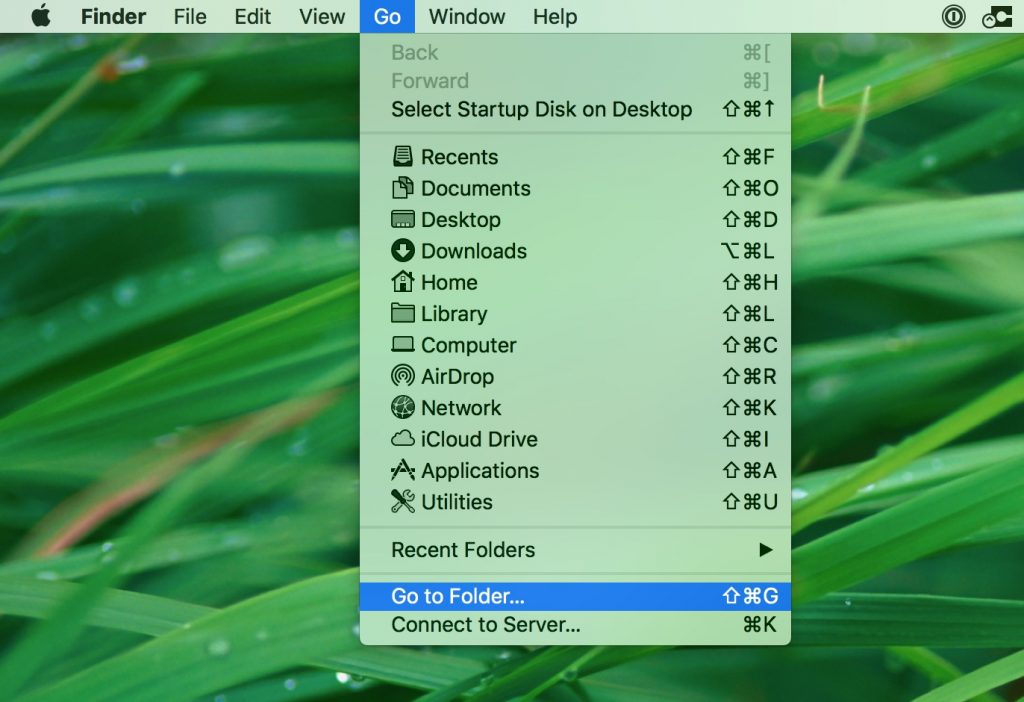
1. Click on «Go» and Then «Go to Folder» as shown underneath:
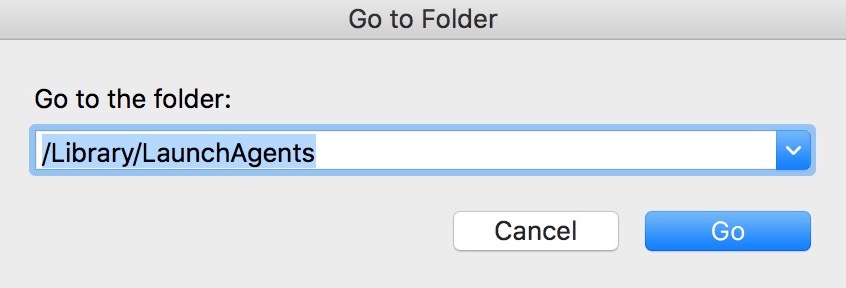
2. Type in «/Library/LauchAgents/» and click Ok:
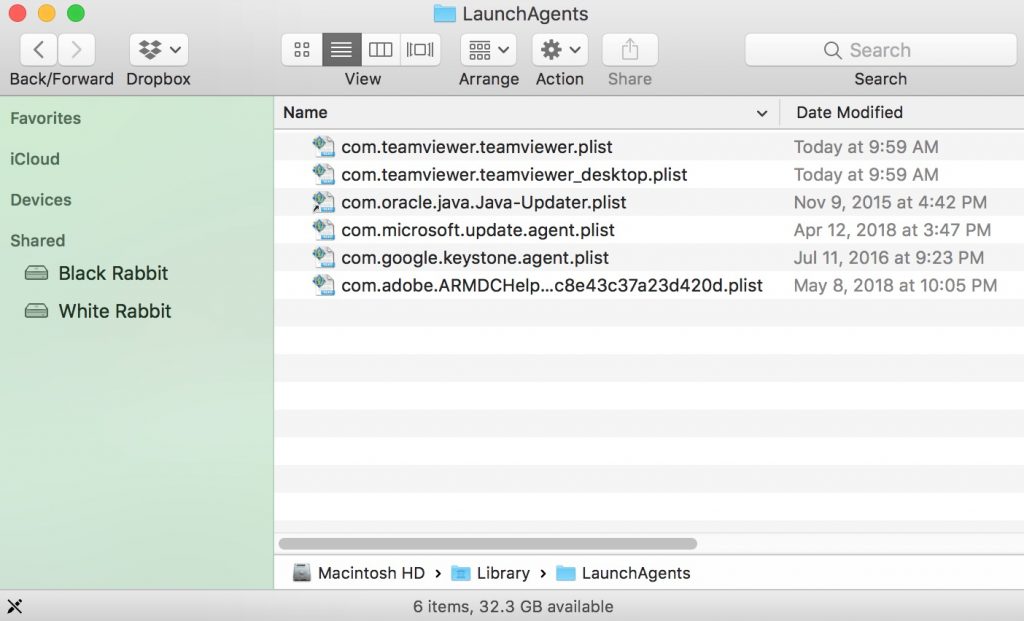
3. Delete all of the virus files that have similar or the same name as Token Factory Iframe. If you believe there is no such file, do not delete anything.
You can repeat the same procedure with the following other Library directories:
Tip: ~ is there on purpose, because it leads to more LaunchAgents.
Step 3: Remove Token Factory Iframe – related extensions from Safari / Chrome / Firefox
Remove an extension from Safari and reset it. Remove a toolbar from Google Chrome Remove a toolbar from Mozilla Firefox
1. Start Safari
2. After hovering your mouse cursor to the top of the screen, click on the Safari text to open its drop down menu .
3. From the menu, click on «Preferences«
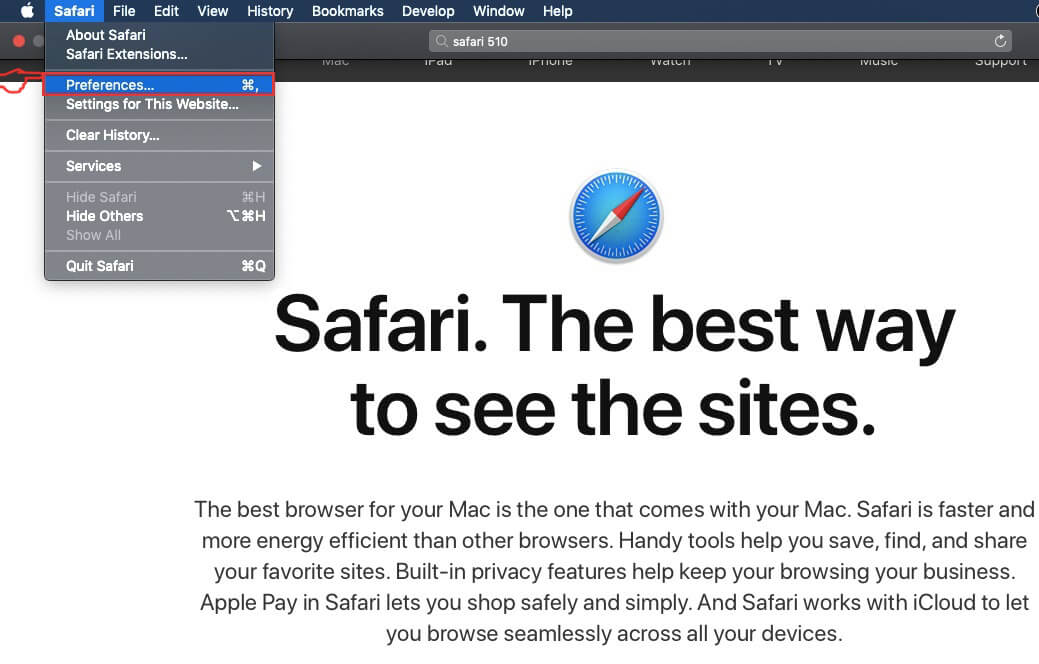
4. After that, select the ‘Extensions’ Tab

5. Click once on the extension you want to remove.
6. Click ‘Uninstall’
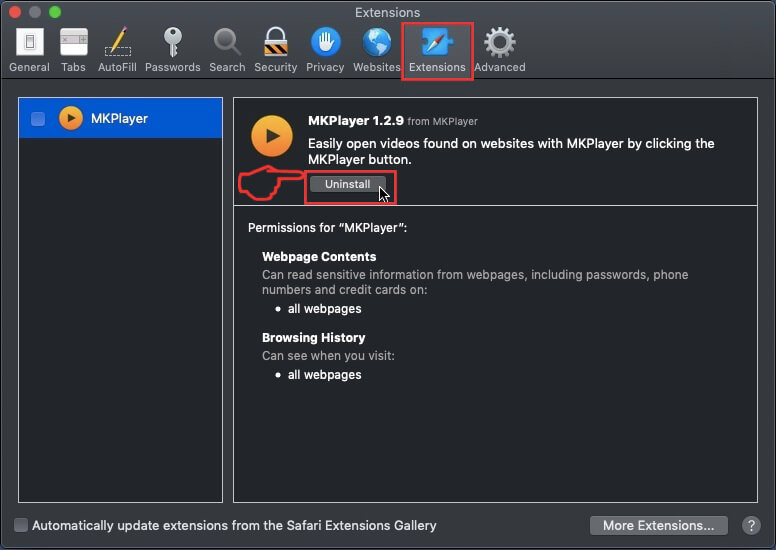
A pop-up window will appear asking for confirmation to uninstall the extension. Select ‘Uninstall’ again, and the Token Factory Iframe will be removed.
How to Reset Safari
IMPORTANT: Before resetting Safari make sure you back up all your saved passwords within the browser in case you forget them.
Start Safari and then click on the gear leaver icon .
Click the Reset Safari button and you will reset the browser .
1. Start Google Chrome and open the drop menu
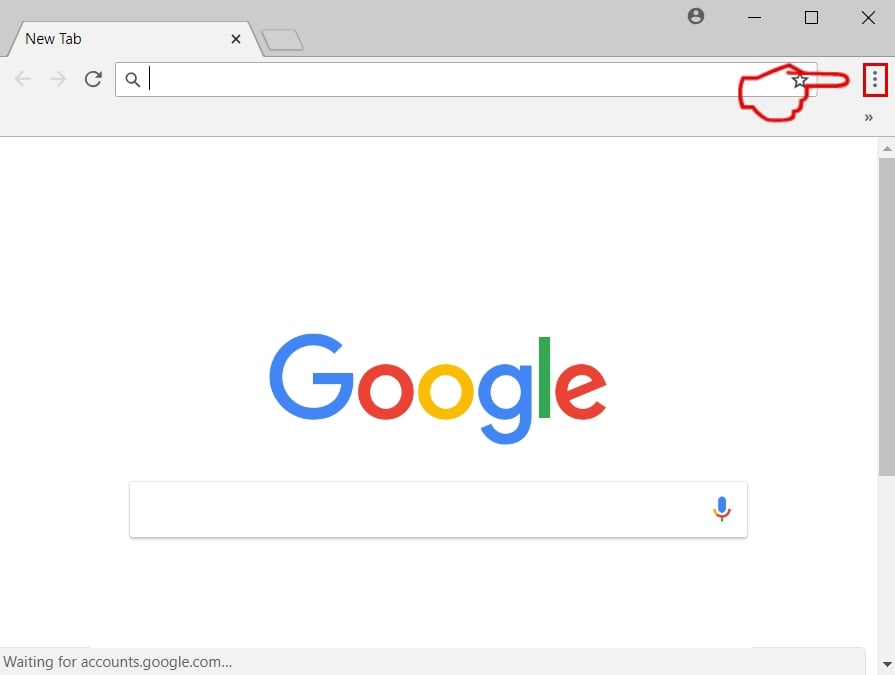
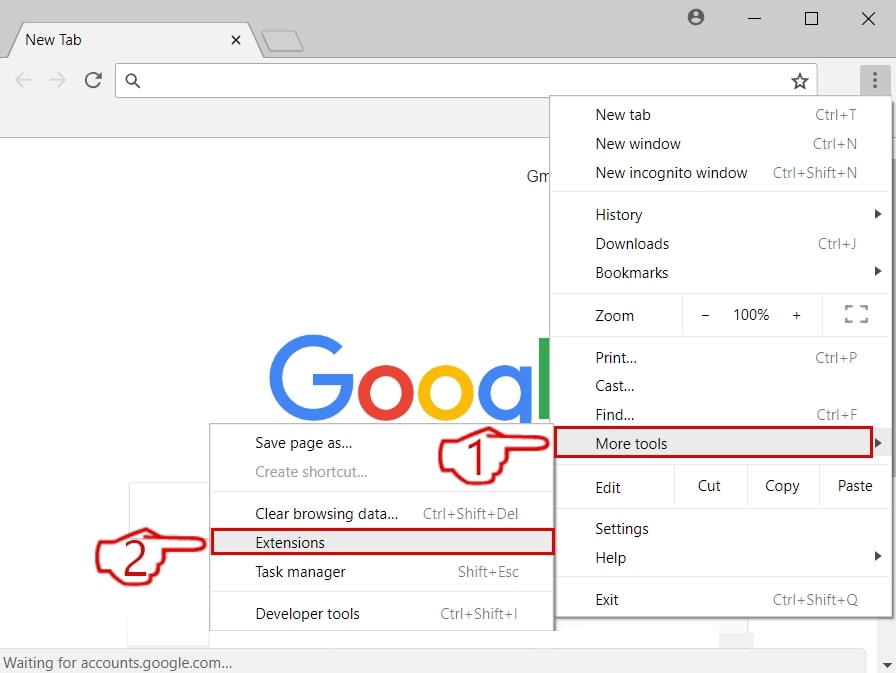
2. Move the cursor over «Tools» and then from the extended menu choose «Extensions«
3. From the opened «Extensions» menu locate the add-on and click on the garbage bin icon on the right of it.
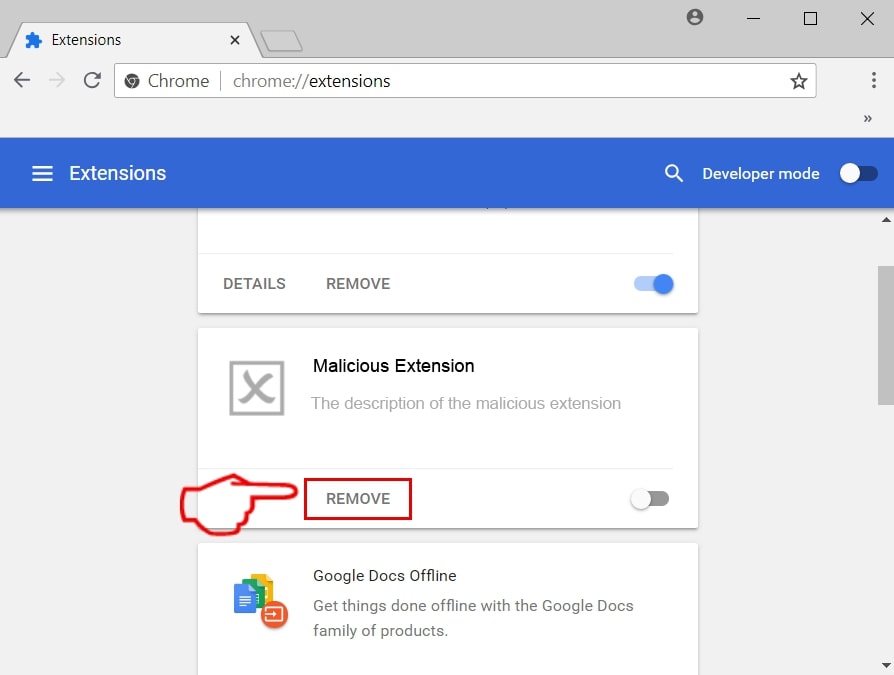
4. After the extension is removed, restart Google Chrome by closing it from the red «X» in the top right corner and start it again.
1. Start Mozilla Firefox. Open the menu window
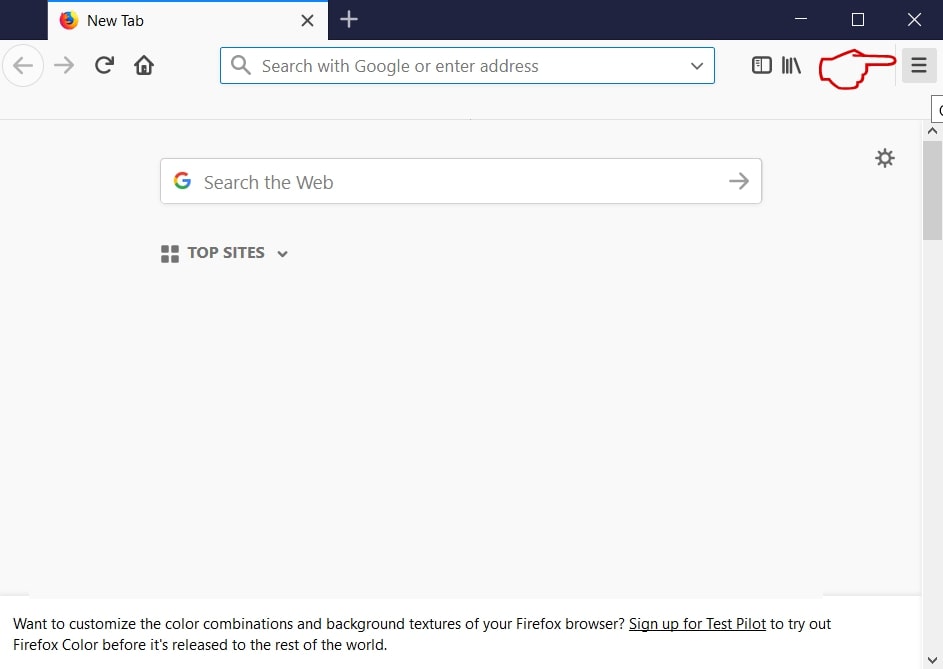
2. Select the «Add-ons» icon from the menu.
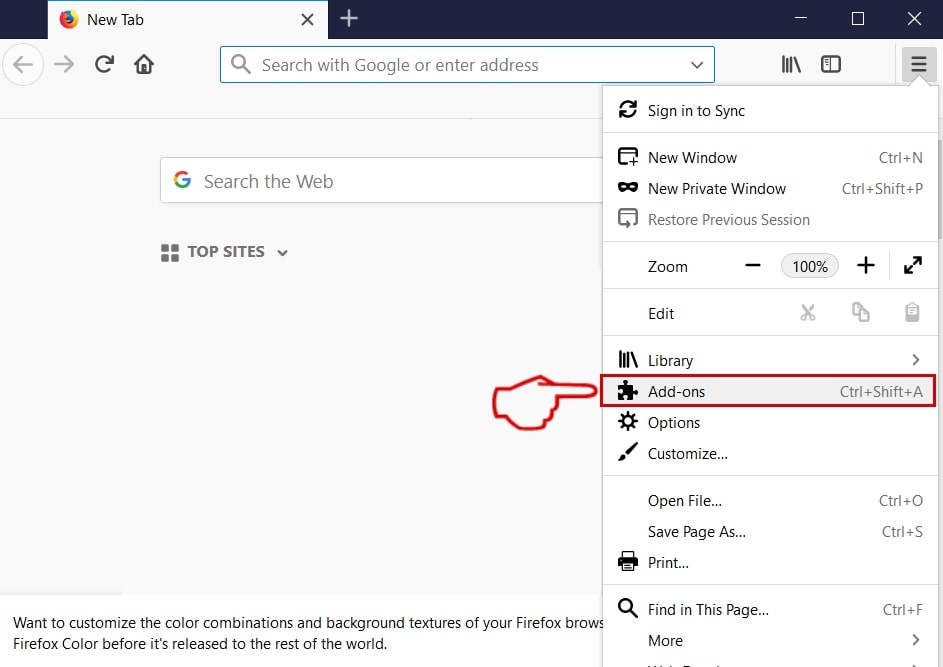
3. Select the Extension and click «Remove«
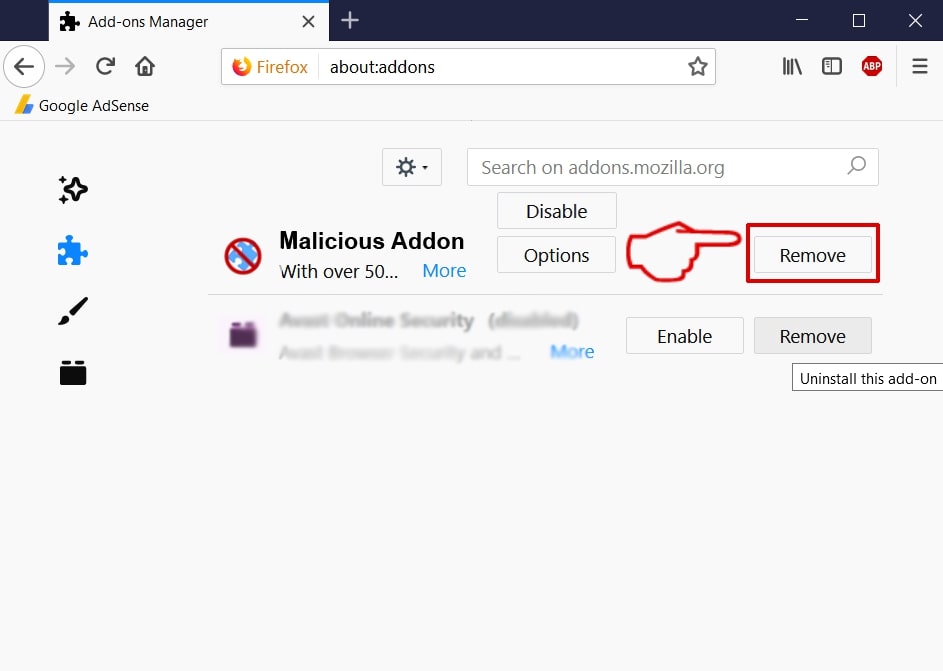
4. After the extension is removed, restart Mozilla Firefox by closing it from the red «X» in the top right corner and start it again.
Token Factory Iframe-FAQ
What is Token Factory Iframe on your Mac?
The Token Factory Iframe threat is probably a potentially unwanted app. There is also a chance it could be related to Mac malware.
If so, such apps tend to slow your Mac down siginficantly and display advertisements. They could also use cookies and other trackers to obtain browsing information from the installed web browsers on your Mac.
The creators of such unwanted apps work with pay-per-click schemes to get your Mac to visit risky or different types of websites that may generate them funds. This is why they do not even care what types of websites show up on the ads. This makes their unwanted software indirectly risky for your MacOS.
Can Macs Get Viruses?
Yes. As much as any other device, Apple computers do get malware. Apple devices may not be a frequent target by malware authors, but rest assured that the following Apple devices can become infected with a threat:
- iMac
- Mac Mini
- Macbook Air
- Macbook Pro
- iPhone
- iPad
What Are The Symptoms of Token Factory Iframe On Mac?
There are several symptoms to look for when this particular threat and also most Mac threats in general are active:
Symptom #1: Your Mac may become slow and has poor performance in general.
Symtpom #2: You have toolbars, add-ons or extensions on your web browsers that you don’t remember adding.
Symptom #3: You see all types of ads, like ad-supported search results, pop-ups and redirects to randomly appear.
Symptom #4: You see installed apps on your Mac running automatically and you do not remember installing them.
Symptom #5: You see suspicious processes running in your Mac’s Activity Monitor.
If you see one or more of those symptoms, then security experts reccomend that you check your Mac for viruses.
What Types of Mac Threats Are There?
According to most malware researchers and cyber-security experts, the threats that can currently infect your Mac can be the following types:
- Rogue Antivirus programs.
- Adware and hijackers.
- Trojan horses and other spyware.
- Ransomware and screen-lockers.
- Cryptocurrency miner malware.
What To Do If I Have a Mac Virus, Like Token Factory Iframe?
Do not panic! You can easily get rid of most Mac threats by firstly isolating them and then removing them. One recommended way to do that is by using a reputable malware removal software that can take care of the removal automatically for you.
There are many Mac anti-malware apps out there that you can choose from. SpyHunter for Mac is one of the reccomended Mac anti-malware apps, that can scan for free and detect any viruses. This saves time for manual removal that you would otherwise have to do.
How to Secure My Data from Token Factory Iframe?
With few simple actions. First and foremost, it is imperative that you follow these steps:
Step 1: Find a safe computer and connect it to another network, not the one that your Mac was infected in.
Step 2: Change all of your passwords, starting from your e-mail passwords.
Step 3: Enable two-factor authentication for protection of your important accounts.
Step 4: Call your bank to change your credit card details (secret code, etc.) if you have saved your credit card for online shopping or have done online activiites with your card.
Step 5: Make sure to call your ISP (Internet provider or carrier) and ask them to change your IP address.
Step 6: Change your Wi-Fi password.
Step 7: (Optional): Make sure to scan all of the devices connected to your network for viruses and repeat these steps for them if they are affected.
Step 8: Install anti-malware software with real-time protection on every device you have.
Step 9: Try not to download software from sites you know nothing about and stay away from low-reputation websites in general.
If you follow these reccomendations, your network and Apple devices will become significantly more safe against any threats or information invasive software and be virus free and protected in the future too.
More tips you can find on our MacOS Virus section, where you can also ask any questions and comment about your Mac problems.
About the Token Factory Iframe Research
The content we publish on SensorsTechForum.com, this Token Factory Iframe how-to removal guide included, is the outcome of extensive research, hard work and our team’s devotion to help you remove the specific macOS issue.
How did we conduct the research on Token Factory Iframe?
Please note that our research is based on an independent investigation. We are in contact with independent security researchers, thanks to which we receive daily updates on the latest malware definitions, including the various types of Mac threats, especially adware and potentially unwanted apps (PUAs).
Furthermore, the research behind the Token Factory Iframe threat is backed with VirusTotal.
To better understand the threat posed by Mac malware, please refer to the following articles which provide knowledgeable details.
Token Factory Iframe Mac
Token Factory Iframe is an unpleasant and potentially hazardous add-on for Mac browsers that generates obstructive ads and makes unauthorized browser changes. Token Factory Iframe is oftentimes distributed with the help of misleading links and clickbait ads as well as using file-bundles.
Annoying ads, banners and pop-ups all over your screen? Token Factory Iframe might be the program that is generating them. Other visible symptoms that could give the presence of this program away may be related to the sudden change in the browser’s homepage, or to the replacement of your default search engine with another one, which constantly initiates sponsored page-redirects.
The Token Factory Iframe download
The common term that describes the Token Factory iframe download behavior, and is used to classify programs of this type, is Browser Hijackers. In the next paragraphs, you will learn more about the nature of the Browser Hijackers and their typical symptoms, as well as about the methods you could use to effectively deal with the Token Factory Iframe download, and with the changes it has imposed on your Safari, Chrome, Firefox or any other main browser.
In fact, below you will find a detailed removal guide and a professional removal tool, both of which can help you quickly remove unwelcome browser add-ons, such as the one that we are talking about right now.
Token Factory Iframe on Safari
Token Factory Iframe on Safari is one of the many browser hijacker apps for macOS computers that try to take over the browser and inject it with ads. Token Factory Iframe on Safari will not directly cause harm to the system of your Mac but its presence there is still unwelcome and might lead to more serious problems.
The initial reaction of most people who encounter the nuisance of Browser Hijackers is usually the same – they think that their computer might have been infected with a strange redirect virus or with some unfamiliar malware piece similar to Ransomware or Trojans. Luckily, this is not the case with Browser Hijackers. Those programs are much different than the computer viruses you fear of since they are typically incapable of causing system damage, corruption of files, or other destructive issues.
What is Token Factory Iframe?
Token Factory Iframe is a page-redirecting app that will immediately begin to reroute your web traffic the moment it gets installed in your browser. Token Factory Iframe has been categorized as a browser hijacker that aims to aggressively promote sponsored sites on the user’s screen.
The main activity of these apps is related to online advertising and, for as long as they operate on your computer, most Browser Hijackers will only spam you with different sponsored ads, pay-per-click messages, pop-ups, banners, and redirects to predefined web pages. A real virus, on the other hand, is a threat that would do much more than simply spam your screen with commercials. For instance, a Ransomware infection can not only sneak in the system without any visible symptoms, but it can render your files inaccessible until you pay a ransom for them. A program like Token Factory Iframe is far less problematic and will never do such a thing, even if it tends to be extremely annoying and unpleasant to have in your browsing program.
The TokenFactoryIframe app
The TokenFactoryIframe app is an obstructive and unwanted piece of software that injects ads into the browser search results and changes the default homepage. The TokenFactoryIframe app is not an application you should keep on your Mac as it might potentially lead to exposure to malware.
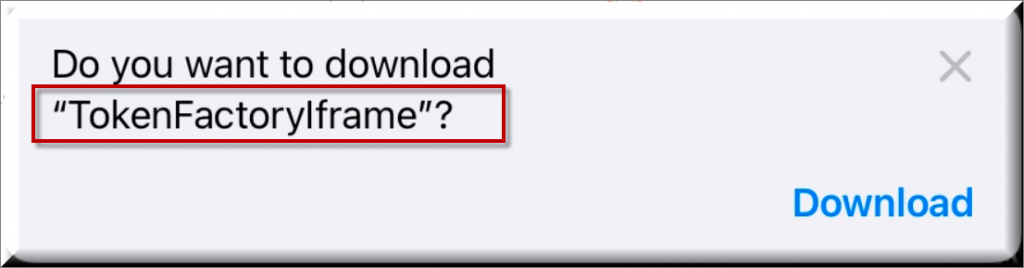
Not being a direct security threat, however, does not mean that the Browser Hijacker should remain on the system. Such software may still create a lot of disturbance not only in your web browsing experience, but also in the system’s performance. Apps like Token Factory Iframe and Navlibx for instance, may be very intrusive in their attempts to make you click on certain ads and sponsored links. They may literally flood your screen with colorful pop-ups, banners, and clickbait boxes that just won’t stop showing in your browser. Sometimes, they may not even wait for you to click on something but may automatically redirect your web searches to some predefined pages, again, with the goal of to landing you on some promotional message. Therefore, we usually advise our readers to uninstall programs like Token Factory Iframe, and uninstall their changes as soon as possible. You can do that with the help of the instructions in the removal guide below.
SUMMARY:
Remove Token Factory Iframe virus from Mac
There have been a number of reports that the instructions below can help you get rid of Token Factory Iframe from your Mac. Therefore, we encourage you to give them a go before going through the extensive removal instructions that follow.
- The hijacked Mac browser should be opened.
- Next, click on the menu icon (typically located top right), then select Preferences.
- Select Extensions and see if Token Factory Iframe has been added to the extensions list.
- Highlight the undesirable extension and remove it from the browser if you find it.
- If there are any other extensions or add-ons that you’re not sure about, do the same.
Detailed instructions on how to remove Token Factory Iframe from Safari, Google Chrome, and Mozilla Firefox are provided below.
We get asked this a lot, so we are putting it here: Removing a malware manually may take hours and damage your system in the process. We recommend downloading SpyHunter to see if it can detect the malware for you.
More information on SpyHunter, steps to uninstall, EULA, Threat Assessment Criteria, and Privacy Policy.
To complete the next steps, make sure that you Quit the Safari browser if it’s open. The Force Quit option can be used if Token Factory Iframe is preventing the browser from shutting down normally.
You can access Force Quit from the Apple menu >> Force Quit.
WARNING! READ CAREFULLY BEFORE PROCEEDING!
More information on SpyHunter, steps to uninstall, EULA, Threat Assessment Criteria, and Privacy Policy.
Next, open Finder and navigate to Applications, then Utilities, then the Activity Monitor.
You should be able to see all of your Mac’s active processes once you get there. Highlight Token Factory Iframe in the processes list and then click the “i” button at the top. The screen should display an information box similar to the one below:
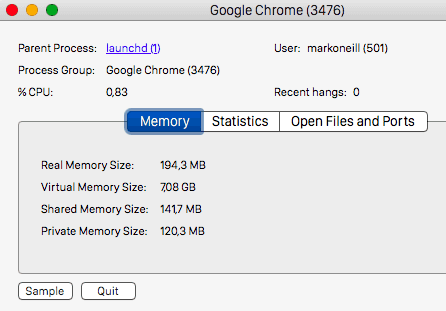
Click the Sample button located at the bottom of the page. This technique will be used to generate a sample file of the selected process. This is a sample of a Google Chrome process that has been selected:
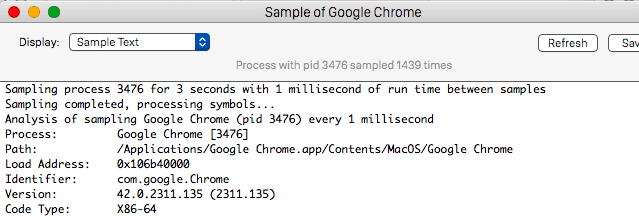
Next, scan the sample file with the fee virus scanner below:
Each file will be scanned with up to 64 antivirus programs to ensure maximum accuracy
This scanner is free and will always remain free for our website’s users.
This file is not matched with any known malware in the database. You can either do a full real-time scan of the file or skip it to upload a new file. Doing a full scan with 64 antivirus programs can take up to 3-4 minutes per file.
Drag and Drop File Here To Scan
Upload File
Analyzing 0 s
Each file will be scanned with up to 64 antivirus programs to ensure maximum accuracy
This scanner is based on VirusTotal’s API. By submitting data to it, you agree to their Terms of Service and Privacy Policy, and to the sharing of your sample submission with the security community. Please do not submit files with personal information if you do not want them to be shared.
Stop the related process if the sample is detected as a threat by the scanner. You can repeat this method for any other processes that you consider to be causing you problems or are tied to the browser hijacker.
Start Safari by pressing and holding the Shift key on your keyboard until the browser opens. This action is supposed to prevent any sponsored hijacker-related sites from loading automatically when the browser starts.
If a page loads automatically despite holding down the Shift key, try forcing Safari to quit and disconnecting your Mac from the internet. To disable Wi-Fi on your Mac, go to the Apple menu and select “Wi-Fi off”. Alternatively, you can disconnect the computer’s internet cable by unplugging it from the computer. After that, restart the Safari browser while holding down the Shift key again. This should prevent any opening of sponsored pages.
Remove Token Factory Iframe from Safari
Once Safari has opened in the manner described above, select Preferences from the Safari Menu.
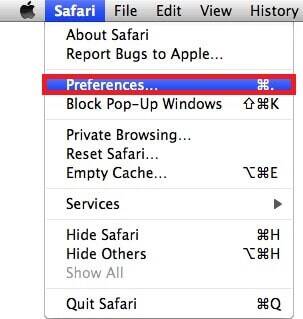
Click on the Extensions tab next.

Uninstall any extensions that you don’t recognize or that appear to have a connection to Token Factory Iframe.
Return to the Preferences menu and select the Privacy option.
Select “Remove All Website Data” then click on “Remove Now”. This action will delete all previously stored data, including your saved passwords and login credentials. Keep this in mind the next time you visit any of these websites, as you will have to re-enter your login credentials.
When you’re finished, go back to the Preferences menu and click on the General tab:

If the Homepage section has been altered by Token Factory Iframe and you want to use a different homepage URL, remove the sponsored one and add an address of your choice.
In the main menu, select Clear History from the drop-down list in the History menu. The pages loaded by Token Factory Iframe will be completely removed from your computer when you perform this step.
How to Remove Token Factory Iframe From Firefox in OSX:
Open Firefox, click on to open the main menu. If you want to clear your browser of any traces of Token Factory Iframe, choose Extensions from the Add-ons drop-down menu and click on it.
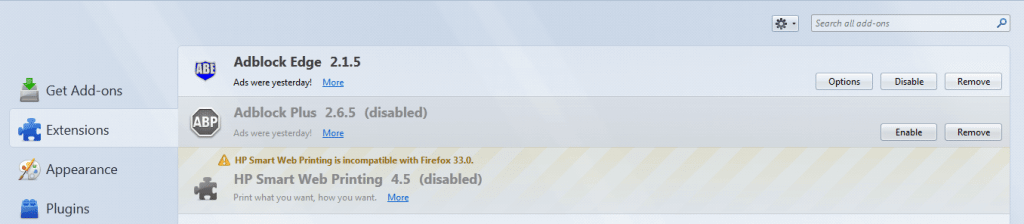
Remove all extensions that are clearly responsible for your browsing disturbance or have a relation to Token Factory Iframe. After that Refresh Your Firefox Settings.
How to Remove Token Factory Iframe From Chrome in OSX:
Start Chrome, click and you will see a slide-down menu. From the menu, select More Tools. Then, use the panel on the left to open Extensions. There, search for Token Factory Iframe and select to remove it.
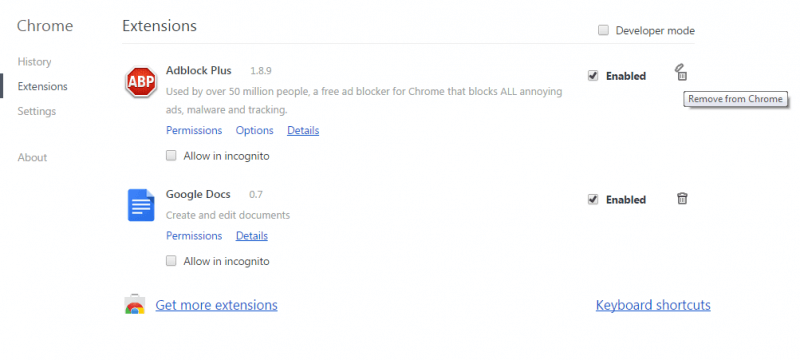
Click again, open the Search tab by clicking on Settings and then clicking Search. To see if any new search engines have been added by Token Factory Iframe, select Manage Search Engines. Select a search engine that you’re confident in, and remove any other suspicious search engines you see. At the end, Reset Your Chrome Settings to complete the action.
If the problem with Token Factory Iframe persists after you’ve followed the manual instructions on this page, you may want to use our free online virus scanner or the recommended professional removal tool and run a scan of your machine. Browser hijackers, like this one, may embed helper components in hard-to-reach places on your computer. If you have any questions or concerns about any of the steps in this guide, please leave a comment below and our team will get back to you as soon as possible.

About the author
Brandon Skies
Brandon is a researcher and content creator in the fields of cyber-security and virtual privacy. Years of experience enable him to provide readers with important information and adequate solutions for the latest software and malware problems.
Что такое вайтлисты и как их получать.
Whitelist — в досканальном переводе белый список, он дает нам привилегии в основном на стадии минта (надеюсь все знают, что такое минт и мне не надо будет это объяснять).
В этой статье я буду рассматривать вайтлист не как товар, а как привелегию, то есть мы рассчитываем на то, что проект гем и мы с вероятностью 100% будем минтить его, однако описанные позже способы могут использоваться в обеих целях.
Что нам необходимо?
- Аккаунт дискорд (т.к. мы не планируем продавать его, то можно использовать основной, либо же купить отдельные аккаунты с целью продажи вайтлистов).
Советую вам поставить на аватарку какой-нибудь блючип проект, чтобы все чувствовали, какой вы стронгхолдер и инфлюенсер, а также написать БИО.
Да, вам нужен будет только аккаунт дискорда. Если же вы покупали аккаунты, то удобнее всего будет заходить на них через токен.
Как зайти в дискорд по токену?
- Переходим на страницу https://discord.com/login
- Нажимаем F12 и открываем вкладку консоль
3. В самом низу есть поле, в котором мы можем печатать. Вставляем туда данный код заменяя слово TOKEN на ваш токен.
Дефолтные и недефолтные способы получения вайтлиста.
Мы подошли к самому интересному, это то, что хочет знать каждый. Если вы опытный криптан, то большую часть способов вы скорее всего уже видели или слышали про них, но я опишу способы, которые приходили мне в голову, которые приносили мне ВЛы и с помощью которых я получал деньги на девочек.
Начну с самого банального и закончу собственными способами.
1. Уровни, уровни, уровни.
В настоящее время, а именно в день написания данной статьи (15.03.2023) почти во всех нормальных проектах условия получения вайтлиста не описываются так четко, как было это раньше (уже не идет речь о набивании уровня и инвайтов), однако это можно увидеть.
Для набивания уровней я рекомендую использовать бота, чтобы не травмировать себя и не перегореть в первый же день ворка.
Я поделюсь ботом, которым пользуюсь сам: https://drive.google.com/file/d/1U-wrnZZYOW635yF0ptmFvG-R9ZCdMl2l/view?usp=sharing
(помимо отправки сообщений там есть ещё интересные вещи, но ими я не пользовался и даже не пытался)
Небольшой гайд:
- После распаковки архива смотрим requirements.txt и устанавливаем все, что там нужно. (Бот на питоне)
- Заходим в папку src/config
- Открываем файл config.yaml с помощью текстового редактора и смотрим что к чему, меняем параметры по необходимости. (файл messages.txt своеобразный диалог между 3 аккаунтами, то есть нам нужно будет вставить как минимум 3 токена в файл accounts.txt)
- После настройки открываем accounts.txt и вставляем токены в таком формате
5. Сохраняем все изменения и после этого запускаем файл main.py
Если бот не работает, убедитесь в том, что правильно настроили конфиг и в том, что у вас установлено все необходимое для его работы.
2. Креатив — важное качество во всём.
В этом способе речь будет идти об артах, мемах, идеях (suggestions).
Арты и мемы
Если вы владеете творческими навыками, будь это рисование, пение, монтаж и т.д. вам точно следует использовать это на практике. Качественный и креативный арт или мем это почти успех, дело останется за малым.
Я хоть и владею фотошопом, но не на таком уровне, чтобы делать шедевры, поэтому я поступал следующим образом:
Заходим на сервер проекта и включаем поиск по каналу.
Листаем немного вперед и ищем подходящий шедевр для дальнейшего редача или же просто перезалива от нашего имени. Я рекомендую вам открывать историю канала с самого начала, так как арты вряд ли запомнились модерам проекта, даже если они были нереально взорванными.
Идеи
Были случаи, когда я получал вайтлист просто за то, что написал грамотную идею в канал suggestions.
После этого, я решил пользоваться этим и собирал различные адекватные идеи, которые содержат действительно полезную информацию для проектов.
3. Интерактивы, квизы, игры.
Очень часто модераторы проектов проводят различные игры или квизы, где вы также можете получить вайтлист лишь выиграв в игру (звучит легко, не так ли?)
1. Lol Beans; Fall Guys; Stumble Guys — Бег с препятствиями, где призовые места получают ВЛ.
2. Smash Karts — игра про машины, где проходит Deathmatch и вам необходимо убить наибольшее число игроков за определенное время или же первым набрать необходимое количество убийств
3. Покер — турниры по покеру, в которых чаще всего не требуются вложения, этот способ идеально подходит для вас, если вы играете хотя бы немного лучше среднего.
4. Rumble Royale — рулетка, где происходит что-то типа battle royale, где остаётся один выживший (в неё можно загонять аккаунты и также лутать вайтлистики).
Также вы можете попробовать сами проводить шоу или квизы, я встречал пару ребят, которые в каждом проекте качественно проводили шоу «Угадай мелодию» и в каждом проекте получали вайтлист.
4. Твиттер среда
Все проекты трясутся за свои твиттеры, их популярность и актив. Любая команда будет рада получить фидбек о проекте, особенно если он положительный.
Если вы зашли на сервер и видите, что челы в чате сидят с 5к+ сообщений без вайтлиста, то можно попробовать воспользоваться данным способом.
Открываем roadmap проекта и whitepaper и пробегаем глазами информацию о проекте, их цели и планы на будущее, а затем пишем твиттер-тред в виде краткого рассказа или же обзора проекта, перечисляя все его качества.
ОБЯЗАТЕЛЬНО тегаем проект и парочку фаундеров, а также накидываем хештегов.
Вот тред, который я писал для проекта Art Gobblers на эфире:
I want to greet all the members of this community, project, association — call it what you want. Not so long ago, I myself became a part of this company and personally felt the whole essence of the project.
The project in question is Art Gobblers. This is a decentralized art factory owned by aliens. As artists make cool art, Gobblers gains cultural relevance, making collectors want the art more, incentivizing artists to make cooler art.
This description is perfect for the project, as soon as I saw these sneak peaks — I was speechless! They are so perfect that the works of Leonardo Da Vinci are not next to them, this is one of the thousand reasons why you should become part of our community!
All the paintings that were made by Art Gobblers will always be in your portfolio, just imagine, every day you will go into your collection and marvel at your exclusive work!
Of course they won’t be able to create art for free, for this you will need the coins that Art Gobblers earn to buy canvases and paper.
Another huge advantage of this project is the complete autonomy of the ecosystem, which will independently create and collect the coolest works of art in the universe without the need for human intervention.
I hope that I managed to clarify at least a little about this project, I tried to tell you as clearly and concisely as possible about the whitepaper, if you go into details, then my thread would take up my entire twitter profile 🙂
Each of us makes his own choice, but my choice fell on this project and I am ready to do everything to make it successful, because, as I said earlier, the future of the project does not depend on the aliens who brought it to us, but on us — the people !
5. ФЕЙК ДАО.
Думаю понятно по названию, что именно будет в этом способе. Мы будем прикидываться холдерами bluechip коллекций, для которых выделяются whitelist места в проекте. Очень редко это проверяется, потому что командам просто напросто впадлу проверять каждого.
Заходим на сервер интересующего нас проекта и видим вот такую стопку каналов:
Это как раз то, что нам нужно. Выбираем любой понравившийся нам проект и просто фотошопим роли к своему профилю либо заходим на сервер:
https://discord.gg/YQCwkzMM3v
Выбираем нужные нам роли и просто делаем скрин, но если проект годный то советую вам запариться, так как при скрине видна иконка сервера и дата входа на сервер:
После проделанного остается зайти в канал проекта, который мы «холдим» и выложить пруф (показан выше) + скрин твиттера с подпиской на проект.
Заключение
Надеюсь, что каждый узнал для себя что-то новое или вспомнил хорошо забытое старое, я впервые решил написать статью и поделиться собственным экспириенсом.
Благодарю за прочтение!