Process Detail
aciseposture.exe is known as Cisco AnyConnect ISE Posture and it is developed by Cisco Systems, Inc. , it is also developed by . We have seen about 100 different instances of aciseposture.exe in different location. So far we haven’t seen any alert about this product. If you think there is a virus or malware with this product, please submit your feedback at the bottom.
aciseposture.exe
Something wrong with aciseposture.exe ?
Is aciseposture.exe using too much CPU or memory ? It’s probably your file has been infected with a virus. Let try the program named DriverIdentifier to see if it helps.
How to remove aciseposture.exe
If you encounter difficulties with aciseposture.exe , you can uninstall the associated program (Start > Control Panel > Add/Remove programs
What can you do to fix aciseposture.exe ?
Let try to run a system scan with Speed Up My PC to see any error, then you can do some other troubleshooting steps.
If you think this is a driver issue, please try DriverDouble.com
Where do we see aciseposture.exe ?
Here is the list of instances that we see for the process: aciseposture.exe
| Path | Product Name | Vendor | Version | Size | MD5 | |
| 1 | C:\Program Files\Cisco\Cisco AnyConnect Secure Mobility Client\aciseposture.exe | Cisco AnyConnect ISE Posture | Cisco Systems, Inc. | 4, 2, 00096 | 13044 | 34251F4663E9B4C1A5D3A19E20088BC6 |
| 2 | C:\Program Files (x86)\Cisco\Cisco AnyConnect Secure Mobility Client\aciseposture.exe | Cisco AnyConnect ISE Posture | Cisco Systems, Inc. | 4, 2, 03013 | 13721 | CF6B163F6D2FAC29EB3FDFE8FCA50572 |
| 3 | C:\Program Files (x86)\Cisco\Cisco AnyConnect Secure Mobility Client\aciseposture.exe | Cisco AnyConnect ISE Posture | Cisco Systems, Inc. | 4, 2, 02075 | 13721 | 173AA13C42F6425BD43A5F65197C7A81 |
| 4 | C:\Program Files (x86)\Cisco\Cisco AnyConnect Secure Mobility Client\aciseposture.exe | Cisco AnyConnect ISE Posture | Cisco Systems, Inc. | 4, 4, 04030 | 13516 | CBFEED8A64C2B573F88B2A42B1787480 |
| 5 | C:\Program Files\Cisco\Cisco AnyConnect Secure Mobility Client\aciseposture.exe | Cisco AnyConnect ISE Posture | Cisco Systems, Inc. | 4, 0, 02052 | 12430 | AF50DF2E164BC89A861DE2A2BA219AB0 |
| 6 | D:\Program Files\Cisco\Cisco AnyConnect Secure Mobility Client\aciseposture.exe | Cisco AnyConnect ISE Posture | Cisco Systems, Inc. | 4, 2, 00096 | 13044 | 34251F4663E9B4C1A5D3A19E20088BC6 |
| 7 | C:\Program Files (x86)\Cisco\Cisco AnyConnect Secure Mobility Client\aciseposture.exe | Cisco AnyConnect ISE Posture | Cisco Systems, Inc. | 4, 0, 00048 | 12430 | 103CDC827B2C9BEA998AFC44E1EBADA1 |
| 8 | C:\Program Files (x86)\Cisco\Cisco AnyConnect Secure Mobility Client\aciseposture.exe | Cisco AnyConnect ISE Posture | Cisco Systems, Inc. | 4, 2, 01035 | 13044 | 813A0862B237B4E4F74BA43EC7D4CF3A |
| 9 | C:\Program Files\Cisco\Cisco AnyConnect Secure Mobility Client\aciseposture.exe | Cisco AnyConnect ISE Posture | Cisco Systems, Inc. | 4, 0, 00051 | 12430 | 98597F0969E6711B060A45C8F9E8D04A |
| 10 | C:\Program Files (x86)\Cisco\Cisco AnyConnect Secure Mobility Client\aciseposture.exe | Cisco AnyConnect ISE Posture | Cisco Systems, Inc. | 4, 0, 00061 | 12430 | 29C5D96E4504F7834B94F0948A350C0C |
| 11 | C:\Program Files (x86)\Cisco\Cisco AnyConnect Secure Mobility Client\aciseposture.exe | Cisco AnyConnect ISE Posture | Cisco Systems, Inc. | 4, 1, 00028 | 12430 | AD9798CFB6C81C7F69E1E4981325659C |
| 12 | C:\Program Files (x86)\Cisco\Cisco AnyConnect Secure Mobility Client\aciseposture.exe | Cisco AnyConnect ISE Posture | Cisco Systems, Inc. | 4, 0, 02052 | 12430 | AF50DF2E164BC89A861DE2A2BA219AB0 |
| 13 | C:\Program Files\Cisco\Cisco AnyConnect Secure Mobility Client\aciseposture.exe | Cisco AnyConnect ISE Posture | Cisco Systems, Inc. | 4, 0, 00061 | 12430 | 29C5D96E4504F7834B94F0948A350C0C |
| 14 | C:\Program Files\Cisco\Cisco AnyConnect Secure Mobility Client\aciseposture.exe | Cisco AnyConnect ISE Posture | Cisco Systems, Inc. | 4, 1, 02011 | 12430 | CA2CF12A1F79D98F862065BE028F6FE3 |
| 15 | C:\Program Files\Cisco\Cisco AnyConnect Secure Mobility Client\aciseposture.exe | Cisco AnyConnect ISE Posture | Cisco Systems, Inc. | 4, 4, 03034 | 13516 | F4399D9B06AD632876E854B522F01B54 |
| 16 | C:\Program Files (x86)\Cisco\Cisco AnyConnect Secure Mobility Client\aciseposture.exe | Cisco AnyConnect ISE Posture | Cisco Systems, Inc. | 4, 1, 04011 | 12430 | 7D512F4962D4887C5A73B14E7ED485C3 |
| 17 | C:\Program Files (x86)\Cisco\Cisco AnyConnect Secure Mobility Client\aciseposture.exe | Cisco AnyConnect ISE Posture | Cisco Systems, Inc. | 4, 1, 06020 | 12430 | 58298F382381D60710B8CCD5BCFB11C2 |
| 18 | C:\Program Files (x86)\Cisco\Cisco AnyConnect Secure Mobility Client\aciseposture.exe | Cisco AnyConnect ISE Posture | Cisco Systems, Inc. | 4, 1, 02011 | 12430 | CA2CF12A1F79D98F862065BE028F6FE3 |
| 19 | C:\Program Files (x86)\Cisco\Cisco AnyConnect Secure Mobility Client\aciseposture.exe | Cisco AnyConnect ISE Posture | Cisco Systems, Inc. | 4, 2, 00096 | 13044 | 34251F4663E9B4C1A5D3A19E20088BC6 |
| 20 | C:\Program Files\Cisco\Cisco AnyConnect Secure Mobility Client\aciseposture.exe | Cisco AnyConnect ISE Posture | Cisco Systems, Inc. | 4, 2, 02075 | 13721 | 173AA13C42F6425BD43A5F65197C7A81 |
| 21 | C:\Program Files (x86)\Cisco\Cisco AnyConnect Secure Mobility Client\aciseposture.exe | Cisco AnyConnect ISE Posture | Cisco Systems, Inc. | 4, 1, 06013 | 12430 | 28E282F6E79677D6B143D094A861B54E |
| 22 | C:\Program Files\Cisco\Cisco AnyConnect Secure Mobility Client\aciseposture.exe | Cisco AnyConnect ISE Posture | Cisco Systems, Inc. | 4, 3, 00748 | 13107 | FAE07FE9DFFBE91286C9FD392369B12D |
| 23 | C:\Program Files (x86)\Cisco\Cisco AnyConnect Secure Mobility Client\aciseposture.exe | Cisco AnyConnect ISE Posture | Cisco Systems, Inc. | 4, 2, 04018 | 13721 | 43ACFC480062FDF5768D50FE176A6B23 |
| 24 | C:\Program Files\Cisco\Cisco AnyConnect Secure Mobility Client\aciseposture.exe | Cisco AnyConnect ISE Posture | Cisco Systems, Inc. | 4, 1, 06013 | 12430 | 28E282F6E79677D6B143D094A861B54E |
| 25 | C:\Program Files (x86)\Cisco\Cisco AnyConnect Secure Mobility Client\aciseposture.exe | Cisco AnyConnect ISE Posture | Cisco Systems, Inc. | 4, 1, 08005 | 12430 | B2D9943C68FB452FD6D61D6402B0E685 |
| 26 | C:\Program Files\Cisco\Cisco AnyConnect Secure Mobility Client\aciseposture.exe | Cisco AnyConnect ISE Posture | Cisco Systems, Inc. | 4, 2, 03013 | 13721 | CF6B163F6D2FAC29EB3FDFE8FCA50572 |
| 27 | C:\Program Files (x86)\Cisco\Cisco AnyConnect Secure Mobility Client\aciseposture.exe | Cisco AnyConnect ISE Posture | Cisco Systems, Inc. | 4, 2, 04039 | 13721 | 6457FF8D911C4E4DBB41E60642555CBE |
| 28 | C:\Program Files (x86)\Cisco\Cisco AnyConnect Secure Mobility Client\aciseposture.exe | Cisco AnyConnect ISE Posture | Cisco Systems, Inc. | 4, 3, 02039 | 12902 | 1FE9F6C8E69688FE348990EFA12BFFEF |
| 29 | C:\Program Files\Cisco\Cisco AnyConnect Secure Mobility Client\aciseposture.exe | Cisco AnyConnect ISE Posture | Cisco Systems, Inc. | 4, 2, 04018 | 13721 | 43ACFC480062FDF5768D50FE176A6B23 |
| 30 | C:\Program Files\Cisco\Cisco AnyConnect Secure Mobility Client\aciseposture.exe | Cisco AnyConnect ISE Posture | Cisco Systems, Inc. | 4, 2, 04039 | 13721 | 6457FF8D911C4E4DBB41E60642555CBE |
| 31 | C:\Program Files (x86)\Cisco\Cisco AnyConnect Secure Mobility Client\aciseposture.exe | Cisco AnyConnect ISE Posture | Cisco Systems, Inc. | 4, 2, 06014 | 13721 | A32AC9EB2753E7BA59A7E61B045C1E20 |
| 32 | C:\Program Files\Cisco\Cisco AnyConnect Secure Mobility Client\aciseposture.exe | Cisco AnyConnect ISE Posture | Cisco Systems, Inc. | 4, 3, 03086 | 12902 | A8088BDB82AB7E771F2BAA9CA5F8BF13 |
| 33 | C:\Program Files (x86)\Cisco\Cisco AnyConnect Secure Mobility Client\aciseposture.exe | Cisco AnyConnect ISE Posture | Cisco Systems, Inc. | 4, 3, 01095 | 13056 | B8E88667CBF344FC68859B7FF19415F9 |
| 34 | C:\Program Files (x86)\Cisco\Cisco AnyConnect Secure Mobility Client\aciseposture.exe | Cisco AnyConnect ISE Posture | Cisco Systems, Inc. | 4, 3, 00748 | 13107 | FAE07FE9DFFBE91286C9FD392369B12D |
| 35 | C:\Program Files (x86)\Cisco\Cisco AnyConnect Secure Mobility Client\aciseposture.exe | Cisco AnyConnect ISE Posture | Cisco Systems, Inc. | 4, 2, 01022 | 13044 | 5737540BC67C0C21CF05C161148B5226 |
| 36 | C:\Program Files\Cisco\Cisco AnyConnect Secure Mobility Client\aciseposture.exe | Cisco AnyConnect ISE Posture | Cisco Systems, Inc. | 4, 4, 00243 | 13363 | ECFDC912E2156DD1BA49A3E5134FDB60 |
| 37 | C:\Program Files\Cisco\Cisco AnyConnect Secure Mobility Client\aciseposture.exe | Cisco AnyConnect ISE Posture | Cisco Systems, Inc. | 4, 1, 08005 | 12430 | B2D9943C68FB452FD6D61D6402B0E685 |
| 38 | C:\Program Files\Cisco\Cisco AnyConnect Secure Mobility Client\aciseposture.exe | Cisco AnyConnect ISE Posture | Cisco Systems, Inc. | 4, 3, 02039 | 12902 | 1FE9F6C8E69688FE348990EFA12BFFEF |
| 39 | C:\Program Files (x86)\Cisco\Cisco AnyConnect Secure Mobility Client\aciseposture.exe | Cisco AnyConnect ISE Posture | Cisco Systems, Inc. | 4, 3, 03086 | 12902 | A8088BDB82AB7E771F2BAA9CA5F8BF13 |
| 40 | C:\Program Files (x86)\Cisco\Cisco AnyConnect Secure Mobility Client\aciseposture.exe | Cisco AnyConnect ISE Posture | Cisco Systems, Inc. | 4, 0, 00051 | 12430 | 98597F0969E6711B060A45C8F9E8D04A |
| 41 | C:\Program Files (x86)\Cisco\Cisco AnyConnect Secure Mobility Client\aciseposture.exe | Cisco AnyConnect ISE Posture | Cisco Systems, Inc. | 4, 4, 00243 | 13363 | ECFDC912E2156DD1BA49A3E5134FDB60 |
| 42 | C:\Program Files (x86)\Cisco\Cisco AnyConnect Secure Mobility Client\aciseposture.exe | Cisco AnyConnect ISE Posture | Cisco Systems, Inc. | 4, 3, 04027 | 12902 | 89C84D10DDDAAD2DCD15C85D8E75811D |
| 43 | C:\Program Files (x86)\Cisco\Cisco AnyConnect Secure Mobility Client\aciseposture.exe | Cisco AnyConnect ISE Posture | Cisco Systems, Inc. | 4, 4, 01054 | 13363 | 61819981593AABBDF71E3CB2C1040F1C |
| 44 | C:\Program Files (x86)\Cisco\Cisco AnyConnect Secure Mobility Client\aciseposture.exe | Cisco AnyConnect ISE Posture | Cisco Systems, Inc. | 4, 3, 05017 | 12902 | E8034CAAD5D25B61D28C695C1695C9CF |
| 45 | C:\Program Files\Cisco\Cisco AnyConnect Secure Mobility Client\aciseposture.exe | Cisco AnyConnect ISE Posture | Cisco Systems, Inc. | 4, 4, 01054 | 13363 | 61819981593AABBDF71E3CB2C1040F1C |
| 46 | C:\Program Files (x86)\Cisco\Cisco AnyConnect Secure Mobility Client\aciseposture.exe | Cisco AnyConnect ISE Posture | Cisco Systems, Inc. | 4, 4, 02034 | 13414 | EC26B2D65A488282FAC805D3F8A86CEB |
| 47 | C:\Program Files (x86)\Cisco\Cisco AnyConnect Secure Mobility Client\aciseposture.exe | Cisco AnyConnect ISE Posture | Cisco Systems, Inc. | 4, 4, 03034 | 13516 | F4399D9B06AD632876E854B522F01B54 |
| 48 | C:\Program Files\Cisco\Cisco AnyConnect Secure Mobility Client\aciseposture.exe | Cisco AnyConnect ISE Posture | Cisco Systems, Inc. | 4, 3, 05017 | 12902 | E8034CAAD5D25B61D28C695C1695C9CF |
| 49 | C:\Program Files\Cisco\Cisco AnyConnect Secure Mobility Client\aciseposture.exe | Cisco AnyConnect ISE Posture | Cisco Systems, Inc. | 4, 1, 06020 | 12430 | 58298F382381D60710B8CCD5BCFB11C2 |
| 50 | C:\Program Files\Cisco\Cisco AnyConnect Secure Mobility Client\aciseposture.exe | Cisco AnyConnect ISE Posture | Cisco Systems, Inc. | 4, 1, 04011 | 12430 | 7D512F4962D4887C5A73B14E7ED485C3 |
| 51 | C:\Program Files (x86)\Cisco\Cisco AnyConnect Secure Mobility Client\aciseposture.exe | Cisco AnyConnect ISE Posture | Cisco Systems, Inc. | 4, 5, 00058 | 13516 | AA5B8FE3C84903D8890A7C48296C3723 |
| 52 | C:\Program Files (x86)\Cisco\Cisco AnyConnect Secure Mobility Client\aciseposture.exe | Cisco AnyConnect ISE Posture | Cisco Systems, Inc. | 4, 5, 02036 | 13516 | 308AA750DA1731CF47AA26845ED86267 |
| 53 | C:\Program Files (x86)\Cisco\Cisco AnyConnect Secure Mobility Client\aciseposture.exe | Cisco AnyConnect ISE Posture | Cisco Systems, Inc. | 4, 5, 03040 | 13619 | 56FC917EC02E1257191350C256FEE58F |
| 54 | C:\Program Files (x86)\Cisco\Cisco AnyConnect Secure Mobility Client\aciseposture.exe | 13516 | ||||
| 55 | C:\Program Files\Cisco\Cisco AnyConnect Secure Mobility Client\aciseposture.exe | Cisco AnyConnect ISE Posture | Cisco Systems, Inc. | 4, 5, 02036 | 13516 | 308AA750DA1731CF47AA26845ED86267 |
| 56 | C:\Program Files\Cisco\Cisco AnyConnect Secure Mobility Client\aciseposture.exe | Cisco AnyConnect ISE Posture | Cisco Systems, Inc. | 4, 4, 04030 | 13516 | CBFEED8A64C2B573F88B2A42B1787480 |
| 57 | C:\Program Files (x86)\Cisco\Cisco AnyConnect Secure Mobility Client\aciseposture.exe | Cisco AnyConnect ISE Posture | Cisco Systems, Inc. | 4, 6, 00362 | 16076 | 4F3B4FD2AF6BA2F623C0916B69F003F8 |
| 58 | C:\Program Files (x86)\Cisco\Cisco AnyConnect Secure Mobility Client\aciseposture.exe | Cisco AnyConnect ISE Posture | Cisco Systems, Inc. | 4, 5, 02033 | 13516 | 8C146237774C95F0B59EE170814501E1 |
| 59 | C:\Program Files\Cisco\Cisco AnyConnect Secure Mobility Client\aciseposture.exe | Cisco AnyConnect ISE Posture | Cisco Systems, Inc. | 4, 5, 02033 | 13516 | 8C146237774C95F0B59EE170814501E1 |
| 60 | C:\Program Files (x86)\Cisco\Cisco AnyConnect Secure Mobility Client\aciseposture.exe | Cisco AnyConnect ISE Posture | Cisco Systems, Inc. | 4, 6, 02074 | 42803 | FD5866BAA4AAA4852B55CAB731C3E577 |
| 61 | C:\Program Files (x86)\Cisco\Cisco AnyConnect Secure Mobility Client\aciseposture.exe | Cisco AnyConnect ISE Posture | Cisco Systems, Inc. | 4, 6, 01098 | 42496 | 3C6389AA7F6B55BC20ACA9E098683337 |
| 62 | C:\Program Files (x86)\Cisco\Cisco AnyConnect Secure Mobility Client\aciseposture.exe | Cisco AnyConnect ISE Posture | Cisco Systems, Inc. | 4, 5, 04029 | 13619 | 3F53FB3739AF752A47992419276A3617 |
| 63 | C:\Program Files\Cisco\Cisco AnyConnect Secure Mobility Client\aciseposture.exe | Cisco AnyConnect ISE Posture | Cisco Systems, Inc. | 4, 6, 00362 | 16076 | 4F3B4FD2AF6BA2F623C0916B69F003F8 |
| 64 | C:\Program Files\Cisco\Cisco AnyConnect Secure Mobility Client\aciseposture.exe | Cisco AnyConnect ISE Posture | Cisco Systems, Inc. | 4, 4, 02034 | 13414 | EC26B2D65A488282FAC805D3F8A86CEB |
| 65 | C:\Program Files (x86)\Cisco\Cisco AnyConnect Secure Mobility Client\aciseposture.exe | Cisco AnyConnect ISE Posture | Cisco Systems, Inc. | 4, 5, 05030 | 13619 | AD665FB0557E91200077DF62783017EB |
| 66 | C:\Program Files (x86)\Cisco\Cisco AnyConnect Secure Mobility Client\aciseposture.exe | Cisco AnyConnect ISE Posture | Cisco Systems, Inc. | 4, 5, 01044 | 13516 | C309049CE9EACAA09F5EBBEB324ADD33 |
| 67 | C:\Program Files (x86)\Cisco\Cisco AnyConnect Secure Mobility Client\aciseposture.exe | Cisco AnyConnect ISE Posture | Cisco Systems, Inc. | 4, 4, 02039 | 13414 | 7F4D7F490D88C74AD27029E6D130EDEE |
| 68 | C:\Program Files (x86)\Cisco\Cisco AnyConnect Secure Mobility Client\aciseposture.exe | Cisco AnyConnect ISE Posture | Cisco Systems, Inc. | 4, 6, 01103 | 42496 | 2D63754C0FC7194BB08958D6A017DE89 |
| 69 | C:\Program Files\Cisco\Cisco AnyConnect Secure Mobility Client\aciseposture.exe | Cisco AnyConnect ISE Posture | Cisco Systems, Inc. | 4, 4, 02039 | 13414 | 7F4D7F490D88C74AD27029E6D130EDEE |
| 70 | C:\Program Files\Cisco\Cisco AnyConnect Secure Mobility Client\aciseposture.exe | Cisco AnyConnect ISE Posture | Cisco Systems, Inc. | 4, 5, 04029 | 13619 | 3F53FB3739AF752A47992419276A3617 |
| 71 | C:\Program Files (x86)\Cisco\Cisco AnyConnect Secure Mobility Client\aciseposture.exe | Cisco AnyConnect ISE Posture | Cisco Systems, Inc. | 4, 6, 03049 | 42803 | C8F13C7858ECBB92A0D946C34A36E11C |
| 72 | C:\Program Files\Cisco\Cisco AnyConnect Secure Mobility Client\aciseposture.exe | Cisco AnyConnect ISE Posture | Cisco Systems, Inc. | 4, 5, 03040 | 13619 | 56FC917EC02E1257191350C256FEE58F |
| 73 | C:\Program Files\Cisco\Cisco AnyConnect Secure Mobility Client\aciseposture.exe | Cisco AnyConnect ISE Posture | Cisco Systems, Inc. | 4, 5, 01044 | 13516 | C309049CE9EACAA09F5EBBEB324ADD33 |
| 74 | C:\Program Files\Cisco\Cisco AnyConnect Secure Mobility Client\aciseposture.exe | Cisco AnyConnect ISE Posture | Cisco Systems, Inc. | 4, 6, 01103 | 42496 | 2D63754C0FC7194BB08958D6A017DE89 |
| 75 | C:\Program Files (x86)\Cisco\Cisco AnyConnect Secure Mobility Client\aciseposture.exe | Cisco AnyConnect ISE Posture | Cisco Systems, Inc. | 4, 7, 00136 | 3891 | 5E9B555D086CF96B08EF9509E2887F78 |
| 76 | C:\Program Files (x86)\Cisco\Cisco AnyConnect Secure Mobility Client\aciseposture.exe | Cisco AnyConnect ISE Posture | Cisco Systems, Inc. | 4, 6, 04054 | 42803 | B9CEF47804A8DFAE25D53F230E2993DC |
| 77 | C:\Program Files (x86)\Cisco\Cisco AnyConnect Secure Mobility Client\aciseposture.exe | Cisco AnyConnect ISE Posture | Cisco Systems, Inc. | 4, 7, 01076 | 3891 | 6DE0DC98CBF0263AAF5252F246C1FCB6 |
| 78 | C:\Program Files (x86)\Cisco\Cisco AnyConnect Secure Mobility Client\aciseposture.exe | Cisco AnyConnect ISE Posture | Cisco Systems, Inc. | 4, 7, 02036 | 3891 | FC50F1E188656B5C7D00F006FBAD5338 |
| 79 | C:\Program Files (x86)\Cisco\Cisco AnyConnect Secure Mobility Client\aciseposture.exe | Cisco AnyConnect ISE Posture | Cisco Systems, Inc. | 4, 7, 03052 | 3891 | 008927BC4F0CA19EBD03C3879AD02B50 |
| 80 | C:\Program Files (x86)\Cisco\Cisco AnyConnect Secure Mobility Client\aciseposture.exe | Cisco AnyConnect ISE Posture | Cisco Systems, Inc. | 4, 6, 04056 | 42803 | 1C7AAC6DF7E59326D309B34086A37F6C |
| 81 | C:\Program Files\Cisco\Cisco AnyConnect Secure Mobility Client\aciseposture.exe | Cisco AnyConnect ISE Posture | Cisco Systems, Inc. | 4, 6, 03049 | 42803 | C8F13C7858ECBB92A0D946C34A36E11C |
| 82 | C:\Program Files\Cisco\Cisco AnyConnect Secure Mobility Client\aciseposture.exe | Cisco AnyConnect ISE Posture | Cisco Systems, Inc. | 4, 5, 05030 | 13619 | AD665FB0557E91200077DF62783017EB |
| 83 | C:\Program Files\Cisco\Cisco AnyConnect Secure Mobility Client\aciseposture.exe | Cisco AnyConnect ISE Posture | Cisco Systems, Inc. | 4, 7, 03052 | 3891 | 008927BC4F0CA19EBD03C3879AD02B50 |
| 84 | C:\Program Files (x86)\Cisco\Cisco AnyConnect Secure Mobility Client\aciseposture.exe | Cisco AnyConnect ISE Posture | Cisco Systems, Inc. | 4, 8, 01090 | 4024 | 0A1698AF6072FE69C0F1B315B238F186 |
| 85 | C:\Program Files (x86)\Cisco\Cisco AnyConnect Secure Mobility Client\aciseposture.exe | Cisco AnyConnect ISE Posture | Cisco Systems, Inc. | 4, 7, 04056 | 3891 | 4F08F0D30FF3E87DECBEB8A5711D1C6B |
| 86 | C:\Program Files (x86)\Cisco\Cisco AnyConnect Secure Mobility Client\aciseposture.exe | Cisco AnyConnect ISE Posture | Cisco Systems, Inc. | 4, 8, 02042 | 4024 | F6A4472FB708C8BF29632FDBF83A25D3 |
| 87 | C:\Program Files (x86)\Cisco\Cisco AnyConnect Secure Mobility Client\aciseposture.exe | Cisco AnyConnect ISE Posture | Cisco Systems, Inc. | 4, 8, 02045 | 4076 | 15DD88C4F933B061EC964C0880FA5681 |
| 88 | C:\Program Files (x86)\Cisco\Cisco AnyConnect Secure Mobility Client\aciseposture.exe | Cisco AnyConnect ISE Posture | Cisco Systems, Inc. | 4, 8, 03036 | 4076 | DAF0DE9FB6B587F931CEE05D1712EA37 |
| 89 | C:\Program Files\Cisco\Cisco AnyConnect Secure Mobility Client\aciseposture.exe | Cisco AnyConnect ISE Posture | Cisco Systems, Inc. | 4, 7, 04056 | 3891 | 4F08F0D30FF3E87DECBEB8A5711D1C6B |
| 90 | C:\Program Files (x86)\Cisco\Cisco AnyConnect Secure Mobility Client\aciseposture.exe | Cisco AnyConnect ISE Posture | Cisco Systems, Inc. | 4, 2, 05015 | 13721 | 7EF23592353E08871BCF7EF4301AB57E |
| 91 | C:\Program Files\Cisco\Cisco AnyConnect Secure Mobility Client\aciseposture.exe | Cisco AnyConnect ISE Posture | Cisco Systems, Inc. | 4, 8, 02045 | 4076 | 15DD88C4F933B061EC964C0880FA5681 |
| 92 | C:\Program Files (x86)\Cisco\Cisco AnyConnect Secure Mobility Client\aciseposture.exe | Cisco AnyConnect ISE Posture | Cisco Systems, Inc. | 4, 8, 03052 | 4076 | AB08B546E1767110942B59CC7FE9B633 |
| 93 | C:\Program Files (x86)\Cisco\Cisco AnyConnect Secure Mobility Client\aciseposture.exe | Cisco AnyConnect ISE Posture | Cisco Systems, Inc. | 4, 8, 03043 | 4076 | 9C667F31572235C58BF8F83A14B167F3 |
| 94 | C:\Program Files\Cisco\Cisco AnyConnect Secure Mobility Client\aciseposture.exe | Cisco AnyConnect ISE Posture | Cisco Systems, Inc. | 4, 7, 01076 | 3891 | 6DE0DC98CBF0263AAF5252F246C1FCB6 |
| 95 | C:\Program Files\Cisco\Cisco AnyConnect Secure Mobility Client\aciseposture.exe | Cisco AnyConnect ISE Posture | Cisco Systems, Inc. | 4, 8, 03052 | 4076 | AB08B546E1767110942B59CC7FE9B633 |
| 96 | C:\Program Files (x86)\Cisco\Cisco AnyConnect Secure Mobility Client\aciseposture.exe | Cisco AnyConnect ISE Posture | Cisco Systems, Inc. | 4, 9, 01095 | 4069 | 38620BFD903A9FE53CE60392F94FADBE |
| 97 | X:\Program Files (x86)\Cisco\Cisco AnyConnect Secure Mobility Client\aciseposture.exe | Cisco AnyConnect ISE Posture | Cisco Systems, Inc. | 4, 4, 04030 | 13516 | CBFEED8A64C2B573F88B2A42B1787480 |
| 98 | C:\Program Files\Cisco\Cisco AnyConnect Secure Mobility Client\aciseposture.exe | Cisco AnyConnect ISE Posture | Cisco Systems, Inc. | 4, 9, 01095 | 4069 | 38620BFD903A9FE53CE60392F94FADBE |
| 99 | C:\Program Files (x86)\Cisco\Cisco AnyConnect Secure Mobility Client\aciseposture.exe | Cisco AnyConnect ISE Posture | Cisco Systems, Inc. | 4, 9, 00086 | 4069 | 6FA9E0CA8C64D032677140EAEDAE0251 |
| 100 | C:\Program Files (x86)\Cisco\Cisco AnyConnect Secure Mobility Client\aciseposture.exe | Cisco AnyConnect ISE Posture | Cisco Systems, Inc. | 4, 9, 03049 | 40696 | 27C6C78C14C9F5AE039C7D9A2551C925 |
 Comments about this process:
What is aciseposture.exe? Is it Safe or a Virus? How to remove or fix it
aciseposture.exe is an executable file that is part of the Cisco AnyConnect Web Security Module program developed by Cisco Systems, Inc.. The software is usually about 12.59 MB in size.
The .exe extension of a file name displays an executable file. In some cases, executable files can damage your computer. Please read the following to decide for yourself whether the aciseposture.exe file on your computer is a virus or trojan horse that you should delete, or whether it is a valid Windows operating system file or a reliable application.

Is aciseposture.exe safe, or is it a virus or malware?
The first thing that will help you determine if a particular file is a legitimate Windows process or a virus, is the location of the executable itself. For example, a process like aciseposture.exe should run from C:\Program Files\Cisco\Cisco AnyConnect Secure Mobility Client\acwebsecagent.exe and not elsewhere.
To confirm, open the Task Manager, go to View -> Select Columns and select «Image Path Name» to add a location column to your Task Manager. If you find a suspicious directory here, it may be a good idea to investigate this process further.
Another tool that can sometimes help you detect bad processes is Microsoft’s Process Explorer. Start the program (it does not require installation) and activate «Check Legends» under Options. Now go to View -> Select Columns and add «Verified Signer» as one of the columns.
If the «Verified Signer» status of a process is listed as «Unable to Verify», you should take a moment look at the process. Not all good Windows processes have a Verified Signature label, but neither do any of the bad ones.
The most important facts about aciseposture.exe:
- Located in C:\Program Files\Cisco\Cisco AnyConnect Secure Mobility Client\ subfolder;
- Publisher: Cisco Systems, Inc.
- Full Path: C:\Program Files\Cisco\Cisco AnyConnect Secure Mobility Client\acwebsecagent.exe
- Help file: www.cisco.com/TAC
- Publisher URL: www.cisco.com
- Known to be up to 12.59 MB in size on most Windows;
If you had any difficulties with this executable, you should determine if it’s trustworthy before deleting aciseposture.exe. To do this, find this process in Task Manager.
Find its location (it should be in C:\Program Files\Cisco\Cisco AnyConnect Secure Mobility Client\) and compare the size etc with the above facts.
If you suspect that you may be infected with a virus, then you must attempt to fix it immediately. To delete the aciseposture.exe virus, you should download and install a full security application like Malwarebytes. Note that not all tools can detect every type of malware, so you may need to try several options before you’re successful.
In addition, the functionality of the virus may itself affect the deletion of aciseposture.exe. In this case, you must enable Safe Mode with Networking — a secure environment that disables most processes and loads only the most required services and drivers. When there, you can run a security program and a complete system analysis.
Can I remove or delete aciseposture.exe?
You should not delete a safe executable file without a valid reason, as this may affect the performance of any associated programs that use that file. Be sure to keep your software and programs up to date to avoid future problems caused by corrupted files. With regard to software functionality issues, check driver and software updates more often, so there is little or no risk of such problems occurring.
According to various sources online, 8% of people remove this file, so it may be harmless, but it is recommended that you check the trustworthiness of this executable yourself to determine if it is safe or a virus. The best diagnosis for these suspicious files is a complete system analysis with Fortect. If the file is classified as malicious, these applications will also delete aciseposture.exe and get rid of the associated malware.
However, if it is not a virus and you need to delete aciseposture.exe, then you can uninstall Cisco AnyConnect Web Security Module from your computer using its uninstaller, which should be located at: MsiExec.exe /X. If you cannot find it’s uninstaller, then you may need to uninstall Cisco AnyConnect Web Security Module to completely delete aciseposture.exe. You can use the Add/Remove Program function in the Windows Control Panel.
- 1. In the Start menu (for Windows 8, right-click the screen’s bottom-left corner), click Control Panel, and then under Programs:
o Windows Vista/7/8.1/10: Click Uninstall a Program.
o Windows XP: Click Add or Remove Programs.
- 2. When you find the program Cisco AnyConnect Web Security Module, click it, and then:
o Windows Vista/7/8.1/10: Click Uninstall.
o Windows XP: Click the Remove or Change/Remove tab (to the right of the program).
- 3. Follow the prompts to remove Cisco AnyConnect Web Security Module.
Common aciseposture.exe error messages
The most common aciseposture.exe errors that can appear are:
• «aciseposture.exe Application Error.»
• «aciseposture.exe failed.»
• «aciseposture.exe has encountered a problem and needs to close. We are sorry for the inconvenience.»
• «aciseposture.exe is not a valid Win32 application.»
• «aciseposture.exe is not running.»
• «aciseposture.exe not found.»
• «Cannot find aciseposture.exe.»
• «Error starting program: aciseposture.exe.»
• «Faulting Application Path: aciseposture.exe.»
These .exe error messages can occur during the installation of a program, during the execution of it’s associate software program, Cisco AnyConnect Web Security Module, during the startup or shutdown of Windows, or even during the installation of the Windows operating system. Keeping a record of when and where your aciseposture.exe error occurs is important information when it comes to troubleshooting.
How to fix aciseposture.exe
A clean and tidy computer is one of the best ways to avoid problems with Cisco AnyConnect Web Security Module. This means performing malware scans, cleaning your hard disk with cleanmgr and sfc /scannow, uninstalling programs you no longer need, monitoring any auto-start programs (with msconfig), and enabling automatic Windows updates. Don’t forget to always make regular backups or at least define recovery points.
If you have a bigger problem, try to remember the last thing you did or the last thing you installed before the problem. Use the resmon command to identify the processes that are causing your problem. Even in case of serious problems, instead of reinstalling Windows, you should try to repair your installation or, in the case of Windows 8, by executing the command DISM.exe /Online /Cleanup-image /Restorehealth. This allows you to repair the operating system without data loss.
To help you analyze the aciseposture.exe process on your computer, you may find the following programs useful: Security Task Manager displays all Windows tasks running, including built-in hidden processes such as keyboard and browser monitoring or auto-start entries. A single security risk rating indicates the probability that it is spyware, malware or a potential Trojan horse. This anti-virus detects and removes spyware, adware, Trojans, keyloggers, malware and trackers from your hard disk.
Updated November 2023:
We recommend you try out this new software that fixes computer errors, protects them from malware and optimizes your PC for performance. This new tool fixes a wide range of computer errors, protects against things like file loss, malware and hardware failures.
- Step 1 : Download PC Repair & Optimizer Tool (Windows 10, 8, 7, XP, Vista – Microsoft Gold Certified).
- Step 2 : Click “Start Scan” to find Windows registry issues that could be causing PC problems.
- Step 3 : Click “Repair All” to fix all issues.

(optional offer for Fortect)
Download or reinstall aciseposture.exe
It is not recommended to download replacement exe files from any download sites, as these may themselves contain viruses etc. If you need to download or reinstall aciseposture.exe, then we recommend that you reinstall the main application associated with it Cisco AnyConnect Web Security Module.
Operating system information
aciseposture.exe errors can occur in any of the following Microsoft Windows operating systems:
- Windows 10
- Windows 8.1
- Windows 7
- Windows Vista
- Windows XP
- Windows ME
- Windows 2000
Other files in Cisco AnyConnect Web Security Module:
- acwebsecagent.exe
- acise.exe
- aciseagent.exe
- aciseuac.exe
- acnamagent.exe
- acnamcontrol.exe
- acnamlogonagent.exe
- acobfuscate.exe
- acwebsecagent_original.exe
- dartcli.exe
- DartOffline.exe
Other software titles by Cisco Systems, Inc.:
- Cisco LEAP Module
- Cisco EAP-FAST Module
- Cisco PEAP Module
- Cisco Systems VPN Client 4.7.00.0533
- Cisco Connect
- Cisco NAC Agent
- Network Magic
- Cisco ASDM Launcher
- Cisco ASDM-IDM Launcher
- Cisco AnyConnect Secure Mobility Client
Cisco AnyConnect Secure Mobility Client Administrator Guide, Release 4.0
The documentation set for this product strives to use bias-free language. For the purposes of this documentation set, bias-free is defined as language that does not imply discrimination based on age, disability, gender, racial identity, ethnic identity, sexual orientation, socioeconomic status, and intersectionality. Exceptions may be present in the documentation due to language that is hardcoded in the user interfaces of the product software, language used based on RFP documentation, or language that is used by a referenced third-party product. Learn more about how Cisco is using Inclusive Language.
Book Contents
Book Contents
- Deploy AnyConnect
- Customize and Localize the AnyConnect Client and Installer
- The AnyConnect Profile Editor
- Configure VPN Access
- Configure Network Access Manager
- Configure Posture
- Configure Web Security
- Enable FIPS in the Local Policy
- Cisco AnyConnect Customer Experience Feedback Module
- Troubleshoot AnyConnect
Find Matches in This Book
Log in to Save Content
Available Languages
Download Options
Book Title
Cisco AnyConnect Secure Mobility Client Administrator Guide, Release 4.0
Configure Posture
- PDF — Complete Book (6.21 MB)PDF — This Chapter (1.34 MB) View with Adobe Reader on a variety of devices
Results
Updated: June 29, 2015
Chapter: Configure Posture
Chapter Contents
- Configure Posture
- What ISE Posture Module Provides
- Posture Checks
- Any Necessary Remediation
- Reassessment of Endpoint Compliance
- Automatic Compliance
- VLAN Monitoring and Transitioning
- HostScan
- Basic Functionality
- Endpoint Assessment
- Advanced Endpoint Assessment:Antivirus, Antispyware, and Firewall Remediation
- Configure Antivirus Applications for HostScan
- Specify the BIOS as a DAP Endpoint Attribute
- How to Obtain BIOS Serial Numbers
Configure Posture
The AnyConnect Secure Mobility Client offers an VPN Posture (HostScan) Module and an ISE Posture Module. Both provide the Cisco AnyConnect Secure Mobility Client with the ability to assess an endpoint’s compliance for things like antivirus, antispyware, and firewall software installed on the host. You can then restrict network access until the endpoint is in compliance or can elevate local user privileges so they can establish remediation practices.
VPN Posture is bundled with hostscan_version.pkg, which is the application that gathers what operating system, antivirus, antispyware, and software is installed on the host. ISE Posture deploys one client when accessing ISE-controlled networks, rather than deploying both AnyConnect and the NAC Agent. ISE Posture is a module you can choose to install as an additional security component into the AnyConnect product. HostScan, which was part of the AnyConnect bundle in release 3.x, is now a separate install.
ISE Posture performs a client-side evaluation. The client receives the posture requirement policy from the headend, performs the posture data collection, compares the results against the policy, and sends the assessment results back to the headend. Even though ISE actually determines whether or not the endpoint is compliant, it relies on the endpoint’s own evaluation of the policy.
In contrast, HostScan performs server-side evaluation where the ASA asks only for a list of endpoint attributes (such as operating system, IP address, registry entries, local certificates, and filenames), and they are returned by HostScan. Based on the result of the policy’s evaluation, you can control which hosts are allowed to create a remote access connection to the security appliance.
The combined use of HostScan and ISE posture agent is not supported. Unexpected results occur when two different posture agents are running.
The following posture checks are supported in HostScan but not ISE Posture: Hostname, IP address, MAC address, port numbers, OPSWAT version, BIOS serial number, file check with checksum validation, personal firewall, and certificate field attributes.
What ISE Posture Module Provides
Posture Checks
The ISE Posture module uses the OPSWAT v3 library to perform posture checks. With an initial posture check, any endpoint that fails to satisfy all mandatory requirements is deemed non-compliant. The other endpoint authorization states are posture unknown or compliant (meeting mandatory requirements).
If an error occurs during the posture checking phase and AnyConnect is able to continue, the user is notified, but posture checking continues, if possible. If the error occurs during a mandatory posture check, the check is marked as failed. Network access is granted if all mandatory requirements are satisfied. If not, the user can restart the posture process.
Any Necessary Remediation
The remediation window runs in the background so that the updates on network activity do not pop up and interfere or cause disruption. You can click Details in the ISE Posture tile portion of the AnyConnect UI to see what has been detected and what updates are needed before you can join the network. If a required manual remediation is necessary, the remediation window opens, displaying the items that require action. This System Scan Summary window shows the progress of the updates, the time left of the allotted update time, the status of any requirements, and the system compliance state.
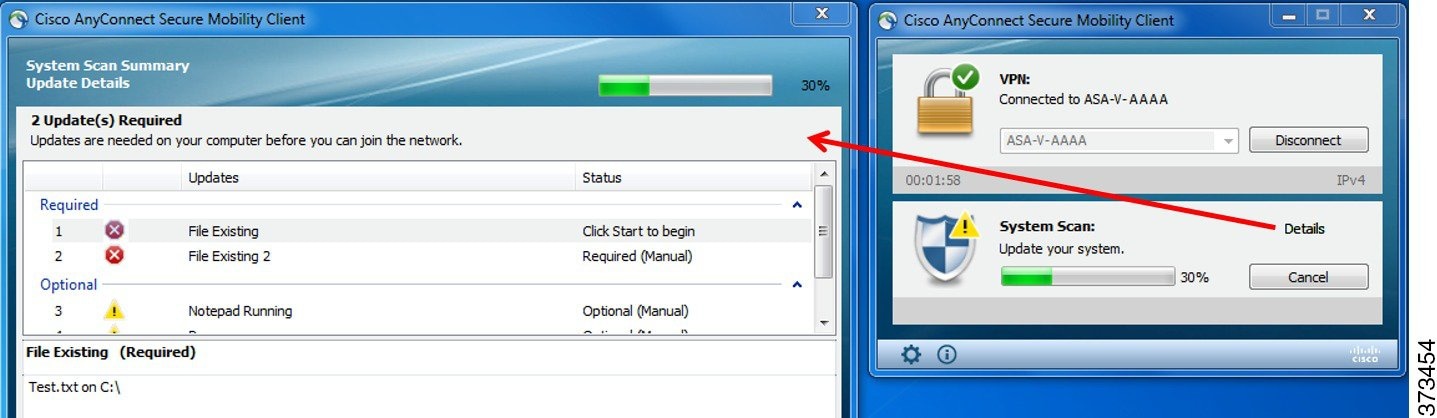
An administrator can configure a Network Usage Policy that displays at the end of the ISE Posture process. When accessing the policy, you see any required terms and conditions that the user must accept before access is granted to the access VLAN.
When only optional updates are left, you can choose to Skip to the next one or Skip All to disregard all remaining remediations. You can skip the optional remediations in the interest of time and still maintain network access.
After remediation (or after requirement checks when no remediation was needed), you may get an Acceptable Use Policy notification. It requires you to accept the policy for network access and limits access if you reject it. During this part of remediation, the Posture tile portion of the AnyConnect UI displays «System Scan: Network Acceptable Use Policy.»
When remediation is complete, all of the checks listed as required updates appear with a Done status and a green checkbox. After remediation, the agent sends the posture result to ISE.
Because of architectural changes in Symantec products, ISE posture cannot support remediation from Symantec AV 12.1.x and onwards.
Patch Management Checks and Remediation
The AnyConnect 4.x and Microsoft System Center Configuration Manager (SCCM) integration provides patch management checks and patch management remediation. It checks the state of critical patches missing on the endpoint to see if a software patch should be triggered. If no critical patches are missing on the Windows endpoint, the patch management check passes. Patch management remediation triggers only for administrator-level users and only if one or more critical patches are missing on the Windows endpoint.
Refer to Policy Conditions to learn how to set up policy conditions on ISE or Patch Management Remediation for further information on patch management remediation.
Reassessment of Endpoint Compliance
After the endpoint is deemed compliant and is granted network access, the endpoint can optionally be periodically reassessed based on what controls the administrator configured. The passive reassessment posture checks differ from the initial posture checks. If any fail, the user is given the option to remediate, if the administrator had the setting configured as such. The configuration settings control whether or not the user maintains trusted network access, even when one or more mandatory requirements have not been met. With initial posture assessment, failing to satisfy all mandatory requirements deems the endpoint non-compliant. This feature is set to disabled by default, and if enabled for a user role, it reassesses the posture every 1 to 24 hours.
The administrator can set the outcome to Continue, Logoff, or Remediate and can configure other options such as enforcement and grace time.
Automatic Compliance
With posture lease, the ISE server can skip posture completely and simply put the system into compliant state. With this functionality, users do not experience delays switching between networks when their system has recently been postured. The ISE Posture agent simply sends a status message to the UI shortly after the ISE server is discovered, indicating whether the system is compliant. In the ISE UI (in Settings > Posture > General Settings), you can specify an amount of time when an endpoint is considered posture compliant after an initial compliance check. The compliance status is expected to be preserved even when users switch from one communicating interface to another.
Note With a posture lease, if the session is valid on ISE, the endpoint is expected to go from posture unknown state to compliant state. VLAN Monitoring and Transitioning
Some sites use different VLANs or subnets to partition their network for corporate groups and levels of access. A change of authorization (CoA) from ISE specifies a VLAN change. Changes can also happen due to administrator actions, such as session termination. To support VLAN changes during wired connections, configure the following settings in the ISE Posture profile:
- VLAN Detection Interval— Determines the frequency with which the agent detects a VLAN transition and whether monitoring is disabled. VLAN monitoring is enabled when this interval is set to something besides 0. Set this value to at least 5 for macOS. VLAN monitoring is implemented on both Windows and macOS, although it is only necessary on macOS for the detection of unexpected VLAN changes. If a VPN is connected or an acise (the main AnyConnect ISE process) is not running, it disables automatically. The valid range is 0 to 900 seconds.
- Enable Agent IP Refresh—When unchecked, ISE sends the Network Transition Delay value to the agent. When checked, ISE sends DHCP release and renew values to the agent, and the agent does an IP refresh to retrieve the latest IP address.
- DHCP Release Delay and DHCP Renew Delay— Used in correlation with an IP refresh and the Enable Agent IP Refresh setting. When you check the Enable Agent IP Refresh checkbox and this value is not 0, the agent waits for the release delay number of seconds, refreshes the IP addresses, and waits for the renew delay number of seconds. If a VPN is connected, IP refresh is automatically disabled. If 4 consecutive probes are dropped, it triggers a DHCP refresh.
- Network Transition Delay— Used when VLAN monitoring is disabled or enabled by the agent (in the Enable Agent IP Refresh checkbox). This delay adds a buffer when a VLAN is not used, giving the agent an appropriate amount of time to wait for an accurate status from the server. ISE sends this value to the agent. If you also have the Network Transition Delay value set in the global settings on the ISE UI, the value in the ISE Posture Profile Editor overwrites it.
The ASA does not support VLAN changes, so these settings do not apply when the client is connected to ISE through an ASA.
Troubleshooting
If the endpoint device cannot access the network after posture is complete, check the following:
- Is the VLAN change configured on the ISE UI?
- If yes, is DHCP release delay and renew delay set in the profile?
- If both settings are 0, is Network Transition Delay set in the profile?
Operations That Interrupt the AnyConnect ISE Flow
For various reasons, the AnyConnect ISE Posture flow can be interrupted during either initial posture reassessment or passive reassessment.
- User Cancels AnyConnect ISE—During the period of posture checking and remediation, the user can cancel AnyConnect ISE. The UI immediately notifies a user that a cancellation is in progress, but it should occur only during a time that avoids putting the endpoint into a questionable state. Some cancellations may require a reboot if third-party software was used. The Posture tile portion of the AnyConnect UI shows the compliance state after the cancellation.
- Remediation Timer Expires—The administrator-controlled time to satisfy posture requirements has expired. An assessment report is sent to the headend. During passive reassessment, the user retains network access, and with posture assessment, network access is granted when all mandatory requirements are satisfied.
- Error During Posture Checking—If an error occurs during the posture checking phase and AnyConnect is able to continue, the user is notified, but posture checking continues, if possible. If the error occurs during a mandatory posture check, the check is marked as failed. Network access is granted if all mandatory requirements are satisfied. If not, the user can restart the posture process.
- Error During Remediation—If an error occurs during the remediation phase and AnyConnect ISE Posture can continue, the user is notified. AnyConnect ISE Posture stops the remediation process if the failed remediation step is associated with a mandatory posture requirement. If the failed remediation step is associated with an optional posture requirement, it attempts to continue with the next step and finish the ISE Posture operation. Network access is granted if all mandatory requirements are satisfied. If not, the user can restart the posture process.
- Default Gateway Change—A user might lose trusted network access because of a change to the default gateway, causing the ISE Posture to attempt a rediscovery of ISE. The ISE Posture tile portion on the AnyConnect UI displays the status of ISE Posture when it goes into rediscovery mode.
- Loss of Connectivity Between AnyConnect and ISE—After the endpoint is deemed compliant and granted network access, various network scenarios can occur: the endpoint can experience complete loss of network connectivity, ISE could go down, the ISE posture could fail (because of a session timeout, manual restart, or the like), or ISE behind an ASA may lose the VPN tunnel.
- You cannot have multiple console users logged in on a macOS endpoint when using ISE posture.
- Delays in Initalization and Posture Assessment Flow (macOS only)—Apple advises you to allow their subnet in the pre-posture phase so that failures with signature verification of Compliance Module libraries won’t occur.
Status of ISE Posture
When AnyConnect ISE Posture is working and blocking network access as expected, you see «System Scan: Searching for policy server» in the ISE Posture tile of the AnyConnect UI. In the Windows Task Manager or macOS system log, you can see that the process is running. If the service is not running, you see «System Scan: Service is unavailable» in the ISE Posture tile of the AnyConnect UI.
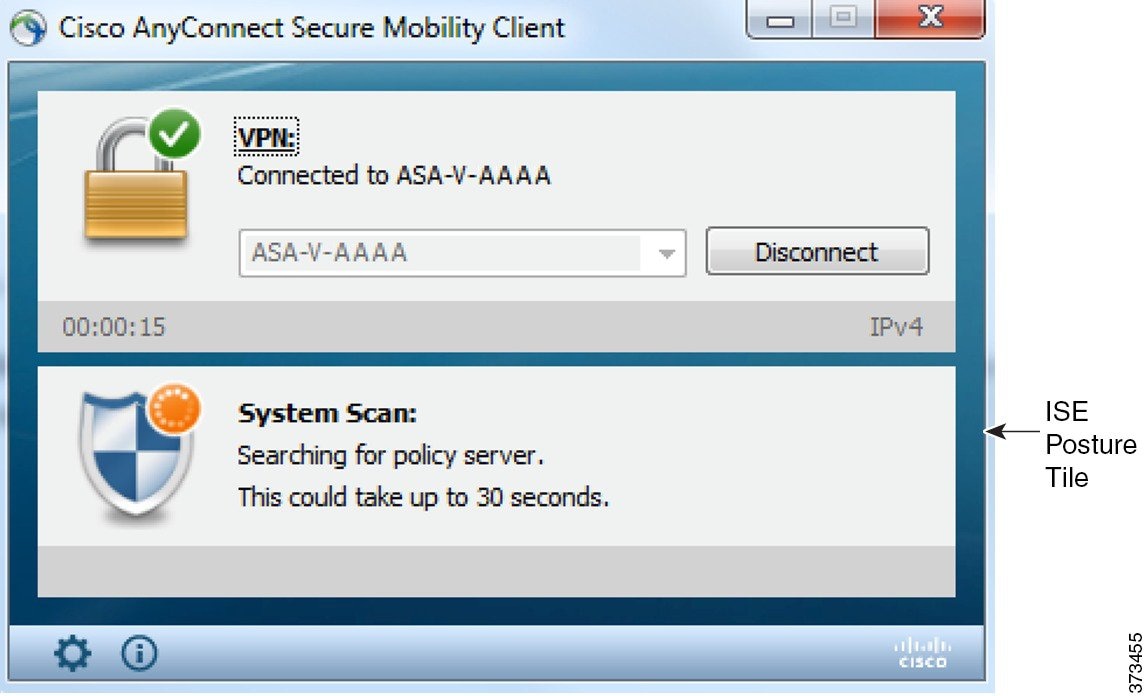
A network change starts the discovery phase. With AnyConnect ISE Posture, if the default route of the primary interface is changed, it brings the agent back to the discovery process. For example, when WiFi and the primary LAN are connected, the agent restarts discovery. Likewise, if WiFi and the primary LAN are connected but then WiFi becomes disconnected, the agent will not restart discovery.
You may also see the following status messages after «System Scan» in the ISE Posture tile of the AnyConnect UI:
- Limited or no connectivity—No discovery is occurring because you have no connection. The AnyConnect ISE Posture agent may be performing discovery on the wrong endpoint on the network.
- System scan not required on current WiFi—No discovery is occurring because an unsecured WiFi was detected. The AnyConnect ISE Posture agent only starts discovery on the LAN, on the wireless if 802.1X authentication is used, and on the VPN. The WiFi may be unsecured, or you disabled the feature by setting OperateOnNonDot1XWireless to 1 in the agent profile.
- Unauthorized policy server—The host does not match the server name rule of the ISE network so there is limited or no network access.
- The AnyConnect Downloader is performing update. —The downloader is invoked and compares the package versions, downloads the AnyConnect configuration, and performs the necessary upgrades.
- Scanning System. —Scanning for antivirus and antispyware security products has started. If the network is changed during this process, the agent recycles the process of generating the log file, and the status goes back to «No policy server detected.»
- Bypassing AnyConnect scan—Your network is configured to use the Cisco NAC agent.
- Untrusted Policy Server Cancelled by the user—When you unblock the connection to untrusted servers in the AnyConnect UI with the System Scan Preferences tab, you receive the AnyConnect Downloader’s Security Warning in a popup window. When you click Cancel Connection on this warning page, the ISE Posture tile changes to this status.
- Network Acceptable Use Policy—The access to the network requires that you view and accept the Acceptable Use Policy. Declining the policy may result in limited network access.
- Updating Network Settings—In the ISE UI in Settings > Posture > General Settings, you can specify how many seconds of delay should occur between network transitions.
- Not Compliant. Update time expired.—The time set for remediation has expired.
- Compliant. Network access allowed.—The remediation is complete. The System Scan > Scan Summary also shows the status as complete.
- No policy server detected—The ISE network is not found. After 30 seconds, the agent slows down probing. The default network access takes effect.
Posture and Multi Homing
AnyConnect ISE posture module does not support multi homing because its behavior for such scenarios is undefined. For example, when media changes from wired to wireless and them back to wired, the user may see a posture status status of compliant from the ISE posture module even though the endpoint is actually in redirect on the wired connection.
Simultaneous Users on an Endpoint
AnyConnect ISE does not support separate posture assessment when multiple users are logged onto an endpoint simultaneously sharing a network connection. When the first user to run AnyConnect ISE is successfully postured, and the endpoint is granted trusted network access, all other users on the endpoint inherit the network access. To prevent this, the administrator can disable features that allow simultaneous users on the endpoint.
Logging for Posture Modules
For ISE Posture, events are written to the native operating system event logs (Windows Event Log Viewer or macOS system log).
For VPN Posture (HostScan), any errors and warnings go to syslogs (for non-Windows) and to the event viewer (for Windows). All available messages go to the log files.
The VPN Posture (HostScan) module components output up to three logs based on your operating system, privilege level, and launching mechanism (Web Launch or AnyConnect):
- cstub.log—Captures logging when AnyConnect web launch is used.
- libcsd.log—Created by the AnyConnect thread that uses the VPN Posture API. Debugging entries are made in this log depending on the logging level configuration.
- cscan.log—Created by the scanning executable (cscan.exe) and is the main log for VPN posture. Debugging entries are made in this log depending on the logging level configuration.
Posture Modules’ Log Files and Locations
For ISE Posture, events are contained in their own subfolder of the installed AnyConnect version, making them easy to isolate from the rest of the AnyConnect events. Each viewer allows the searching of keywords and filtering. The Web Agent events write to the standard application log.
For troubleshooting purposes, the ISE Posture requirement policy and assessment reports are logged, but to a separate, obfuscated file on the endpoint rather than to the event logs. Some log file sizes, such as aciseposture, can be configured by the administrator in the profile; however, the UI log size is predefined.
Whenever a process terminates abnormally, a mini dump file is generated, just as other AnyConnect modules provide.
For VPN Posture (HostScan), the files are located in the users home folder in the following directory:
- (Non-Windows)—.cisco/hostscan/log
- (Windows)— C:\Users\\AppData\Local\Cisco HostScan\log\cscan.log
ISE Posture Profile Editor
An administrator can choose to use the standalone editor to create the posture profile and then upload it to ISE. Otherwise, the embedded posture profile editor is configured in the ISE UI under Policy Elements. When the AnyConnect configuration editor is launched in ISE, it creates the AnyConnect configuration complete with AnyConnect software and its associated modules, profiles, OPSWAT, and any customization. The standalone profile editor for ISE Posture in ASA contains the following parameters:
- Agent Behavior
- IP Address Change For the optimal user experience, set the values below to our recommendations.
- VLAN detection interval —Interval at which the agent tries to detect VLAN changes before refreshing the client IP address. The valid range is 0 to 900 seconds, and the recommended value is 5 seconds.
- Ping or ARP —The method for detecting IP address changes. The recommended setting is ARP because the default gateway might be configured to block ICMP packets.
- Maximum timeout for ping —The ping timeout from 1 to 10 seconds.
- Enable agent IP refresh —Check to enable VLAN change detection.
- DHCP renew delay —The number of seconds the agent waits after an IP refresh. Configure this value when you have Enable Agent IP Refresh enabled. If this value is not 0, the agent will do an IP refresh during this expected transition. If a VPN is detected during the refresh, the refresh will be disabled. The valid values are 0 to 60 seconds, and the recommended value is 5 seconds.
- DHCP release delay — The number of seconds the agent delays doing an IP refresh. Configure this value when you have Enable Agent IP Refresh enabled. If this value is not 0, the agent will do an IP refresh during this expected transition. If a VPN is detected during the refresh, the refresh will be disabled. The valid values are 0 to 60 seconds, and the recommended value is 5 seconds.
- Network transition delay —The timeframe (in seconds) for which the agent suspends network monitoring so that it can wait for a planned IP change. The recommended value is 5 seconds.
- Discovery host —The server to which the agent can connect. For standalone profile editors, enter a single host only.
- Server name rules —A list of wild-carded, comma-separated names that defines the servers to which the agent can connect (such as .cisco.com).
- PRA retransmission time —When a passive reassessment communication failure occurs, this agent retry period is specified. The valid range is 60 to 3600 seconds.
Advanced Panel
The Advanced Panel of the AnyConnect Secure Mobility Client UI is an area for each component to display statistics, user preferences, and any extra information specific to the component. If you click the Advanced Window for all components icon on the AnyConnect system tray, the new System Scan section contains the following tabs:
These statistics, user preferences, message history, and such are displayed under the Statistics window on macOS. Preferences are in the Preferences window and not in a tab orientation as in Windows.
- Preferences—Allows you to block connections to untrusted servers so that during the downloader process, you receive an «Untrusted Server Blocked» message for any ISE server that has untrusted certification and is unverified. If you disable the blocking, AnyConnect will not block connections to potentially malicious network devices.
- Statistics—Provides current ISE Posture status (compliant or not), OPSWAT version information, the status of the Acceptable Use Policy, the last running time stamp for posture, any missing requirements, and any other statistics deemed important enough to display for troubleshooting purposes.
- Security Products—Accesses the list of antivirus and antispyware products installed on your system.
- Scan Summary—Allows the users to see whatever posture items the administrator configured for them to see. For example, when configured, they could see all of the items that have been postured on their system or only the ones that failed the posture check and required remediation.
- Message History—Provides a history of every status message sent to the system tray for a component. This history is useful for troubleshooting.
What VPN Posture (HostScan) Module Provides
HostScan
HostScan is a package that installs on the remote device after the user connects to the ASA and before the user logs in. HostScan consists of any combination of the basic module, the endpoint assessment module, and the advanced endpoint assessment module. HostScan is not supported with mobile devices (Android, iOS, Chrome, or UWP).
Note In AnyConnect release 3.x, this package was bundled in the hostscan_version.pkg file, which must be updated in ASA under HostScan image and enabled to get HostScan functioning. It is now a separate install. Basic Functionality
HostScan automatically identifies operating systems and service packs on any remote device establishing a Cisco clientless SSL VPN or AnyConnect VPN client session.
You can also configure HostScan to inspect the endpoint for specific processes, files, and registry keys. It performs all of these inspections before full tunnel establishment and sends this information to the ASA to distinguish between corporate-owned, personal, and public computers. The information can also be used in assessments.
Pre-login assessment and returning certificate information is not available. HostScan is not an authentication method; it simply checks to verify what exists on the device attempting to connect.
HostScan also automatically returns the following additional values for evaluation against configured DAP endpoint criteria:
- Microsoft Windows, macOS, and Linux operating systems
- Microsoft Knowledge Base numbers (Kbs)
- Device endpoint attributes types such as host name, MAC address, BIOS serial number, port numbers (legacy attribute), TCP/UDP port number, privacy protection, and version of endpoint assessment (OPSWAT)
Endpoint Assessment
Endpoint Assessment is a HostScan extension that examines the remote computer for a large collection of antivirus and antispyware applications, associated definitions updates, and firewalls. You can use this feature to combine endpoint criteria to satisfy your requirements before the ASA assigns a specific dynamic access policy (DAP) to the session.
See the Dynamic Access Policies section in the appropriate version of the Cisco ASA Series VPN Configuration Guide for details.
Advanced Endpoint Assessment:Antivirus, Antispyware, and Firewall Remediation
On Windows, Mac OS X, and Linux desktops, Advanced Endpoint Assessment can attempt to begin remediation of various aspects of antivirus, antispyware, and personal firewall protection if that software allows a separate application to begin remediation.
Antivirus—Remediate these components of antivirus software:
- Force File System Protection—Enable antivirus software that is disabled.
- Force Virus Definitions Update—Begin an update of virus definitions, if the antivirus definitions have not been updated in the number of days defined by the Advanced Endpoint Assessment configuration.
Antispyware—Begin an update of antispyware definitions, if the antispyware definitions have not been updated in the number of days defined by the Advanced Endpoint Assessment configuration.
Personal Firewall—Reconfigure firewall settings and rules that do not meet the requirements defined in the Advanced Endpoint Assessment configuration. For example,
If the end user disables antivirus or personal firewall after successfully establishing the VPN connection, our Advanced Endpoint Assessment feature attempts to re-enable that application within approximately 60 seconds.
Configure Antivirus Applications for HostScan
Before installing the VPN Posture (HostScan) module, configure your antivirus software to “white-list” or make security exceptions for these applications below. Antivirus applications can misinterpret the behavior of these applications as malicious:
- cscan.exe
- ciscod.exe
- cstub.exe
Integration with Dynamic Access Policies
The ASA integrates the HostScan features into dynamic access policies (DAPs). Depending on the configuration, the ASA uses one or more endpoint attribute values in combination with optional AAA attribute values as conditions for assigning a DAP. The HostScan features supported by the endpoint attributes of DAPs include OS detection, policies, basic results, and endpoint assessment.
You can specify a single attribute or combine attributes that form the conditions required to assign a DAP to a session. The DAP provides network access at the level that is appropriate for the endpoint AAA attribute value. The ASA applies a DAP when all of its configured endpoint criteria are satisfied.
See the Configure Dynamic Access Policies section in the Cisco ASA Series VPN Configuration Guide.
BIOS Serial Number in a DAP
VPN Posture (HostScan) can retrieve the BIOS serial number of a host. You can use a Dynamic Access Policy (DAP) to allow or prevent a VPN connection to the ASA based on that BIOS serial number.
Specify the BIOS as a DAP Endpoint Attribute
Procedure
Choose Configuration > Remote Access VPN > Network (Client) Access or Clientless SSL VPN Access > Dynamic Access Policies .
In the Configure Dynamic Access Policies panel, click Add or Edit to configure BIOS as a DAP Endpoint Attribute.
To the right of the Endpoint ID table, click Add .
In the Endpoint Attribute Type field, select Device .
Check the BIOS Serial Number checkbox, select = (equals) or != (not equals), and enter the BIOS number in the BIOS Serial Number field. Click OK to save changes in the Endpoint Attribute dialog box.
Click OK to save your changes to the Edit Dynamic Access Policy.
Click Apply to save your changes to the Dynamic Access Policy.
How to Obtain BIOS Serial Numbers
- Windows—http://support.microsoft.com/kb/558124
- macOS—http://support.apple.com/kb/ht1529
- Linux—Use this command:
/usr/bin/hal-get-property --udi /org/freedesktop/Hal/devices/computer --key system.hardware.serialDetermine the HostScan Image Enabled on the ASA
Open ASDM and choose Configuration > Remote Access VPN > HostScan Image.
Upgrade HostScan
If you are upgrading AnyConnect and HostScan manually (using msiexec), make sure that you first upgrade AnyConnect and then HostScan.
OPSWAT Support
AnyConnect’s VPN (Hostscan) Posture and ISE Posture modules both use the OPSWAT framework to secure endpoints.
This framework, that involves both the client and the headend, assists in the assessment of third-party applications on the endpoint. The version of OPSWAT used in the client and the headend must match. Support charts are provided for each posture method that contain product and version information for the list of applications recognized by the OPSWAT versions used.
When there is a mismatch in the version number between the headend (ASA or ISE) and the endpoint (VPN posture or ISE posture), the OPSWAT compliance module gets upgraded or downgraded to match the version on the headend. These upgrades/downgrades are mandatory and happen automatically without end user intervention, as soon as a connection to the headend is established.
VPN Hostscan Posture OPSWAT Support
The HostScan Support Charts correspond to the HostScan package version which provides HostScan posture in AnyConnect working with an ASA headend.
HostScan is versioned to coordinate with AnyConnect major and maintenance releases. You specify the HostScan version when you configure the HostScan package in ASDM at Configuration > Remote Access VPN > Secure Desktop Manager > Host Scan Image .
VPN HostScan Posture guidelines:
- All versions of HostScan use OPSWAT v2. OPSWAT v3 is not supported in any version of HostScan.
ISE Posture OPSWAT Support
ISE Agent Compliance Modules version reflects the base OPSWAT version. In ISE posture, the OPSWAT binaries are packaged into a separate installer. You can manually load the OPSWAT library to the ISE headend from the local file system, or configure ISE to obtain it directly using the ISE Update Feed URL.
Only the OPSWAT v3 library can be uploaded to ISE.
Что такое acise.exe? Это безопасно или вирус? Как удалить или исправить это
acise.exe это исполняемый файл, который является частью Модуль Cisco AnyConnect Web Security Программа, разработанная Cisco Systems, Inc, Программное обеспечение обычно о 12.59 MB по размеру.
Расширение .exe имени файла отображает исполняемый файл. В некоторых случаях исполняемые файлы могут повредить ваш компьютер. Пожалуйста, прочитайте следующее, чтобы решить для себя, является ли acise.exe Файл на вашем компьютере — это вирус или троянский конь, который вы должны удалить, или это действительный файл операционной системы Windows или надежное приложение.
Acise.exe безопасно, или это вирус или вредоносная программа?
Первое, что поможет вам определить, является ли тот или иной файл законным процессом Windows или вирусом, это местоположение самого исполняемого файла. Например, такой процесс, как acise.exe, должен запускаться из C: \ Program Files \ Cisco \ Cisco AnyConnect Secure Mobility Client \ acwebsecagent.exe, а не в другом месте.
Для подтверждения откройте диспетчер задач, выберите «Просмотр» -> «Выбрать столбцы» и выберите «Имя пути к изображению», чтобы добавить столбец местоположения в диспетчер задач. Если вы обнаружите здесь подозрительный каталог, возможно, стоит дополнительно изучить этот процесс.
Еще один инструмент, который иногда может помочь вам обнаружить плохие процессы, — это Microsoft Process Explorer. Запустите программу (не требует установки) и активируйте «Проверить легенды» в разделе «Параметры». Теперь перейдите в View -> Select Columns и добавьте «Verified Signer» в качестве одного из столбцов.
Если статус процесса «Проверенная подписывающая сторона» указан как «Невозможно проверить», вам следует взглянуть на процесс. Не все хорошие процессы Windows имеют метку проверенной подписи, но ни один из плохих.
Самые важные факты о acise.exe:
- Находится в C: \ Program Files \ Cisco \ Cisco AnyConnect Secure Mobility Client \ вложенная;
- Издатель: Cisco Systems, Inc
- Полный путь: C: \ Program Files \ Cisco \ Клиент безопасной мобильности Cisco AnyConnect \ acwebsecagent.exe
- Файл справки: www.cisco.com/TAC
- URL издателя: www.cisco.com
- Известно, что до 12.59 MB по размеру на большинстве окон;
Если у вас возникли какие-либо трудности с этим исполняемым файлом, перед удалением acise.exe необходимо определить, заслуживает ли он доверия. Для этого найдите этот процесс в диспетчере задач.
Найдите его местоположение (оно должно быть в C: \ Program Files \ Cisco \ Cisco AnyConnect Secure Mobility Client \) и сравните размер и т. Д. С приведенными выше фактами.
Если вы подозреваете, что можете быть заражены вирусом, вы должны немедленно попытаться это исправить. Чтобы удалить вирус acise.exe, вы должны Загрузите и установите приложение полной безопасности, например Malwarebytes., Обратите внимание, что не все инструменты могут обнаружить все типы вредоносных программ, поэтому вам может потребоваться попробовать несколько вариантов, прежде чем вы добьетесь успеха.
Кроме того, функциональность вируса сама может влиять на удаление acise.exe. В этом случае вы должны включить Безопасный режим с загрузкой сетевых драйверов — безопасная среда, которая отключает большинство процессов и загружает только самые необходимые службы и драйверы. Когда вы можете запустить программу безопасности и полный анализ системы.
Могу ли я удалить или удалить acise.exe?
Не следует удалять безопасный исполняемый файл без уважительной причины, так как это может повлиять на производительность любых связанных программ, использующих этот файл. Не забывайте регулярно обновлять программное обеспечение и программы, чтобы избежать будущих проблем, вызванных поврежденными файлами. Что касается проблем с функциональностью программного обеспечения, проверяйте обновления драйверов и программного обеспечения чаще, чтобы избежать или вообще не возникало таких проблем.
Согласно различным источникам онлайн, 8% людей удаляют этот файл, поэтому он может быть безвредным, но рекомендуется проверить надежность этого исполняемого файла самостоятельно, чтобы определить, является ли он безопасным или вирусом. Лучшая диагностика для этих подозрительных файлов — полный системный анализ с Защитить, Если файл классифицирован как вредоносный, эти приложения также удалят acise.exe и избавятся от связанных вредоносных программ.
Однако, если это не вирус, и вам нужно удалить acise.exe, вы можете удалить модуль Cisco AnyConnect Web Security с вашего компьютера, используя его деинсталлятор, который должен находиться по адресу: MsiExec.exe / X . Если вы не можете найти его деинсталлятор, то вам может потребоваться удалить модуль Cisco AnyConnect Web Security, чтобы полностью удалить acise.exe. Вы можете использовать функцию «Установка и удаление программ» на панели управления Windows.
- 1. в Меню Пуск (для Windows 8 щелкните правой кнопкой мыши в нижнем левом углу экрана), нажмите Панель управления, а затем под Программы:
o Windows Vista / 7 / 8.1 / 10: нажмите Удаление программы.
o Windows XP: нажмите Установка и удаление программ.
- 2. Когда вы найдете программу Модуль Cisco AnyConnect Web Securityщелкните по нему, а затем:
o Windows Vista / 7 / 8.1 / 10: нажмите Удалить.
o Windows XP: нажмите Удалить or Изменить / Удалить вкладка (справа от программы).
- 3. Следуйте инструкциям по удалению Модуль Cisco AnyConnect Web Security.
Распространенные сообщения об ошибках в acise.exe
Наиболее распространенные ошибки acise.exe, которые могут возникнуть:
• «Ошибка приложения acise.exe».
• «Ошибка acise.exe».
• «acise.exe столкнулся с проблемой и должен быть закрыт. Приносим извинения за неудобства».
• «acise.exe не является допустимым приложением Win32».
• «acise.exe не запущен».
• «acise.exe не найден».
• «Не удается найти acise.exe».
• «Ошибка запуска программы: acise.exe».
• «Неверный путь к приложению: acise.exe.»Эти сообщения об ошибках .exe могут появляться во время установки программы, во время выполнения связанной с ней программы, модуля Cisco AnyConnect Web Security, при запуске или завершении работы Windows, или даже при установке операционной системы Windows. Отслеживание момента появления ошибки acise.exe является важной информацией, когда дело доходит до устранения неполадок.
Как исправить acise.exe
Аккуратный и опрятный компьютер — это один из лучших способов избежать проблем с модулем Cisco AnyConnect Web Security. Это означает выполнение сканирования на наличие вредоносных программ, очистку жесткого диска cleanmgr и ПФС / SCANNOWудаление ненужных программ, мониторинг любых автозапускаемых программ (с помощью msconfig) и включение автоматических обновлений Windows. Не забывайте всегда делать регулярные резервные копии или хотя бы определять точки восстановления.
Если у вас возникла более серьезная проблема, постарайтесь запомнить последнее, что вы сделали, или последнее, что вы установили перед проблемой. Использовать resmon Команда для определения процессов, вызывающих вашу проблему. Даже в случае серьезных проблем вместо переустановки Windows вы должны попытаться восстановить вашу установку или, в случае Windows 8, выполнив команду DISM.exe / Online / Очистка-изображение / Восстановить здоровье, Это позволяет восстановить операционную систему без потери данных.
Чтобы помочь вам проанализировать процесс acise.exe на вашем компьютере, вам могут пригодиться следующие программы: Менеджер задач безопасности отображает все запущенные задачи Windows, включая встроенные скрытые процессы, такие как мониторинг клавиатуры и браузера или записи автозапуска. Единый рейтинг риска безопасности указывает на вероятность того, что это шпионское ПО, вредоносное ПО или потенциальный троянский конь. Это антивирус обнаруживает и удаляет со своего жесткого диска шпионское и рекламное ПО, трояны, кейлоггеры, вредоносное ПО и трекеры.
Обновлено ноябрь 2023 г .:
Мы рекомендуем вам попробовать это новое программное обеспечение, которое исправляет компьютерные ошибки, защищает их от вредоносных программ и оптимизирует производительность вашего ПК. Этот новый инструмент исправляет широкий спектр компьютерных ошибок, защищает от таких вещей, как потеря файлов, вредоносное ПО и сбои оборудования.
- Шаг 1: Скачать PC Repair & Optimizer Tool (Windows 10, 8, 7, XP, Vista — Microsoft Gold Certified).
- Шаг 2: Нажмите «Начать сканирование”, Чтобы найти проблемы реестра Windows, которые могут вызывать проблемы с ПК.
- Шаг 3: Нажмите «Починить все», Чтобы исправить все проблемы.
(дополнительное предложение для Fortect)
Загрузите или переустановите acise.exe
Это не рекомендуется загружать заменяемые exe-файлы с любых сайтов загрузки, так как они могут содержать вирусы и т. д. Если вам нужно скачать или переустановить acise.exe, мы рекомендуем переустановить основное приложение, связанное с ним. Модуль Cisco AnyConnect Web Security.
Информация об операционной системе
Ошибки acise.exe могут появляться в любых из нижеперечисленных операционных систем Microsoft Windows:
- Windows 10
- Windows 8.1
- Windows 7
- Windows Vista
- Windows XP
- Windows ME
- Windows 2000
Другие файлы в модуле веб-безопасности Cisco AnyConnect:
- acwebsecagent.exe
- aciseagent.exe
- aciseposture.exe
- aciseuac.exe
- acnamagent.exe
- acnamcontrol.exe
- acnamlogonagent.exe
- acobfuscate.exe
- acwebsecagent_original.exe
- dartcli.exe
- DartOffline.exe
Другие названия программного обеспечения от Cisco Systems, Inc .:
- Модули Cisco LEAP
- Модуль Cisco EAP-FAST
- Модуль Cisco PEAP
- Клиент Cisco Systems VPN 4.7.00.0533
- Cisco Connect
- Агент Cisco NAC
- Сетевая магия
- Cisco ASDM Launcher
- Модуль запуска Cisco ASDM-IDM
- Cisco AnyConnect Secure Mobility Client